
Ssoon
Container Registry, Git Repository, Local Kubernetes Cluster 본문
Container Registry, Git Repository, Local Kubernetes Cluster
구구달스 2025. 10. 14. 00:06🧩 GitOps를 위한 준비 단계
GitOps를 실습하기 위해서는 몇 가지 기본 환경이 필요합니다.
컨테이너 이미지를 저장할 Container Registry,
소스 코드를 관리할 Git Repository,
그리고 애플리케이션을 실행할 Kubernetes Cluster가 있어야 합니다.
이 장에서는 GitOps 실습을 위한 3가지 필수 환경 구성 요소를 단계별로 살펴봅니다.
“GitOps의 첫걸음은 코드를 저장하고, 이미지를 빌드하며, Kubernetes에서 실행할 수 있는 환경을 만드는 것이다.”
🐳 2.1 Registering for a Container Registry
🔍 Container Registry란?
Container Registry는 컨테이너 이미지를 저장하고 배포하는 저장소(Repository) 역할을 합니다.
GitOps 환경에서는 애플리케이션을 컨테이너로 빌드한 뒤,
이 이미지를 Registry에 저장한 다음 Kubernetes가 가져와 실행하게 됩니다.
가장 널리 사용되는 공용 Registry는 Docker Hub(docker.io) 이며,
Red Hat의 Quay.io 같은 대안도 자주 사용됩니다.
“Container Registry는 모든 GitOps 파이프라인의 이미지 저장소다.”
🧭 Docker Hub 가입하기
1️⃣ Docker Hub 에 접속합니다.
2️⃣ “Sign Up” 버튼을 클릭하여 회원가입 페이지로 이동합니다.
3️⃣ Docker ID, Email, Password를 입력하고 “Sign Up”을 클릭합니다.
“Docker Hub는 가장 표준적이고 접근성이 높은 Container Registry이다.”
🧰 Quay.io 대안
Quay.io는 Red Hat에서 제공하는 Container Registry로,
클라우드뿐 아니라 On-Premise 환경에도 설치하여 사용할 수 있습니다.
“Quay.io는 기업 환경에서 보안성과 관리 편의성을 높이기 위한 대안 Registry이다.”
🧠 2.2 Registering for a Git Repository
💡 Git Repository란?
Git Repository는 소스 코드의 버전을 관리하고 협업을 가능하게 하는 공간입니다.
GitOps의 핵심은 모든 인프라와 애플리케이션 상태를 Git에 기록하는 것이므로,
Git Repository는 단순한 코드 저장소 이상의 의미를 가집니다.
가장 대표적인 서비스는 GitHub, 그 외에 GitLab, Bitbucket 등이 있습니다.
“Git Repository는 GitOps의 단 하나의 Truth Source이다.”
🪄 GitHub 가입하기
1️⃣ GitHub 에 접속합니다.
2️⃣ “Sign up for GitHub” 버튼을 클릭하고 사용자 정보를 입력합니다.
3️⃣ 가입 후 로그인하면 프로젝트를 생성하거나 기존 Repository를 Fork할 수 있습니다.
GitHub는 GitOps Cookbook의 모든 예제 코드도 관리하고 있습니다.
아래 명령어로 책의 예제 Repository를 로컬로 Clone 할 수 있습니다.
git clone https://github.com/gitops-cookbook/chapters
“GitHub는 GitOps의 실습과 협업을 위한 가장 보편적 환경이다.”
🍴 Repository Fork
Fork는 다른 사용자의 Repository를 자신의 계정으로 복제하는 기능입니다.
GitOps 실습을 위해서는 책의 예제 Repository를 Fork하여 자신만의 공간에서 수정할 수 있어야 합니다.
1️⃣ Repository 상단의 “Fork” 버튼 클릭
2️⃣ Owner(본인 계정)를 선택
3️⃣ “Create fork” 버튼 클릭
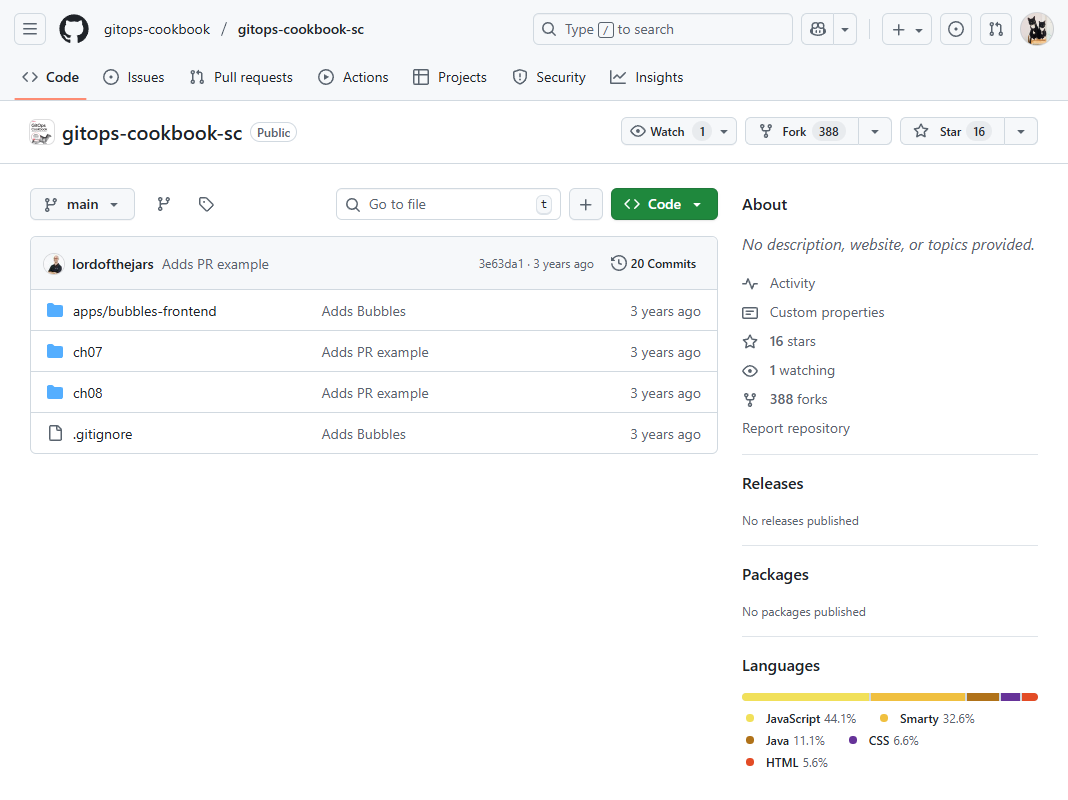

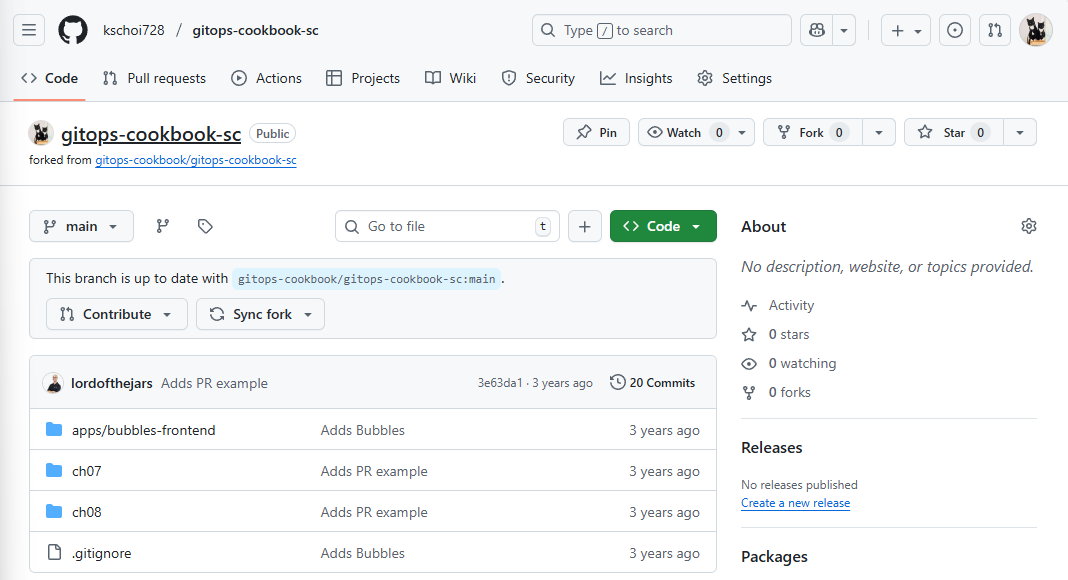
“Fork는 오픈소스 협업과 GitOps 실습의 시작점이다.”
⚙️ WSL(Windows Subsystem for Linux) 설치
WSL은 Windows Subsystem for Linux의 약자로, Windows 운영체제에서 Linux 환경을 실행할 수 있도록 해주는 기능입니다. Windows에서 별도의 가상 머신이나 듀얼 부팅 없이 Linux 명령어와 애플리케이션을 사용할 수 있게 해주는 기술
# WSL 기능을 수동으로 활성화
PS C:\Users\ssoon> dism.exe /online /enable-feature /featurename:Microsoft-Windows-Subsystem-Linux /all /norestart

배포 이미지 서비스 및 관리 도구
버전: 10.0.22621.2792

이미지 버전: 10.0.22631.5909

기능을 사용하도록 설정하는 중
[==========================100.0%==========================]

# WSL 2를 사용하기 위해 필요한 Virtual Machine Platform 기능을 활성화
PS C:\Users\ssoon> dism.exe /online /enable-feature /featurename:VirtualMachinePlatform /all /norestart

배포 이미지 서비스 및 관리 도구
버전: 10.0.22621.2792

이미지 버전: 10.0.22631.5909

기능을 사용하도록 설정하는 중
[==========================100.0%==========================]
작업을 완료했습니다.

# WSL(Windows Subsystem for Linux) 설치를 자동으로 처리
PS C:\Users\ssoon> wsl --install
설치 중: 가상 머신 플랫폼
가상 머신 플랫폼이(가) 설치되었습니다.
설치 중: Linux용 Windows 하위 시스템
Linux용 Windows 하위 시스템이(가) 설치되었습니다.
설치 중: Ubuntu
Ubuntu이(가) 설치되었습니다.
요청한 작업이 잘 실행되었습니다. 시스템을 다시 시작하면 변경 사항이 적용됩니다.

# WSL의 기본 버전을 WSL 2로 설정
PS C:\Users\ssoon> wsl --set-default-version 2
WSL 2와의 주요 차이점에 대한 자세한 내용은 https://aka.ms/wsl2를 참조하세요
작업을 완료했습니다.

# WSL업데이트
wsl --update
⚙️ 윈도우 OS 재부팅
Installing, this may take a few minutes...
WslRegisterDistribution failed with error: 0x80370114
Error: 0x80370114 ??? ??? ???? ?? ?? ??? ??? ??? ? ????.

Press any key to continue...- Windows 하이퍼바이저 플랫폼 켜기
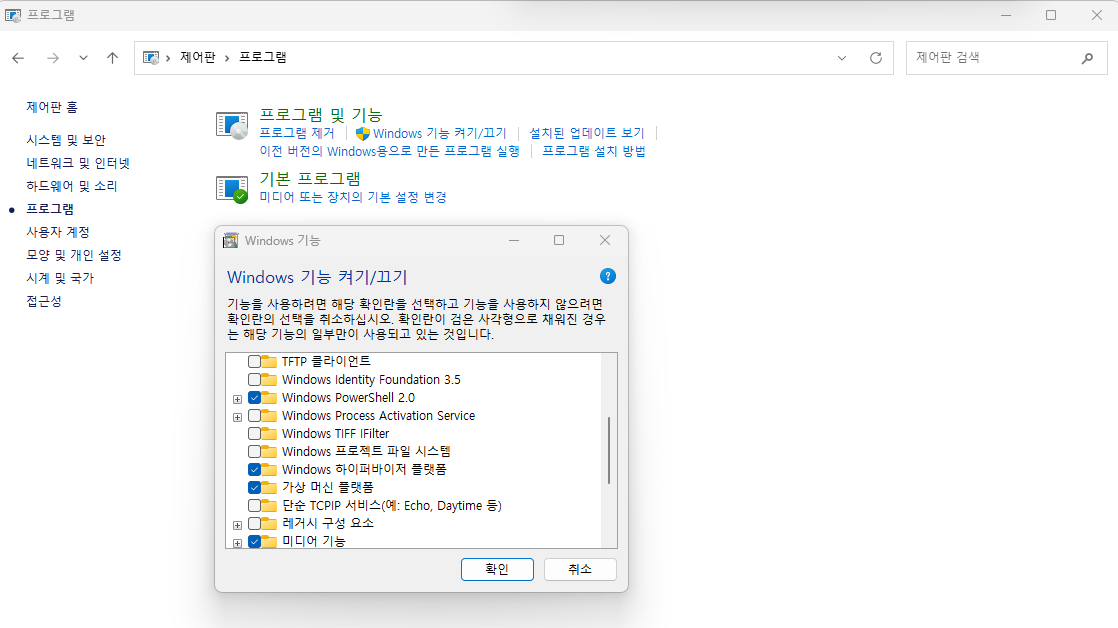
⚙️ 윈도우 OS 재부팅
⚙️ Microsoft Store에서 Ubuntu 설치
Installing, this may take a few minutes...
Please create a default UNIX user account. The username does not need to match your Windows username.
For more information visit: https://aka.ms/wslusers
Enter new UNIX username: ssoon
New password:
Retype new password:
passwd: password updated successfully
Installation successful!
To run a command as administrator (user "root"), use "sudo <command>".
See "man sudo_root" for details.

ssoon@DESKTOP-72C919S:~$
⚙️ 기본 정보 확인
ssoon@DESKTOP-72C919S:~$ hostnamectl
 Static hostname: DESKTOP-72C919S
       Icon name: computer-container
         Chassis: container ☐
      Machine ID: 70945de4b738417c8b66a3a199e19ccd
         Boot ID: 210560abc0dc431ab8c7dac651a9765e
  Virtualization: wsl
Operating System: Ubuntu 24.04.1 LTS
          Kernel: Linux 6.6.87.2-microsoft-standard-WSL2
    Architecture: x86-64
ssoon@DESKTOP-72C919S:~$ whoami
ssoon
ssoon@DESKTOP-72C919S:~$ id
uid=1000(ssoon) gid=1000(ssoon) groups=1000(ssoon),4(adm),20(dialout),24(cdrom),25(floppy),27(sudo),29(audio),30(dip),44(video),46(plugdev),100(users),107(netdev)
ssoon@DESKTOP-72C919S:~$ pwd
/home/ssoon
⚙️ apt 업데이트 및 패키지 설치
ssoon@DESKTOP-72C919S:~$ sudo apt-get update

ssoon@DESKTOP-72C919S:~$ sudo apt install jq htop curl wget ca-certificates net-tools -y

ssoon@DESKTOP-72C919S:~$ ifconfig eth0
eth0: flags=4163<UP,BROADCAST,RUNNING,MULTICAST>  mtu 1500
        inet 172.18.234.111  netmask 255.255.240.0  broadcast 172.18.239.255
        inet6 fe80::215:5dff:fe4b:bfff  prefixlen 64  scopeid 0x20<link>
        ether 00:15:5d:4b:bf:ff  txqueuelen 1000  (Ethernet)
        RX packets 72870  bytes 208389390 (208.3 MB)
        RX errors 0  dropped 0  overruns 0  frame 0
        TX packets 35114  bytes 2429902 (2.4 MB)
        TX errors 0  dropped 0 overruns 0  carrier 0  collisions 0

ssoon@DESKTOP-72C919S:~$ ping -c 1 8.8.8.8
PING 8.8.8.8 (8.8.8.8) 56(84) bytes of data.
64 bytes from 8.8.8.8: icmp_seq=1 ttl=112 time=36.7 ms

--- 8.8.8.8 ping statistics ---
1 packets transmitted, 1 received, 0% packet loss, time 0ms
rtt min/avg/max/mdev = 36.660/36.660/36.660/0.000 ms

PS C:\Users\ssoon> wsl -l -v
  NAME      STATE           VERSION
* Ubuntu    Stopped         2
⚙️ WSL2 Ubuntu 에 Docker 설치
ssoon@DESKTOP-72C919S:~$ curl -fsSL https://get.docker.com -o get-docker.sh
ssoon@DESKTOP-72C919S:~$ sudo sh ./get-docker.sh
[sudo] password for ssoon:
# Executing docker install script, commit: 86415efcfe5f8d966625843da41a0f798238cce5

WSL DETECTED: We recommend using Docker Desktop for Windows.
Please get Docker Desktop from https://www.docker.com/products/docker-desktop/


You may press Ctrl+C now to abort this script.
+ sleep 20
+ sh -c apt-get -qq update >/dev/null
+ sh -c DEBIAN_FRONTEND=noninteractive apt-get -y -qq install ca-certificates curl >/dev/null
+ sh -c install -m 0755 -d /etc/apt/keyrings
+ sh -c curl -fsSL "https://download.docker.com/linux/ubuntu/gpg" -o /etc/apt/keyrings/docker.asc
+ sh -c chmod a+r /etc/apt/keyrings/docker.asc
+ sh -c echo "deb [arch=amd64 signed-by=/etc/apt/keyrings/docker.asc] https://download.docker.com/linux/ubuntu noble stable" > /etc/apt/sources.list.d/docker.list
+ sh -c apt-get -qq update >/dev/null
+ sh -c DEBIAN_FRONTEND=noninteractive apt-get -y -qq install docker-ce docker-ce-cli containerd.io docker-compose-plugin docker-ce-rootless-extras docker-buildx-plugin docker-model-plugin >/dev/null
+ sh -c docker version
Client: Docker Engine - Community
 Version:           28.5.1
 API version:       1.51
 Go version:        go1.24.8
 Git commit:        e180ab8
 Built:             Wed Oct  8 12:17:26 2025
 OS/Arch:           linux/amd64
 Context:           default

Server: Docker Engine - Community
 Engine:
  Version:          28.5.1
  API version:      1.51 (minimum version 1.24)
  Go version:       go1.24.8
  Git commit:       f8215cc
  Built:            Wed Oct  8 12:17:26 2025
  OS/Arch:          linux/amd64
  Experimental:     false
 containerd:
  Version:          v1.7.28
  GitCommit:        b98a3aace656320842a23f4a392a33f46af97866
 runc:
  Version:          1.3.0
  GitCommit:        v1.3.0-0-g4ca628d1
 docker-init:
  Version:          0.19.0
  GitCommit:        de40ad0

ssoon@DESKTOP-72C919S:~$ docker ps
permission denied while trying to connect to the Docker daemon socket at unix:///var/run/docker.sock: Get "http://%2Fvar%2Frun%2Fdocker.sock/v1.51/containers/json": dial unix /var/run/docker.sock: connect: permission denied
ssoon@DESKTOP-72C919S:~$ sudo usermod -aG docker $USER
ssoon@DESKTOP-72C919S:~$ newgrp docker
ssoon@DESKTOP-72C919S:~$ docker ps
CONTAINER ID   IMAGE     COMMAND   CREATED   STATUS    PORTS     NAMES
ssoon@DESKTOP-72C919S:~$ sudo systemctl status docker
● docker.service - Docker Application Container Engine
     Loaded: loaded (/usr/lib/systemd/system/docker.service; enabled; preset: enabled)
     Active: active (running) since Sat 2025-10-18 00:39:45 KST; 2min 20s ago
TriggeredBy: ● docker.socket
       Docs: https://docs.docker.com
   Main PID: 1456 (dockerd)
      Tasks: 16
     Memory: 22.6M (peak: 27.0M)
        CPU: 558ms
     CGroup: /system.slice/docker.service
             └─1456 /usr/bin/dockerd -H fd:// --containerd=/run/containerd/containerd.sock
⚙️ VSCODE 설치
ssoon@DESKTOP-72C919S:~$ code .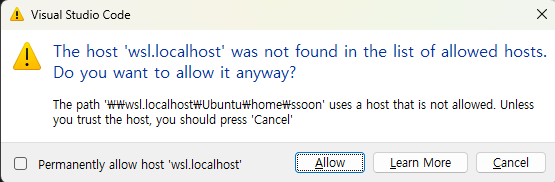
⚙️ WSL2 Ubuntu 에 kind 설치
ssoon@DESKTOP-72C919S:~$ sudo systemctl stop apparmor && sudo systemctl disable apparmor
[sudo] password for ssoon:
Synchronizing state of apparmor.service with SysV service script with /usr/lib/systemd/systemd-sysv-install.
Executing: /usr/lib/systemd/systemd-sysv-install disable apparmor
Removed "/etc/systemd/system/sysinit.target.wants/apparmor.service".

ssoon@DESKTOP-72C919S:~$ sudo apt update && sudo apt-get install bridge-utils net-tools jq tree unzip kubectx kubecolor -y
Hit:1 https://download.docker.com/linux/ubuntu noble InRelease
Hit:2 http://security.ubuntu.com/ubuntu noble-security InRelease
Hit:3 http://archive.ubuntu.com/ubuntu noble InRelease
Hit:4 http://archive.ubuntu.com/ubuntu noble-updates InRelease
Hit:5 http://archive.ubuntu.com/ubuntu noble-backports InRelease
Reading package lists... Done
Building dependency tree... Done
Reading state information... Done
...

ssoon@DESKTOP-72C919S:~$ curl -Lo ./kind https://kind.sigs.k8s.io/dl/v0.30.0/kind-linux-amd64
  % Total    % Received % Xferd  Average Speed   Time    Time     Time  Current
                                 Dload  Upload   Total   Spent    Left  Speed
100    97  100    97    0     0    223      0 --:--:-- --:--:-- --:--:--   222
  0     0    0     0    0     0      0      0 --:--:-- --:--:-- --:--:--     0
100 10.5M  100 10.5M    0     0  6132k      0  0:00:01  0:00:01 --:--:-- 53.4M
ssoon@DESKTOP-72C919S:~$ chmod +x ./kind
ssoon@DESKTOP-72C919S:~$ sudo mv ./kind /usr/local/bin/kind
ssoon@DESKTOP-72C919S:~$ kind --version
kind version 0.30.0
⚙️ WSL2 Ubuntu 에 관히 Tool 설치
ssoon@DESKTOP-72C919S:~$ curl -LO "https://dl.k8s.io/release/$(curl -L -s https://dl.k8s.io/release/stable.txt)/bin/linux/amd64/kubectl"
  % Total    % Received % Xferd  Average Speed   Time    Time     Time  Current
                                 Dload  Upload   Total   Spent    Left  Speed
100   138  100   138    0     0    507      0 --:--:-- --:--:-- --:--:--   507
100 57.7M  100 57.7M    0     0  35.3M      0  0:00:01  0:00:01 --:--:-- 50.9M
ssoon@DESKTOP-72C919S:~$ chmod +x kubectl
ssoon@DESKTOP-72C919S:~$ sudo mv ./kubectl /usr/bin
ssoon@DESKTOP-72C919S:~$ sudo kubectl version --client=true
Client Version: v1.34.1
Kustomize Version: v5.7.1

ssoon@DESKTOP-72C919S:~$ curl -s https://raw.githubusercontent.com/helm/helm/master/scripts/get-helm-3 | bash
Downloading https://get.helm.sh/helm-v3.19.0-linux-amd64.tar.gz
Verifying checksum... Done.
Preparing to install helm into /usr/local/bin
helm installed into /usr/local/bin/helm
ssoon@DESKTOP-72C919S:~$ helm version
version.BuildInfo{Version:"v3.19.0", GitCommit:"3d8990f0836691f0229297773f3524598f46bda6", GitTreeState:"clean", GoVersion:"go1.24.7"}

ssoon@DESKTOP-72C919S:~$ source <(kubectl completion bash)
ssoon@DESKTOP-72C919S:~$ echo 'source <(kubectl completion bash)' >> ~/.bashrc

ssoon@DESKTOP-72C919S:~$ echo 'alias k=kubectl' >> ~/.bashrc
ssoon@DESKTOP-72C919S:~$ echo 'complete -o default -F __start_kubectl k' >> ~/.bashrc

ssoon@DESKTOP-72C919S:~$ echo -e "source $PWD/kube-ps1/kube-ps1.sh" >> ~/.bashrc
ssoon@DESKTOP-72C919S:~$ cat <<"EOT" >> ~/.bashrc
KUBE_PS1_SYMBOL_ENABLE=true
function get_cluster_short() {
  echo "$1" | cut -d . -f1
}
KUBE_PS1_CLUSTER_FUNCTION=get_cluster_short
KUBE_PS1_SUFFIX=') '
PS1='$(kube_ps1)'$PS1
EOT

ssoon@DESKTOP-72C919S:~$ source ~/.bashrc
⚙️ 클러스터 배포 및 확인
ssoon@DESKTOP-72C919S:~$ kind create cluster
Creating cluster "kind" ...
 ✓ Ensuring node image (kindest/node:v1.34.0) 🖼
 ✓ Preparing nodes 📦
 ✓ Writing configuration 📜
 ✓ Starting control-plane 🕹️
 ✓ Installing CNI 🔌
 ✓ Installing StorageClass 💾
Set kubectl context to "kind-kind"
You can now use your cluster with:

kubectl cluster-info --context kind-kind

Not sure what to do next? 😅  Check out https://kind.sigs.k8s.io/docs/user/quick-start/
ssoon@DESKTOP-72C919S:~$ kind get clusters
kind
ssoon@DESKTOP-72C919S:~$ kind get nodes
kind-control-plane
ssoon@DESKTOP-72C919S:~$ kubectl cluster-info
Kubernetes control plane is running at https://127.0.0.1:45877
CoreDNS is running at https://127.0.0.1:45877/api/v1/namespaces/kube-system/services/kube-dns:dns/proxy

To further debug and diagnose cluster problems, use 'kubectl cluster-info dump'.
ssoon@DESKTOP-72C919S:~$ kubectl get node -o wide
NAME                 STATUS   ROLES           AGE   VERSION   INTERNAL-IP   EXTERNAL-IP   OS-IMAGE                         KERNEL-VERSION                     CONTAINER-RUNTIME
kind-control-plane   Ready    control-plane   39s   v1.34.0   172.19.0.2    <none>        Debian GNU/Linux 12 (bookworm)   6.6.87.2-microsoft-standard-WSL2   containerd://2.1.3
ssoon@DESKTOP-72C919S:~$ kubectl get pod -A
NAMESPACE            NAME                                         READY   STATUS    RESTARTS   AGE
kube-system          coredns-66bc5c9577-txk92                     1/1     Running   0          34s
kube-system          coredns-66bc5c9577-xm4lc                     1/1     Running   0          34s
kube-system          etcd-kind-control-plane                      1/1     Running   0          43s
kube-system          kindnet-lqn78                                1/1     Running   0          35s
kube-system          kube-apiserver-kind-control-plane            1/1     Running   0          41s
kube-system          kube-controller-manager-kind-control-plane   1/1     Running   0          41s
kube-system          kube-proxy-9476l                             1/1     Running   0          35s
kube-system          kube-scheduler-kind-control-plane            1/1     Running   0          41s
local-path-storage   local-path-provisioner-7b8c8ddbd6-x2sdv      1/1     Running   0          34s

ssoon@DESKTOP-72C919S:~$ docker ps
CONTAINER ID   IMAGE                  COMMAND                  CREATED              STATUS              PORTS                       NAMES
7b595de11f8b   kindest/node:v1.34.0   "/usr/local/bin/entr…"   About a minute ago   Up About a minute   127.0.0.1:45877->6443/tcp   kind-control-plane
ssoon@DESKTOP-72C919S:~$ docker images
REPOSITORY     TAG       IMAGE ID       CREATED       SIZE
kindest/node   <none>    4357c93ef232   7 weeks ago   985MB

ssoon@DESKTOP-72C919S:~$ kind delete cluster
Deleting cluster "kind" ...
⚙️ kind 로 k8s 배포
ssoon@DESKTOP-72C919S:~$ kind create cluster --name myk8s --image kindest/node:v1.32.8 --config - <<EOF
kind: Cluster
apiVersion: kind.x-k8s.io/v1alpha4
nodes:
- role: control-plane
  extraPortMappings:
  - containerPort: 30000
    hostPort: 30000
  - containerPort: 30001
    hostPort: 30001
- role: worker
EOF
Creating cluster "myk8s" ...
 ✓ Ensuring node image (kindest/node:v1.32.8) 🖼
 ✓ Preparing nodes 📦 📦
 ✓ Writing configuration 📜
 ✓ Starting control-plane 🕹️
 ✓ Installing CNI 🔌
 ✓ Installing StorageClass 💾
 ✓ Joining worker nodes 🚜
Set kubectl context to "kind-myk8s"
You can now use your cluster with:

kubectl cluster-info --context kind-myk8s

Thanks for using kind! 😊
ssoon@DESKTOP-72C919S:~$ kind get nodes --name myk8s
myk8s-control-plane
myk8s-worker
ssoon@DESKTOP-72C919S:~$ kubens default
✔ Active namespace is "default"

ssoon@DESKTOP-72C919S:~$ docker network ls
NETWORK ID     NAME      DRIVER    SCOPE
383721d1603e   bridge    bridge    local
03c65e2ed836   host      host      local
2c900978a7b0   kind      bridge    local
883619abf50e   none      null      local
ssoon@DESKTOP-72C919S:~$ docker inspect kind | jq
[
  {
    "Name": "kind",
    "Id": "2c900978a7b09b55e86b9f3634312cd6676ee6bfe120d493a9300b8e49f98661",
    "Created": "2025-10-18T01:02:13.573307644+09:00",
    "Scope": "local",
    "Driver": "bridge",
    "EnableIPv4": true,
    "EnableIPv6": true,
    "IPAM": {
      "Driver": "default",
      "Options": {},
      "Config": [
        {
          "Subnet": "fc00:f853:ccd:e793::/64"
        },
        {
          "Subnet": "172.19.0.0/16",
          "Gateway": "172.19.0.1"
        }
      ]
    },

ssoon@DESKTOP-72C919S:~$ kubectl cluster-info
Kubernetes control plane is running at https://127.0.0.1:36333
CoreDNS is running at https://127.0.0.1:36333/api/v1/namespaces/kube-system/services/kube-dns:dns/proxy

To further debug and diagnose cluster problems, use 'kubectl cluster-info dump'.
ssoon@DESKTOP-72C919S:~$ kubectl get node -o wide
NAME                  STATUS   ROLES           AGE   VERSION   INTERNAL-IP   EXTERNAL-IP   OS-IMAGE                         KERNEL-VERSION                     CONTAINER-RUNTIME
myk8s-control-plane   Ready    control-plane   88s   v1.32.8   172.19.0.3    <none>        Debian GNU/Linux 12 (bookworm)   6.6.87.2-microsoft-standard-WSL2   containerd://2.1.3
myk8s-worker          Ready    <none>          73s   v1.32.8   172.19.0.4    <none>        Debian GNU/Linux 12 (bookworm)   6.6.87.2-microsoft-standard-WSL2   containerd://2.1.3
ssoon@DESKTOP-72C919S:~$ kubectl get pod -A -o wide
NAMESPACE            NAME                                          READY   STATUS    RESTARTS   AGE    IP           NODE                  NOMINATED NODE   READINESS GATES
kube-system          coredns-668d6bf9bc-8rg8n                      1/1     Running   0          93s    10.244.0.3   myk8s-control-plane   <none>           <none>
kube-system          coredns-668d6bf9bc-j8tj7                      1/1     Running   0          93s    10.244.0.2   myk8s-control-plane   <none>           <none>
kube-system          etcd-myk8s-control-plane                      1/1     Running   0          100s   172.19.0.3   myk8s-control-plane   <none>           <none>
kube-system          kindnet-xklxp                                 1/1     Running   0          91s    172.19.0.4   myk8s-worker          <none>           <none>
kube-system          kindnet-xmtqs                                 1/1     Running   0          94s    172.19.0.3   myk8s-control-plane   <none>           <none>
kube-system          kube-apiserver-myk8s-control-plane            1/1     Running   0          100s   172.19.0.3   myk8s-control-plane   <none>           <none>
kube-system          kube-controller-manager-myk8s-control-plane   1/1     Running   0          100s   172.19.0.3   myk8s-control-plane   <none>           <none>
kube-system          kube-proxy-prm7c                              1/1     Running   0          91s    172.19.0.4   myk8s-worker          <none>           <none>
kube-system          kube-proxy-swt2h                              1/1     Running   0          94s    172.19.0.3   myk8s-control-plane   <none>           <none>
kube-system          kube-scheduler-myk8s-control-plane            1/1     Running   0          100s   172.19.0.3   myk8s-control-plane   <none>           <none>
local-path-storage   local-path-provisioner-7dc846544d-kbs85       1/1     Running   0          93s    10.244.0.4   myk8s-control-plane   <none>           <none>
ssoon@DESKTOP-72C919S:~$ kubectl get namespaces
NAME                 STATUS   AGE
default              Active   113s
kube-node-lease      Active   113s
kube-public          Active   113s
kube-system          Active   113s
local-path-storage   Active   105s
ssoon@DESKTOP-72C919S:~$ docker ps
CONTAINER ID   IMAGE                  COMMAND                  CREATED         STATUS         PORTS                                                             NAMES
b361a5a800d8   kindest/node:v1.32.8   "/usr/local/bin/entr…"   2 minutes ago   Up 2 minutes   0.0.0.0:30000-30001->30000-30001/tcp, 127.0.0.1:36333->6443/tcp   myk8s-control-plane
900a0f4e6f63   kindest/node:v1.32.8   "/usr/local/bin/entr…"   2 minutes ago   Up 2 minutes                                                                     myk8s-worker

ssoon@DESKTOP-72C919S:~$ docker images
REPOSITORY     TAG       IMAGE ID       CREATED       SIZE
kindest/node   <none>    4357c93ef232   7 weeks ago   985MB
kindest/node   v1.32.8   05f8e4e76c17   7 weeks ago   1.04GB
ssoon@DESKTOP-72C919S:~$ docker exec -it myk8s-control-plane ss -tnlp
State  Recv-Q Send-Q  Local Address:Port    Peer Address:Port Process
LISTEN 0      4096       172.19.0.3:2379         0.0.0.0:*     users:(("etcd",pid=663,fd=9))
LISTEN 0      4096       172.19.0.3:2380         0.0.0.0:*     users:(("etcd",pid=663,fd=7))
LISTEN 0      4096        127.0.0.1:2381         0.0.0.0:*     users:(("etcd",pid=663,fd=15))
LISTEN 0      4096        127.0.0.1:2379         0.0.0.0:*     users:(("etcd",pid=663,fd=8))
LISTEN 0      4096        127.0.0.1:10248        0.0.0.0:*     users:(("kubelet",pid=735,fd=16))
LISTEN 0      4096        127.0.0.1:10249        0.0.0.0:*     users:(("kube-proxy",pid=935,fd=24))
LISTEN 0      4096        127.0.0.1:10259        0.0.0.0:*     users:(("kube-scheduler",pid=531,fd=3))
LISTEN 0      4096        127.0.0.1:10257        0.0.0.0:*     users:(("kube-controller",pid=568,fd=3))
LISTEN 0      4096       127.0.0.11:43555        0.0.0.0:*
LISTEN 0      4096        127.0.0.1:40823        0.0.0.0:*     users:(("containerd",pid=109,fd=3))
LISTEN 0      4096                *:6443               *:*     users:(("kube-apiserver",pid=580,fd=3))
LISTEN 0      4096                *:10256              *:*     users:(("kube-proxy",pid=935,fd=11))
LISTEN 0      4096                *:10250              *:*     users:(("kubelet",pid=735,fd=26))

ssoon@DESKTOP-72C919S:~$ kubectl get pod -v6
I1018 01:09:17.989376    9415 loader.go:402] Config loaded from file:  /home/ssoon/.kube/config
I1018 01:09:17.989854    9415 envvar.go:172] "Feature gate default state" feature="InOrderInformers" enabled=true
I1018 01:09:17.989898    9415 envvar.go:172] "Feature gate default state" feature="InformerResourceVersion" enabled=false
I1018 01:09:17.989941    9415 envvar.go:172] "Feature gate default state" feature="WatchListClient" enabled=false
I1018 01:09:17.990028    9415 envvar.go:172] "Feature gate default state" feature="ClientsAllowCBOR" enabled=false
I1018 01:09:17.990075    9415 envvar.go:172] "Feature gate default state" feature="ClientsPreferCBOR" enabled=false
I1018 01:09:18.001146    9415 round_trippers.go:632] "Response" verb="GET" url="https://127.0.0.1:36333/api/v1/namespaces/default/pods?limit=500" status="200 OK" milliseconds=8
No resources found in default namespace.

ssoon@DESKTOP-72C919S:~$ kind delete cluster --name myk8s
Deleting cluster "myk8s" ...
Deleted nodes: ["myk8s-control-plane" "myk8s-worker"]
☸️ 2.3 Creating a Local Kubernetes Cluster
🌍 Kubernetes Cluster 준비
GitOps의 마지막 준비 단계는 로컬 Kubernetes 클러스터를 만드는 것입니다.
책에서는 Minikube를 이용해 클러스터를 구성합니다.
Minikube는 로컬 환경에서 Kubernetes를 테스트할 수 있는 가장 간단한 방법입니다.
“Minikube는 Kubernetes 학습과 GitOps 실습에 가장 적합한 로컬 환경이다.”
🧩 VirtualBox 설치
Minikube는 내부적으로 Virtualization 기술을 사용하여 가상의 Linux 환경을 생성합니다.
이를 위해 VirtualBox를 설치해야 합니다.
1️⃣ VirtualBox 공식 사이트 접속
2️⃣ OS에 맞는 설치 파일 다운로드
3️⃣ 설치 완료 후 실행
Figure: VirtualBox 설치 페이지
(작은 캡션: VirtualBox home page)
“VirtualBox는 Kubernetes Cluster를 가상 환경에서 실행하기 위한 기반이다.”
⚡ Minikube 설치 및 실행
이제 Minikube를 설치하고 클러스터를 실행합니다.
GitOps 실습에서는 v1.23.0 버전을 사용합니다.
minikube start --kubernetes-version='v1.23.0' \
--driver='virtualbox' --memory=8196 -p gitops
명령어 설명:
- --kubernetes-version: 설치할 Kubernetes 버전 지정
- --driver: VirtualBox 사용
- --memory: 메모리 크기(8GB)
- -p: 클러스터 프로필 이름 (예: gitops)
Figure: Minikube 실행 로그
(작은 캡션: Minikube startup output)
설치가 완료되면, 기본 Namespace로 default가 설정되고 클러스터가 준비됩니다.
“명령어 한 줄로 로컬 Kubernetes 클러스터를 시작할 수 있다.”
🧮 kubectl 버전 정렬
Minikube 설치 후 kubectl 버전이 다를 경우,
Kubernetes와 호환되지 않아 오류가 발생할 수 있습니다.
아래 명령으로 정확한 버전을 설치할 수 있습니다.
curl -LO https://dl.k8s.io/release/v1.23.0/bin/darwin/amd64/kubectl
설치 후 실행 권한을 부여하고 PATH에 등록합니다.
“kubectl은 Kubernetes와의 대화창구이며, GitOps 자동화의 CLI 중심 도구다.”
💡 기타 대안
Minikube 외에도 Kubernetes를 로컬에서 실행하는 여러 방법이 있습니다.
예를 들어 kind(Kubernetes in Docker) 도 자주 사용됩니다.
하지만, 책의 모든 예제는 Minikube에서 검증되었으므로
최초 실습에서는 Minikube를 사용하는 것이 가장 안전합니다.
“kind, microk8s, k3d 등 다양한 대안이 있지만 Minikube가 가장 안정적이다.”
📌 핵심 요약
- Container Registry: 컨테이너 이미지를 저장 (예: Docker Hub, Quay.io)
- Git Repository: 코드와 설정을 관리하는 GitOps의 중심 (예: GitHub)
- Kubernetes Cluster: GitOps의 실행 환경 (예: Minikube)
- 필수 툴체인 구성: VirtualBox + Minikube + kubectl
- 목표: Git을 중심으로 코드, 이미지, 배포를 연결하는 GitOps 환경 구축
“GitOps를 실습하기 위한 준비는 단순하다 — 코드(Git), 이미지(Container), 그리고 실행(Kubernetes)을 연결하는 것이다.”
다음으로 원하신다면 CHAPTER 3 – Containers와 이어지는
CHAPTER 4 – Kustomize 부분도 동일한 포맷으로 정리해드릴 수 있습니다.
계속 진행할까요?
'CICD Study [1기]' 카테고리의 다른 글
| Kustomize : Kustomize에서 Kubernetes 필드 업데이트하기 (0) | 2025.10.14 |
|---|---|
| Kustomize : Kustomize에서 컨테이너 이미지 업데이트하기 (0) | 2025.10.14 |
| Kustomize : Kustomize를 사용한 Kubernetes 리소스 배포 (0) | 2025.10.14 |
| Containers (0) | 2025.10.14 |
| GitOps와 Kubernetes (0) | 2025.10.13 |