Ssoon
Helm : 5.4 - Helm 차트 패키징 및 배포 본문
⚙️ Helm Chart란?
- Helm의 기본 단위는 Chart입니다. Chart는 애플리케이션을 배포하기 위해 필요한 Kubernetes 리소스 파일, 템플릿, 그리고 기본 설정값(values.yaml)을 포함하고 있습니다.
- 이를 배포 가능한 패키지 형태(.tgz) 로 만들고 Chart Repository에 업로드하는 방법
"Helm Chart는 Kubernetes 애플리케이션 배포를 코드 형태로 관리하기 위한 단위 패키지입니다."
🧰 Helm Chart 패키징하기
- Helm에서는 helm package 명령어를 사용해 Chart를 손쉽게 패키징할 수 있습니다.
예를 들어, pacman Chart 디렉토리에서 아래 명령을 실행합니다: 이 명령을 실행하면 Helm은 pacman Chart를 .tgz 파일로 압축해줍니다.
(⎈|kind-myk8s:N/A) ssoon@DESKTOP-72C919S:~/pacman$ helm package .
Successfully packaged chart and saved it to: /home/ssoon/pacman/pacman-0.1.0.tgz- 즉, 이제 pacman-0.1.0.tgz 파일이 만들어졌으며, 이 파일이 바로 배포 가능한 Chart 패키지입니다.
"Helm Chart를 배포용으로 만들기 위해서는 helm package 명령어를 사용합니다."
🌐 Chart Repository 구조
- Chart를 단순히 .tgz 파일로 패키징했다고 해서 끝이 아닙니다.
다른 사람이 이 Chart를 사용할 수 있으려면 Chart Repository에 업로드해야 합니다. - Chart Repository는 일반적인 HTTP 서버이며, 내부에는 index.yaml 파일과 .tgz 패키지 파일이 존재합니다.
Repository 구조 예시:
repo
├── index.yaml
├── pacman-0.1.0.tgz
🗂 index.yaml 파일의 역할
- index.yaml은 Repository의 메타데이터 파일로, 어떤 Chart가 어떤 버전으로 등록되어 있는지를 Helm이 알 수 있도록 해줍니다.
- 이 파일에는 Chart 이름, 버전, 앱 버전, 생성일시, 설명, 해시값(digest) 등의 정보가 포함됩니다.
- index.yaml 파일은 수동으로 작성할 수도 있지만, Helm이 자동으로 생성해줄 수도 있습니다:
(⎈|kind-myk8s:N/A) ssoon@DESKTOP-72C919S:~/pacman$ helm repo index .
(⎈|kind-myk8s:N/A) ssoon@DESKTOP-72C919S:~/pacman$ cat index.yaml
apiVersion: v1
entries:
  pacman:
  - apiVersion: v2
    appVersion: 1.1.0
    created: "2025-10-21T23:52:08.047249622+09:00"
    description: A Helm chart for Pacman
    digest: 8986a3fc41d52aef51c892d456bda27d890fbe02de9df6bdba0b57ce48071413
    name: pacman
    type: application
    urls:
    - pacman-0.1.0.tgz
    version: 0.1.0
generated: "2025-10-21T23:52:08.04662917+09:00"- 이 명령을 실행하면 현재 디렉토리에 있는 .tgz 파일들을 스캔하여 자동으로 index.yaml을 만들어줍니다.
"Chart Repository는 .tgz 파일과 index.yaml 파일로 구성되며, Helm은 이를 통해 Chart 정보를 조회합니다."
🔐 Chart 서명(Signing) 및 검증(Verification)
- Chart를 배포할 때 보안적으로 중요한 점은, 누군가가 Chart 파일을 임의로 수정하거나 변조하지 않았는지를 검증할 수 있어야 한다는 것입니다.
- Helm은 이를 위해 GPG(Signing) 기능을 제공합니다.
🔏 Chart 서명하기
- 서명을 하기 위해서는 GPG key pair가 로컬에 이미 생성되어 있어야 합니다.
서명을 포함해 패키징하려면 아래 명령을 사용합니다: - GPG 설치 확인
(⎈|kind-myk8s:N/A) ssoon@DESKTOP-72C919S:~/pacman$ gpg --version
gpg (GnuPG) 2.4.4
libgcrypt 1.10.3
Copyright (C) 2024 g10 Code GmbH
License GNU GPL-3.0-or-later <https://gnu.org/licenses/gpl.html>
This is free software: you are free to change and redistribute it.
There is NO WARRANTY, to the extent permitted by law.

Home: /home/ssoon/.gnupg
Supported algorithms:
Pubkey: RSA, ELG, DSA, ECDH, ECDSA, EDDSA
Cipher: IDEA, 3DES, CAST5, BLOWFISH, AES, AES192, AES256, TWOFISH,
        CAMELLIA128, CAMELLIA192, CAMELLIA256
Hash: SHA1, RIPEMD160, SHA256, SHA384, SHA512, SHA224
Compression: Uncompressed, ZIP, ZLIB, BZIP2- GPG 키 생성
(⎈|kind-myk8s:N/A) ssoon@DESKTOP-72C919S:~/pacman$ gpg --full-generate-key
gpg (GnuPG) 2.4.4; Copyright (C) 2024 g10 Code GmbH
This is free software: you are free to change and redistribute it.
There is NO WARRANTY, to the extent permitted by law.

Please select what kind of key you want:
   (1) RSA and RSA
   (2) DSA and Elgamal
   (3) DSA (sign only)
   (4) RSA (sign only)
   (9) ECC (sign and encrypt) *default*
  (10) ECC (sign only)
  (14) Existing key from card
Your selection? 1
RSA keys may be between 1024 and 4096 bits long.
What keysize do you want? (3072)
Requested keysize is 3072 bits
Please specify how long the key should be valid.
         0 = key does not expire
      <n>  = key expires in n days
      <n>w = key expires in n weeks
      <n>m = key expires in n months
      <n>y = key expires in n years
Key is valid for? (0)
Key does not expire at all
Is this correct? (y/N) y

GnuPG needs to construct a user ID to identify your key.

Real name: ssoon
Email address: ssoon@example.com
Comment:
You selected this USER-ID:
    "ssoon <ssoon@example.com>"

Change (N)ame, (C)omment, (E)mail or (O)kay/(Q)uit?
Change (N)ame, (C)omment, (E)mail or (O)kay/(Q)uit? O
We need to generate a lot of random bytes. It is a good idea to perform
some other action (type on the keyboard, move the mouse, utilize the
disks) during the prime generation; this gives the random number
generator a better chance to gain enough entropy.
We need to generate a lot of random bytes. It is a good idea to perform
some other action (type on the keyboard, move the mouse, utilize the
disks) during the prime generation; this gives the random number
generator a better chance to gain enough entropy.
gpg: /home/ssoon/.gnupg/trustdb.gpg: trustdb created
gpg: directory '/home/ssoon/.gnupg/openpgp-revocs.d' created
gpg: revocation certificate stored as '/home/ssoon/.gnupg/openpgp-revocs.d/6E1C710BE6216B4406722F4383BD02985A0C4DEA.rev'
public and secret key created and signed.

pub   rsa3072 2025-10-21 [SC]
      6E1C710BE6216B4406722F4383BD02985A0C4DEA
uid                      ssoon <ssoon@example.com>
sub   rsa3072 2025-10-21 [E]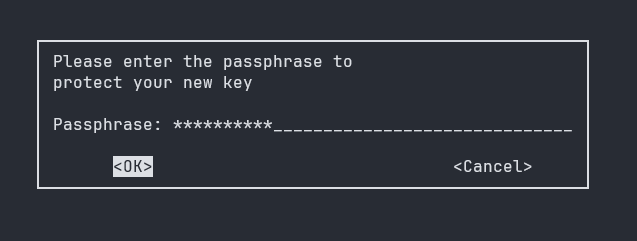
- 키 확인
(⎈|kind-myk8s:N/A) ssoon@DESKTOP-72C919S:~/pacman$ gpg --list-secret-keys --keyid-format LONG
gpg: checking the trustdb
gpg: marginals needed: 3  completes needed: 1  trust model: pgp
gpg: depth: 0  valid:   1  signed:   0  trust: 0-, 0q, 0n, 0m, 0f, 1u
/home/ssoon/.gnupg/pubring.kbx
------------------------------
sec   rsa3072/83BD02985A0C4DEA 2025-10-21 [SC]
      6E1C710BE6216B4406722F4383BD02985A0C4DEA
uid                 [ultimate] ssoon <ssoon@example.com>
ssb rsa3072/814394FEF97901D4 2025-10-21 [E]- Helm용 레거시 키링 파일 생성
(⎈|kind-myk8s:N/A) ssoon@DESKTOP-72C919S:~/pacman$ gpg --export-secret-keys --output ~/.gnupg/secring.gpg ssoon@example.com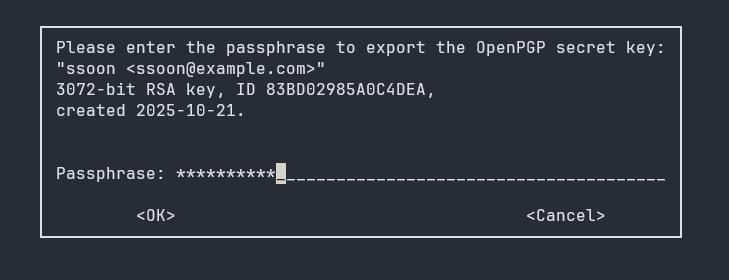
- Helm 패키징
(⎈|kind-myk8s:N/A) ssoon@DESKTOP-72C919S:~/pacman$ helm package --sign \
  --key 'ssoon@example.com' \
  --keyring ~/.gnupg/secring.gpg \
  .
Password for key "ssoon <ssoon@example.com>" >
Successfully packaged chart and saved it to: /home/ssoon/pacman/pacman-0.1.0.tgz- 이 명령을 실행하면 두 개의 파일이 생성됩니다:
(⎈|kind-myk8s:N/A) ssoon@DESKTOP-72C919S:~/pacman$ tree
.
├── Chart.yaml
├── index.yaml
├── newvalues.yaml
├── pacman-0.1.0.tgz
├── pacman-0.1.0.tgz.prov #📌 ← 서명 파일(Signature file)
├── templates
│   ├── _helpers.tpl
│   ├── deployment.yaml
│   └── service.yaml
└── values.yaml

2 directories, 9 files- 즉, .tgz 파일은 Chart 본체이고, .tgz.prov 파일은 서명(Signature) 파일입니다.
이 두 파일을 함께 Repository에 업로드해야 합니다.
"Helm Chart의 무결성을 보장하기 위해 .tgz와 .tgz.prov 파일을 함께 배포합니다."
🧾 Chart 검증하기 (Verification)
- 공개 키링을 레거시 형식으로 내보내기 (검증용)
(⎈|kind-myk8s:N/A) ssoon@DESKTOP-72C919S:~/pacman$ ls ~/.gnupg
openpgp-revocs.d  private-keys-v1.d  pubring.kbx  pubring.kbx~  secring.gpg  trustdb.gpg
(⎈|kind-myk8s:N/A) ssoon@DESKTOP-72C919S:~/pacman$ gpg --export --output ~/.gnupg/pubring.gpg
(⎈|kind-myk8s:N/A) ssoon@DESKTOP-72C919S:~/pacman$ ls ~/.gnupg
openpgp-revocs.d private-keys-v1.d pubring.gpg pubring.kbx pubring.kbx~ secring.gpg trustdb.gpg- 다른 사용자가 Repository에서 Chart를 다운로드했을 때, 그 Chart가 서명된 원본 그대로인지 확인하려면 다음 명령을 실행합니다:
- Signed by: ssoon <ssoon@example.com> → GPG 키로 정상 서명됨
- Fingerprint: 6E1C710BE6216B4406722F4383BD02985A0C4DEA → 서명에 사용된 키의 고유 식별자
- Chart Hash Verified: sha256:97c1ac9d74a80b9a4562aed40754ef90fe9ab69c02210b8e2eacfc4d3634ec68 → 차트 내용 무결성 검증 완료
(⎈|kind-myk8s:N/A) ssoon@DESKTOP-72C919S:~/pacman$ helm verify pacman-0.1.0.tgz
Signed by: ssoon <ssoon@example.com>
Using Key With Fingerprint: 6E1C710BE6216B4406722F4383BD02985A0C4DEA
Chart Hash Verified: sha256:97c1ac9d74a80b9a4562aed40754ef90fe9ab69c02210b8e2eacfc4d3634ec68
- 이 메시지는 해당 Chart가 올바른 GPG Key로 서명되었으며, 파일 내용이 변조되지 않았다는 것을 의미합니다.
"Helm의 verify 명령으로 Chart의 서명과 무결성을 검증할 수 있습니다."
📘 Figure: Repository 구조 예시
🗂 Repository Layout Example
repo/
├── index.yaml
├── pacman-0.1.0.tgz
├── pacman-0.1.0.tgz.prov
📌 핵심 요약
단계 설명
| 🧩 1. Helm Chart 패키징 | helm package . 명령어로 Chart를 .tgz 파일로 패키징 |
| 📁 2. Repository 구성 | .tgz와 index.yaml 파일을 포함한 HTTP 서버 형태의 저장소 필요 |
| 🧾 3. index.yaml 생성 | helm repo index . 명령으로 자동 생성 가능 |
| 🔏 4. 서명(Signing) | helm package --sign 명령으로 GPG 서명 추가 |
| ✅ 5. 검증(Verification) | helm verify 명령으로 Chart 무결성 확인 |
"Helm Chart는 패키징(package) → 배포(upload) → 서명(sign) → 검증(verify)의 단계로 안전하게 관리됩니다."
'CICD Study [1기]' 카테고리의 다른 글
| Helm : 5.6 Deploying a Chart with a Dependency (0) | 2025.10.19 |
|---|---|
| Helm : 5.5 Deploying a Chart from a Repository (0) | 2025.10.19 |
| Helm : 5.3 - Helm에서 컨테이너 이미지 업데이트하기 (0) | 2025.10.19 |
| Helm : 5.2 - 템플릿 간 문장 재사용 (0) | 2025.10.19 |
| Helm : 5.1 - Helm 프로젝트 생성 (0) | 2025.10.19 |
Comments