
Ssoon
Jenkins + ArgoCD : Argo CD + K8S(Kind) 본문
1️⃣ Argo CD
🔧 1. Argo CD란 무엇인가?
- Argo CD는 쿠버네티스(Kubernetes) 환경에서 GitOps 방식으로 배포(CD: Continuous Delivery)를 자동화하는 오픈소스 도구
- 즉, 애플리케이션의 *“원하는 상태(desired state)”*를 Git 저장소에 선언하고, Argo CD가 실제 클러스터의 *“현재 상태(live state)”*와 비교해서 자동으로 맞춰주는 역할
- 이런 방식은 수작업으로 kubectl apply … 하는 것보다 자동화 + 추적가능 + 안정성
🔧 2. 왜 사용해야 할까?
- Git을 *단일 진실 저장소(single source of truth)*로 삼아 애플리케이션과 인프라 구성을 버전관리하고 깔끔히 관리
- 실행 중인 클러스터 상태와 Git에 선언된 상태가 어긋나면(“drift”) 이를 자동으로 바로잡거나 경고
- 여러 쿠버네티스 클러스터나 여러 팀 환경(멀티 테넌시)에서도 하나의 Argo CD 인스턴스로 관리 가능하고, UI/CLI 지원으로 사용 편의성
🔧 3. 주요 핵심 개념
- 애플리케이션(Application): Argo CD에서 ‘배포하고자 하는 리소스 묶음’을 의미. Git 리포지토리 + 경로(path) + 타겟 클러스터 정보를 포함
- 원하는 상태(Target state): Git 저장소 등에 선언된 애플리케이션 구성(예: YAML, Helm 차트, Kustomize 등)
- 현재 상태(Live state): 쿠버네티스 클러스터에서 실제로 실행되고 있는 리소스 상태
- 동기화(Sync): 현재 상태와 원하는 상태가 다를 때, Argo CD가 조치를 취해 두 상태를 일치시키는 과정
- 드리프트(Drift): 현재 클러스터 상태가 Git에 선언된 상태와 달라지는 현상. Argo CD는 이를 탐지하고 동기화
🔧 4. 어떻게 동작하나? (간단 흐름)
- Git 저장소에 애플리케이션 구성(매니페스트, Helm 차트 등)을 커밋
- Argo CD는 이 저장소를 주기적으로 또는 이벤트(Webhook)로 감시
- 쿠버네티스 클러스터에서 실제 실행 중인 상태와 Git에 선언된 상태를 비교
- 상태가 다르면(Out-Of-Sync) → 자동 또는 수동으로 Sync 수행해서 실제 클러스터 상태를 원하는 상태로
- 이후에도 지속적으로 감시하여 새롭게 Git이 바뀌거나 클러스터에 직접 변경이 생기면 다시 동기화 유지
2️⃣ Argo CD 설치 및 기본 설정
root@DESKTOP-72C919S:~/cicd-labs# kubectl create ns argocd
namespace/argocd created
root@DESKTOP-72C919S:~/cicd-labs# cat <<EOF > argocd-values.yaml
dex:
  enabled: false

server:
  service:
    type: NodePort
    nodePortHttps: 30002
  extraArgs:
    - --insecure  # HTTPS 대신 HTTP 사용
EOF- 설치 : Argo CD v3.1.9
root@DESKTOP-72C919S:~/cicd-labs# helm repo add argo https://argoproj.github.io/argo-helm
"argo" has been added to your repositories
root@DESKTOP-72C919S:~/cicd-labs# helm install argocd argo/argo-cd --version 9.0.5 -f argocd-values.yaml --namespace argocd
NAME: argocd
LAST DEPLOYED: Fri Oct 31 22:04:04 2025
NAMESPACE: argocd
STATUS: deployed
REVISION: 1
TEST SUITE: None
NOTES:
In order to access the server UI you have the following options:

1. kubectl port-forward service/argocd-server -n argocd 8080:443

    and then open the browser on http://localhost:8080 and accept the certificate

2. enable ingress in the values file `server.ingress.enabled` and either
      - Add the annotation for ssl passthrough: https://argo-cd.readthedocs.io/en/stable/operator-manual/ingress/#option-1-ssl-passthrough
      - Set the `configs.params."server.insecure"` in the values file and terminate SSL at your ingress: https://argo-cd.readthedocs.io/en/stable/operator-manual/ingress/#option-2-multiple-ingress-objects-and-hosts


After reaching the UI the first time you can login with username: admin and the random password generated during the installation. You can find the password by running:

kubectl -n argocd get secret argocd-initial-admin-secret -o jsonpath="{.data.password}" | base64 -d

(You should delete the initial secret afterwards as suggested by the Getting Started Guide: https://argo-cd.readthedocs.io/en/stable/getting_started/#4-login-using-the-cli)- 최초 접속 암호 확인
root@DESKTOP-72C919S:~/cicd-labs# kubectl -n argocd get secret argocd-initial-admin-secret -o jsonpath="{.data.password}" | base64 -d ;echo
hHRyrjx2tJINiSHs- Argo CD 웹 접속

- UPDATE PASSWORD

- ops-deploy Repo 등록
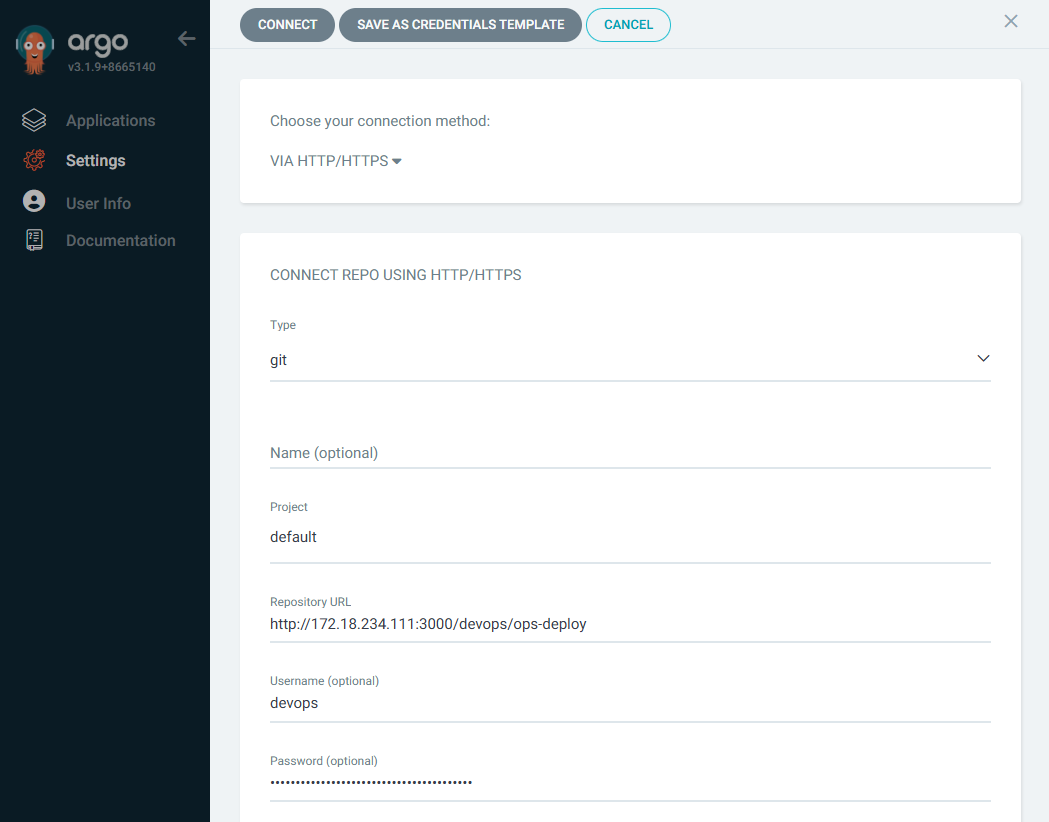
- Argo CD가 Gogs 저장소에 연결은 했지만, 저장소가 비어 있어서 브랜치나 커밋을 찾을 수 없기 때문에 등록에 실패

3️⃣ Repo(ops-deploy) 에 nginx helm chart 를 Argo CD를 통한 배포 1
root@DESKTOP-72C919S:~/cicd-labs# MyIP=172.18.234.111
TOKEN=a85d3883ae34f3eb334c2cfd2aaa05419ef8493f
root@DESKTOP-72C919S:~/cicd-labs# git clone http://devops:$TOKEN@$MyIP:3000/devops/ops-deploy.git
Cloning into 'ops-deploy'...
warning: You appear to have cloned an empty repository.
root@DESKTOP-72C919S:~/cicd-labs# cd ops-deploy
root@DESKTOP-72C919S:~/cicd-labs/ops-deploy# git config --local user.name "devops"
root@DESKTOP-72C919S:~/cicd-labs/ops-deploy# git config --local user.email "devops@example.com"
root@DESKTOP-72C919S:~/cicd-labs/ops-deploy# git config --local init.defaultBranch main
root@DESKTOP-72C919S:~/cicd-labs/ops-deploy# git config --local credential.helper store
root@DESKTOP-72C919S:~/cicd-labs/ops-deploy# git --no-pager config --local --list
core.repositoryformatversion=0
core.filemode=true
core.bare=false
core.logallrefupdates=true
remote.origin.url=http://devops:a85d3883ae34f3eb334c2cfd2aaa05419ef8493f@172.18.234.111:3000/devops/ops-deploy.git
remote.origin.fetch=+refs/heads/*:refs/remotes/origin/*
branch.master.remote=origin
branch.master.merge=refs/heads/master
user.name=devops
user.email=devops@example.com
init.defaultbranch=main
credential.helper=store
root@DESKTOP-72C919S:~/cicd-labs/ops-deploy# git --no-pager branch
root@DESKTOP-72C919S:~/cicd-labs/ops-deploy# git remote -v
origin  http://devops:a85d3883ae34f3eb334c2cfd2aaa05419ef8493f@172.18.234.111:3000/devops/ops-deploy.git (fetch)
origin  http://devops:a85d3883ae34f3eb334c2cfd2aaa05419ef8493f@172.18.234.111:3000/devops/ops-deploy.git (push)
root@DESKTOP-72C919S:~/cicd-labs/ops-deploy# VERSION=1.26.1
root@DESKTOP-72C919S:~/cicd-labs/ops-deploy# mkdir nginx-chart
root@DESKTOP-72C919S:~/cicd-labs/ops-deploy# mkdir nginx-chart/templates
root@DESKTOP-72C919S:~/cicd-labs/ops-deploy# cat > nginx-chart/VERSION <<EOF
$VERSION
EOF- nginx-chart/templates/configmap.yaml
cat > nginx-chart/templates/configmap.yaml <<EOF
apiVersion: v1
kind: ConfigMap
metadata:
  name: {{ .Release.Name }}
data:
  index.html: |
{{ .Values.indexHtml | indent 4 }}
EOF- nginx-chart/templates/deployment.yaml
root@DESKTOP-72C919S:~/cicd-labs/ops-deploy# cat > nginx-chart/templates/deployment.yaml <<EOF
apiVersion: apps/v1
kind: Deployment
metadata:
  name: {{ .Release.Name }}
spec:
  replicas: {{ .Values.replicaCount }}
  selector:
    matchLabels:
      app: {{ .Release.Name }}
  template:
    metadata:
      labels:
        app: {{ .Release.Name }}
    spec:
      containers:
      - name: nginx
        image: {{ .Values.image.repository }}:{{ .Values.image.tag }}
        ports:
        - containerPort: 80
        volumeMounts:
        - name: index-html
          mountPath: /usr/share/nginx/html/index.html
          subPath: index.html
      volumes:
      - name: index-html
        configMap:
          name: {{ .Release.Name }}
EOF- nginx-chart/templates/service.yaml
root@DESKTOP-72C919S:~/cicd-labs/ops-deploy# cat > nginx-chart/templates/service.yaml <<EOF
apiVersion: v1
kind: Service
metadata:
  name: {{ .Release.Name }}
spec:
  selector:
    app: {{ .Release.Name }}
  ports:
  - protocol: TCP
    port: 80
    targetPort: 80
    nodePort: 30000
  type: NodePort
EOF- nginx-chart/values-dev.yaml
root@DESKTOP-72C919S:~/cicd-labs/ops-deploy# cat > nginx-chart/values-dev.yaml <<EOF
indexHtml: |
  <!DOCTYPE html>
  <html>
  <head>
    <title>Welcome to Nginx!</title>
  </head>
  <body>
    <h1>Hello, Kubernetes!</h1>
    <p>DEV : Nginx version $VERSION</p>
  </body>
  </html>

image:
  repository: nginx
  tag: $VERSION

replicaCount: 1
EOF- nginx-chart/values-prd.yaml
root@DESKTOP-72C919S:~/cicd-labs/ops-deploy# cat > nginx-chart/values-prd.yaml <<EOF
indexHtml: |
  <!DOCTYPE html>
  <html>
  <head>
    <title>Welcome to Nginx!</title>
  </head>
  <body>
    <h1>Hello, Kubernetes!</h1>
    <p>PRD : Nginx version $VERSION</p>
  </body>
  </html>

image:
  repository: nginx
  tag: $VERSION

replicaCount: 2
EOF- nginx-chart/Chart.yaml
root@DESKTOP-72C919S:~/cicd-labs/ops-deploy# cat > nginx-chart/Chart.yaml <<EOF
apiVersion: v2
name: nginx-chart
description: A Helm chart for deploying Nginx with custom index.html
type: application
version: 1.0.0
appVersion: "$VERSION"
EOF- 폴더 구조
root@DESKTOP-72C919S:~/cicd-labs/ops-deploy# tree
.
└── nginx-chart
    ├── Chart.yaml
    ├── VERSION
    ├── templates
    │   ├── configmap.yaml
    │   ├── deployment.yaml
    │   └── service.yaml
    ├── values-dev.yaml
    └── values-prd.yaml

3 directories, 7 files- git push
root@DESKTOP-72C919S:~/cicd-labs/ops-deploy# git branch -m main
root@DESKTOP-72C919S:~/cicd-labs/ops-deploy# git add .
root@DESKTOP-72C919S:~/cicd-labs/ops-deploy# git commit -m "Add nginx helm chart"
On branch main
Your branch is based on 'origin/master', but the upstream is gone.
  (use "git branch --unset-upstream" to fixup)

nothing to commit, working tree clean
root@DESKTOP-72C919S:~/cicd-labs/ops-deploy# git push -u origin main
Enumerating objects: 11, done.
Counting objects: 100% (11/11), done.
Delta compression using up to 12 threads
Compressing objects: 100% (9/9), done.
Writing objects: 100% (11/11), 1.38 KiB | 704.00 KiB/s, done.
Total 11 (delta 1), reused 0 (delta 0), pack-reused 0
To http://172.18.234.111:3000/devops/ops-deploy.git
 * [new branch]      main -> main
branch 'main' set up to track 'origin/main'.
- ArgoCD 연결확인
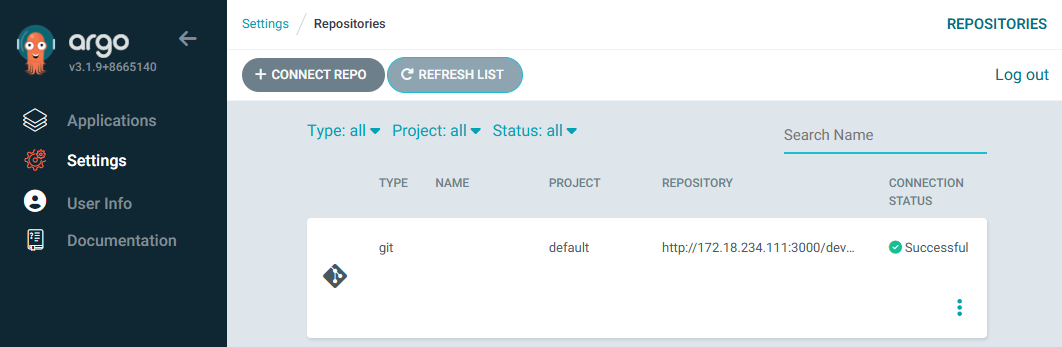
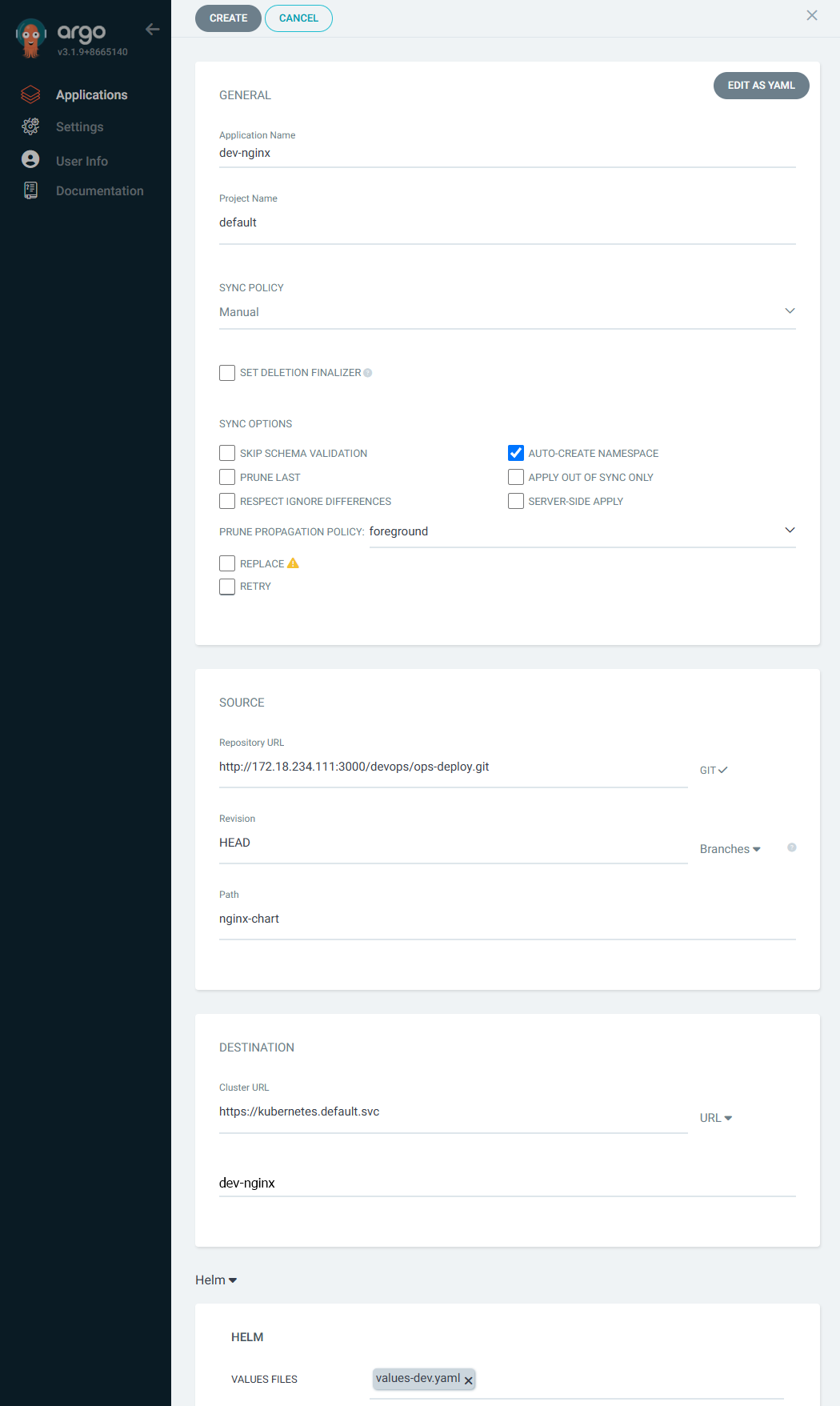
- Argo CD에 App 등록
- SYNC POLICY : Manual
- AUTO-CREATE NAMESPACE : 클러스터에 네임스페이스가 없을 시 argocd에 입력한 이름으로 자동 생성
- APPLY OUT OF SYNC ONLY : 현재 동기화 상태가 아닌 리소스만 배포
- PRUNE PROPAGATION POLICY
- foreground : 부모(소유자, ex. deployment) 자원을 먼저 삭제함
- background : 자식(종속자, ex. pod) 자원을 먼저 삭제함
- orphan : 고아(소유자는 삭제됐지만, 종속자가 삭제되지 않은 경우) 자원을 삭제함
- SYNC POLICY : Manual


root@DESKTOP-72C919S:~/cicd-labs/ops-deploy# kubectl get applications -n argocd
NAME        SYNC STATUS   HEALTH STATUS
dev-nginx OutOfSync Missing- SYNC 클릭 으로 K8S(Live) 반영
- PRUNE : GIt에서 자원 삭제 후 배포시 K8S에서는 삭제되지 않으나, 해당 옵션을 선택하면 삭제시킴
- FORCE : --force 옵션으로 리소스 삭제
- APPLY ONLY : ArgoCD의 Pre/Post Hook은 사용 안함 (리소스만 배포)
- DRY RUN : 테스트 배포 (배포에 에러가 있는지 한번 확인해 볼때 사용)


4️⃣ Repo(ops-deploy) 에 nginx helm chart 를 Argo CD를 통한 배포 2 : ArgoCD Declarative Setup

🧷 정의 — 파이널라이저(Finalizer)
- 파이널라이저는 리소스의 metadata.finalizers 필드에 들어가는 문자열 목록이며, 해당 리소스가 실제로 삭제되기 전에 실행되어야 하는 정리 작업을 표현합니다.
🔁 동작 방식 — 삭제 흐름
- 사용자가 kubectl delete 등으로 리소스를 삭제하면 API는 바로 리소스를 즉시 지우지 않고 deletionTimestamp를 설정해 삭제 대기(terminating) 상태로 만듭니다.
- 그 리소스에 finalizer 항목이 있으면, finalizer를 담당하는 컨트롤러(또는 코드)가 정리 작업을 완료하고 finalizer 항목을 metadata.finalizers에서 제거해야 리소스가 실제로 삭제됩니다.
⚠️ 문제 상황 — 삭제가 멈출 때(스테이킹)
- 정리 작업을 처리하는 컨트롤러가 동작하지 않거나 finalizer를 제거하지 못하면 리소스는 Terminating 상태에 영구적으로 머무를 수 있습니다(삭제가 끝나지 않음). 이 상태를 흔히 “stuck terminating”이라고 부릅니다.
🛠️ 해결(임시/수동) 방법
- 컨트롤러가 복구되도록 조치하는 것이 우선입니다.
- 급하면 kubectl edit으로 해당 리소스의 metadata.finalizers를 수동으로 삭제하거나(편집 후 저장), kubectl patch로 finalizer 배열을 비워서(또는 제거해서) 강제 삭제할 수 있습니다. (수동 제거는 정리 작업이 실제로 수행되지 않으므로 데이터 무결성에 영향을 줄 수 있으니 주의)
✅ 권장 사항 / 모범 사례 (짧게)
- finalizer는 꼭 필요한 경우에만 사용하세요(예: 외부 시스템 정리, 영구 스토리지 정리 등).
- finalizer를 만든 컨트롤러는 실패 시 재시도 로직과 상태 관리를 잘 갖춰야 합니다.
- “stuck” 상황을 모니터링하고, 수동 제거 절차(누가 언제 제거할지)를 운영 정책으로 정의해 두세요
- ArgoCD Finalizers의 목적
- 리소스 정리 보장: 애플리케이션 삭제 시 관련 리소스가 남지 않도록 보장합니다. 이는 GitOps 워크플로우에서 선언적 상태를 유지하는 데 중요합니다.
- 의도치 않은 삭제 방지: finalizer가 없으면 실수로 Argo App을 삭제해도 K8S 리소스가 남아 혼란이 생길 수 있습니다. finalizer는 이를 방지합니다.
- App of Apps 패턴 지원: 여러 애플리케이션을 계층적으로 관리할 때, 상위 애플리케이션 삭제 시 하위 리소스까지 정리되도록 합니다.
- dev-nginx App 생성 및 Auto SYNC
- ⚠️ 경고 메시지 설명
- finalizers 경고:
- resources-finalizer.argocd.argoproj.io는 일반적으로 사용되며, 경고는 권장사항일 뿐입니다.
- finalizers 경고:
- ⚠️ 경고 메시지 설명
root@DESKTOP-72C919S:~/cicd-labs/ops-deploy# cat <<EOF | kubectl apply -f -
apiVersion: argoproj.io/v1alpha1
kind: Application
metadata:
  name: dev-nginx
  namespace: argocd
  finalizers:
  - resources-finalizer.argocd.argoproj.io
spec:
  project: default
  source:
    helm:
      valueFiles:
      - values-dev.yaml
    path: nginx-chart
    repoURL: http://$MyIP:3000/devops/ops-deploy
    targetRevision: HEAD
  syncPolicy:
    automated:
      prune: true
    syncOptions:
    - CreateNamespace=true
  destination:
    namespace: dev-nginx
    server: https://kubernetes.default.svc
EOF
Warning: metadata.finalizers: "resources-finalizer.argocd.argoproj.io": prefer a domain-qualified finalizer name including a path (/) to avoid accidental conflicts with other finalizer writers
application.argoproj.io/dev-nginx created

root@DESKTOP-72C919S:~/cicd-labs/ops-deploy# curl http://127.0.0.1:30000
<!DOCTYPE html>
<html>
<head>
  <title>Welcome to Nginx!</title>
</head>
<body>
  <h1>Hello, Kubernetes!</h1>
  <p>DEV : Nginx version 1.26.1</p>
</body>
</html>- Argo CD App 삭제
root@DESKTOP-72C919S:~/cicd-labs/ops-deploy# kubectl delete applications -n argocd dev-nginx
application.argoproj.io "dev-nginx" deleted from argocd namespace- prd-nginx App 생성 및 Auto SYNC
root@DESKTOP-72C919S:~/cicd-labs/ops-deploy# cat <<EOF | kubectl apply -f -
apiVersion: argoproj.io/v1alpha1
kind: Application
metadata:
  name: prd-nginx
  namespace: argocd
  finalizers:
  - resources-finalizer.argocd.argoproj.io
spec:
  destination:
    namespace: prd-nginx
    server: https://kubernetes.default.svc
  project: default
  source:
    helm:
      valueFiles:
      - values-prd.yaml
    path: nginx-chart
    repoURL: http://$MyIP:3000/devops/ops-deploy
    targetRevision: HEAD
  syncPolicy:
    automated:
      prune: true
    syncOptions:
    - CreateNamespace=true
EOF
Warning: metadata.finalizers: "resources-finalizer.argocd.argoproj.io": prefer a domain-qualified finalizer name including a path (/) to avoid accidental conflicts with other finalizer writers
application.argoproj.io/prd-nginx created

root@DESKTOP-72C919S:~/cicd-labs/ops-deploy# curl http://127.0.0.1:30000
<!DOCTYPE html>
<html>
<head>
  <title>Welcome to Nginx!</title>
</head>
<body>
  <h1>Hello, Kubernetes!</h1>
  <p>PRD : Nginx version 1.26.1</p>
</body>
</html>- Argo CD App 삭제
root@DESKTOP-72C919S:~/cicd-labs/ops-deploy# kubectl delete applications -n argocd prd-nginx
application.argoproj.io "prd-nginx" deleted from argocd namespace
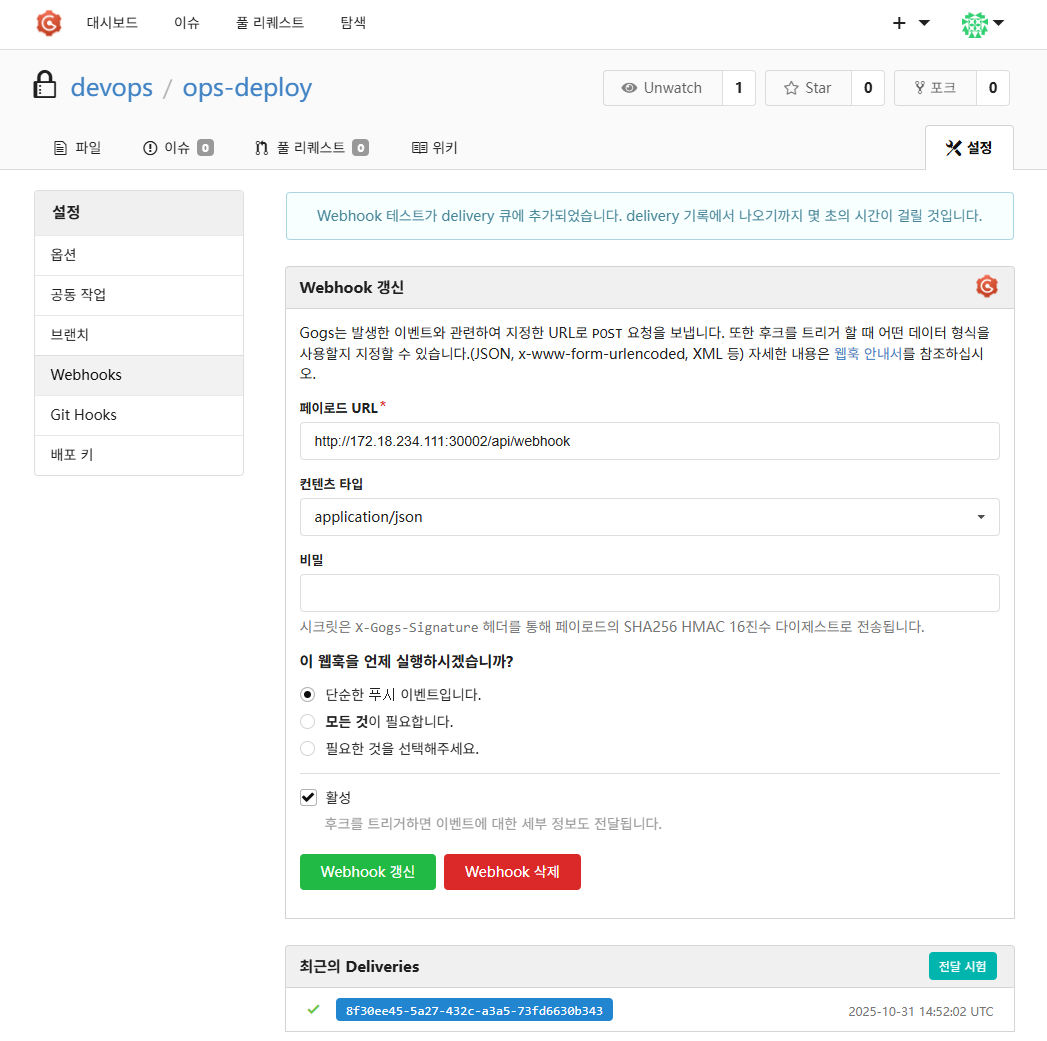
5️⃣ Repo(ops-deploy) 에 Webhook 를 통해 Argo CD 에 즉시 반영 trigger하여 k8s 배포 할 수 있게 설정
- Repo(ops-deploy) 에 webhooks 설정 : 이후 생성된 webhook 클릭 후 Test Delivery 클릭 후 정상 응답 확인
root@DESKTOP-72C919S:~/cicd-labs/ops-deploy# cat <<EOF | kubectl apply -f -
apiVersion: argoproj.io/v1alpha1
kind: Application
metadata:
  name: dev-nginx
  namespace: argocd
  finalizers:
  - resources-finalizer.argocd.argoproj.io
spec:
  project: default
  source:
    helm:
      valueFiles:
      - values-dev.yaml
    path: nginx-chart
    repoURL: http://$MyIP:3000/devops/ops-deploy
    targetRevision: HEAD
  syncPolicy:
    automated:
      prune: true
    syncOptions:
    - CreateNamespace=true
  destination:
    namespace: dev-nginx
    server: https://kubernetes.default.svc
EOF
Warning: metadata.finalizers: "resources-finalizer.argocd.argoproj.io": prefer a domain-qualified finalizer name including a path (/) to avoid accidental conflicts with other finalizer writers
application.argoproj.io/dev-nginx created
- Git(Gogs) 수정 후 ArgoCD 즉시 반영 확인
root@DESKTOP-72C919S:~/cicd-labs/ops-deploy/nginx-chart# sed -i "s|replicaCount: 1|replicaCount: 2|g" va
lues-dev.yaml

root@DESKTOP-72C919S:~/cicd-labs/ops-deploy/nginx-chart# git status
On branch main
Your branch is up to date with 'origin/main'.

Changes not staged for commit:
  (use "git add <file>..." to update what will be committed)
  (use "git restore <file>..." to discard changes in working directory)
        modified:   values-dev.yaml

no changes added to commit (use "git add" and/or "git commit -a")

root@DESKTOP-72C919S:~/cicd-labs/ops-deploy/nginx-chart# git add values-dev.yaml
root@DESKTOP-72C919S:~/cicd-labs/ops-deploy/nginx-chart# git commit -m "Modify nginx-chart : values-dev.yaml"
[main 55fafde] Modify nginx-chart : values-dev.yaml
 1 file changed, 1 insertion(+), 1 deletion(-)
root@DESKTOP-72C919S:~/cicd-labs/ops-deploy/nginx-chart# git push -u origin main
Enumerating objects: 7, done.
Counting objects: 100% (7/7), done.
Delta compression using up to 12 threads
Compressing objects: 100% (3/3), done.
Writing objects: 100% (4/4), 348 bytes | 348.00 KiB/s, done.
Total 4 (delta 2), reused 0 (delta 0), pack-reused 0
To http://172.18.234.111:3000/devops/ops-deploy.git
   a7a6884..55fafde  main -> main
branch 'main' set up to track 'origin/main'.
- Argo CD Application 삭제
root@DESKTOP-72C919S:~/cicd-labs/ops-deploy/nginx-chart# kubectl delete applications -n argocd dev-nginx
application.argoproj.io "dev-nginx" deleted from argocd namespace
'CICD Study [1기]' 카테고리의 다른 글
| Argo CD in Practice – 1) GitOps와 쿠버네티스 (0) | 2025.10.19 |
|---|---|
| Jenkins + ArgoCD : Jenkins CI + Argo CD + K8S(Kind) (0) | 2025.10.19 |
| Jenkins + ArgoCD : Jenkins CD by K8S(Kind) (0) | 2025.10.19 |
| Jenkins + ArgoCD : Jenkins CI + K8S(Kind) (0) | 2025.10.19 |
| Jenkins + ArgoCD : 실습 환경 구성 (0) | 2025.10.19 |
Comments