
Ssoon
Argo Rollouts 설치 및 Sample 테스트 본문
🏛️ Argo Rollouts 설치
- 네임스페이스 생성 및 파라미터 파일 작성
(⎈|kind-myk8s:N/A) ssoon@DESKTOP-72C919S:~$ kubectl create ns argo-rollouts
cat <<EOT > argorollouts-values.yaml
dashboard:
  enabled: true
  service:
    type: NodePort
    nodePort: 30003
EOT
namespace/argo-rollouts created- 설치
(⎈|kind-myk8s:N/A) ssoon@DESKTOP-72C919S:~$ helm install argo-rollouts argo/argo-rollouts --version 2.40.5 -f argorollouts-values.yaml --namespace argo-rollouts
NAME: argo-rollouts
LAST DEPLOYED: Wed Nov 12 20:39:19 2025
NAMESPACE: argo-rollouts
STATUS: deployed
REVISION: 1
TEST SUITE: None

(⎈|kind-myk8s:N/A) ssoon@DESKTOP-72C919S:~$ kubectl get all -n argo-rollouts
NAME                                           READY   STATUS    RESTARTS   AGE
pod/argo-rollouts-658dd58fc8-2tkqf             1/1     Running   0          2m34s
pod/argo-rollouts-658dd58fc8-qcg8w             1/1     Running   0          2m34s
pod/argo-rollouts-dashboard-6bc9fff6fc-vsq2n   1/1     Running   0          2m34s

NAME                              TYPE       CLUSTER-IP    EXTERNAL-IP   PORT(S)          AGE
service/argo-rollouts-dashboard   NodePort   10.96.59.74   <none>        3100:30003/TCP   2m34s

NAME                                      READY   UP-TO-DATE   AVAILABLE   AGE
deployment.apps/argo-rollouts             2/2     2            2           2m34s
deployment.apps/argo-rollouts-dashboard   1/1     1            1           2m34s

NAME                                                 DESIRED   CURRENT   READY   AGE
replicaset.apps/argo-rollouts-658dd58fc8             2         2         2       2m34s
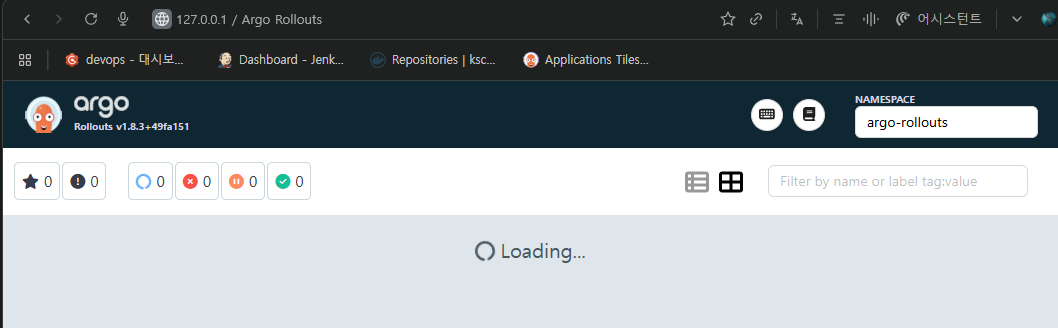
replicaset.apps/argo-rollouts-dashboard-6bc9fff6fc 1 1 1 2m34s- Argo rollouts 대시보드 접속
- Extensions 설정
- extensions.enabled: true → Argo CD 서버에서 외부 확장 기능을 활성화합니다.
- extensionList → 설치할 확장 목록을 정의합니다.
- 여기서는 rollout-extension을 설치하며, 환경 변수 EXTENSION_URL로 tarball 파일 URL을 지정합니다.
- 해당 URL로부터 확장 기능을 다운로드하여 Argo CD에 적용.
cat <<EOF > argocd-values.yaml
global:
  domain: argocd.example.com

certificate:
  enabled: true

server:
  ingress:
    enabled: true
    ingressClassName: nginx
    annotations:
      nginx.ingress.kubernetes.io/force-ssl-redirect: "true"
      nginx.ingress.kubernetes.io/ssl-passthrough: "true"
    tls: true
  extensions:
    enabled: true
    extensionList:
      - name: rollout-extension
        env:
          - name: EXTENSION_URL
            value: https://github.com/argoproj-labs/rollout-extension/releases/download/v0.3.7/extension.tar
EOF- 배포
(⎈|kind-myk8s:N/A) ssoon@DESKTOP-72C919S:~$ helm upgrade -i argocd argo/argo-cd --version 9.0.5 -f argocd-values.yaml --namespace argocd
Release "argocd" has been upgraded. Happy Helming!
NAME: argocd
LAST DEPLOYED: Wed Nov 12 20:54:11 2025
NAMESPACE: argocd
STATUS: deployed
REVISION: 2
TEST SUITE: None
NOTES:
In order to access the server UI you have the following options:

1. kubectl port-forward service/argocd-server -n argocd 8080:443

    and then open the browser on http://localhost:8080 and accept the certificate

2. enable ingress in the values file `server.ingress.enabled` and either
      - Add the annotation for ssl passthrough: https://argo-cd.readthedocs.io/en/stable/operator-manual/ingress/#option-1-ssl-passthrough
      - Set the `configs.params."server.insecure"` in the values file and terminate SSL at your ingress: https://argo-cd.readthedocs.io/en/stable/operator-manual/ingress/#option-2-multiple-ingress-objects-and-hosts


After reaching the UI the first time you can login with username: admin and the random password generated during the installation. You can find the password by running:

kubectl -n argocd get secret argocd-initial-admin-secret -o jsonpath="{.data.password}" | base64 -d

(You should delete the initial secret afterwards as suggested by the Getting Started Guide: https://argo-cd.readthedocs.io/en/stable/getting_started/#4-login-using-the-cli)- initContainer 환경변수 EXTENSION_URL에 설치할 extension을 명시
(⎈|kind-myk8s:N/A) ssoon@DESKTOP-72C919S:~$ k describe deploy -n argocd argocd-server
...
  Init Containers:
   rollout-extension:
    Image:           quay.io/argoprojlabs/argocd-extension-installer:v0.0.8
    Port:            <none>
    Host Port:       <none>
    SeccompProfile:  RuntimeDefault
    Environment:
      EXTENSION_URL:  https://github.com/argoproj-labs/rollout-extension/releases/download/v0.3.7/extension.tar
    Mounts:
      /tmp from tmp (rw)
      /tmp/extensions/ from extensions (rw)
🏛️ 롤아웃 배포
- argo-rollouts 디렉토리 생성 및 이동
- Argo Rollouts 예제 리소스 다운로드
(⎈|kind-myk8s:N/A) ssoon@DESKTOP-72C919S:~/my-sample-app$ mkdir argo-rollouts && cd argo-rollouts
(⎈|kind-myk8s:N/A) ssoon@DESKTOP-72C919S:~/my-sample-app/argo-rollouts$ wget https://raw.githubusercontent.com/argoproj/argo-rollouts/master/docs/getting-started/basic/rollout.yaml
--2025-11-12 21:04:35--  https://raw.githubusercontent.com/argoproj/argo-rollouts/master/docs/getting-started/basic/rollout.yaml
Resolving raw.githubusercontent.com (raw.githubusercontent.com)... 185.199.109.133, 185.199.108.133, 185.199.111.133, ...
Connecting to raw.githubusercontent.com (raw.githubusercontent.com)|185.199.109.133|:443... connected.
HTTP request sent, awaiting response... 200 OK
Length: 752 [text/plain]
Saving to: ‘rollout.yaml’

rollout.yaml                 100%[==============================================>]     752  --.-KB/s    in 0s

2025-11-12 21:04:35 (41.8 MB/s) - ‘rollout.yaml’ saved [752/752]

(⎈|kind-myk8s:N/A) ssoon@DESKTOP-72C919S:~/my-sample-app/argo-rollouts$ wget https://raw.githubusercontent.com/argoproj/argo-rollouts/master/docs/getting-started/basic/service.yaml
--2025-11-12 21:04:43--  https://raw.githubusercontent.com/argoproj/argo-rollouts/master/docs/getting-started/basic/service.yaml
Resolving raw.githubusercontent.com (raw.githubusercontent.com)... 185.199.110.133, 185.199.109.133, 185.199.108.133, ...
Connecting to raw.githubusercontent.com (raw.githubusercontent.com)|185.199.110.133|:443... connected.
HTTP request sent, awaiting response... 200 OK
Length: 178 [text/plain]
Saving to: ‘service.yaml’

service.yaml                 100%[==============================================>]     178  --.-KB/s    in 0s

2025-11-12 21:04:43 (13.4 MB/s) - ‘service.yaml’ saved [178/178]- rollout.yaml
🔹 배포 전략(strategy)
- Canary 전략: 새로운 버전을 점진적으로 배포하여 안정성을 확보합니다.
- steps: 각 단계별 트래픽 배분과 대기 시간을 정의
- setWeight: 20 → 전체 트래픽의 20%를 새 버전에 전달
- pause: {} → 다음 단계 진행 전 일시정지 (사용자 확인 또는 모니터링)
- pause: {duration: 10} → 10초 동안 일시정지
- 이 과정을 반복하여 최종적으로 100% 트래픽을 새 버전으로 전환 가능
🔹 리비전 관리
- 이전 배포 버전을 몇 개까지 저장할지 지정.
- 롤백 시 유용하며, 여기서는 최대 2개 버전 유지.
🔹 Selector
- Rollout이 관리할 Pod를 라벨 기반으로 선택합니다.
(⎈|kind-myk8s:N/A) ssoon@DESKTOP-72C919S:~/argo-rollouts$ cat rollout.yaml
apiVersion: argoproj.io/v1alpha1
kind: Rollout
metadata:
  name: rollouts-demo
spec:
  replicas: 5
  strategy:
    canary:
      steps:
      - setWeight: 20
      - pause: {}
      - setWeight: 40
      - pause: {duration: 10}
      - setWeight: 60
      - pause: {duration: 10}
      - setWeight: 80
      - pause: {duration: 10}
  revisionHistoryLimit: 2
  selector:
    matchLabels:
      app: rollouts-demo
  template:
    metadata:
      labels:
        app: rollouts-demo
    spec:
      containers:
      - name: rollouts-demo
        image: argoproj/rollouts-demo:blue
        ports:
        - name: http
          containerPort: 8080
          protocol: TCP
        resources:
          requests:
            memory: 32Mi
cpu: 5m- argo-rollouts 예제 YAML 파일이 GitHub 저장소 kschoi728/my-sample-app에 정상적으로 업로드
(⎈|kind-myk8s:N/A) ssoon@DESKTOP-72C919S:~/my-sample-app/argo-rollouts$ git add .
(⎈|kind-myk8s:N/A) ssoon@DESKTOP-72C919S:~/my-sample-app/argo-rollouts$ git commit -m "Add sample yaml"
[main 7106813] Add sample yaml
 2 files changed, 49 insertions(+)
 create mode 100644 argo-rollouts/rollout.yaml
 create mode 100644 argo-rollouts/service.yaml
(⎈|kind-myk8s:N/A) ssoon@DESKTOP-72C919S:~/my-sample-app/argo-rollouts$ git push -u origin main
Enumerating objects: 6, done.
Counting objects: 100% (6/6), done.
Delta compression using up to 12 threads
Compressing objects: 100% (5/5), done.
Writing objects: 100% (5/5), 866 bytes | 866.00 KiB/s, done.
Total 5 (delta 0), reused 0 (delta 0), pack-reused 0
To github.com:kschoi728/my-sample-app.git
   401b8df..7106813  main -> main
branch 'main' set up to track 'origin/main'.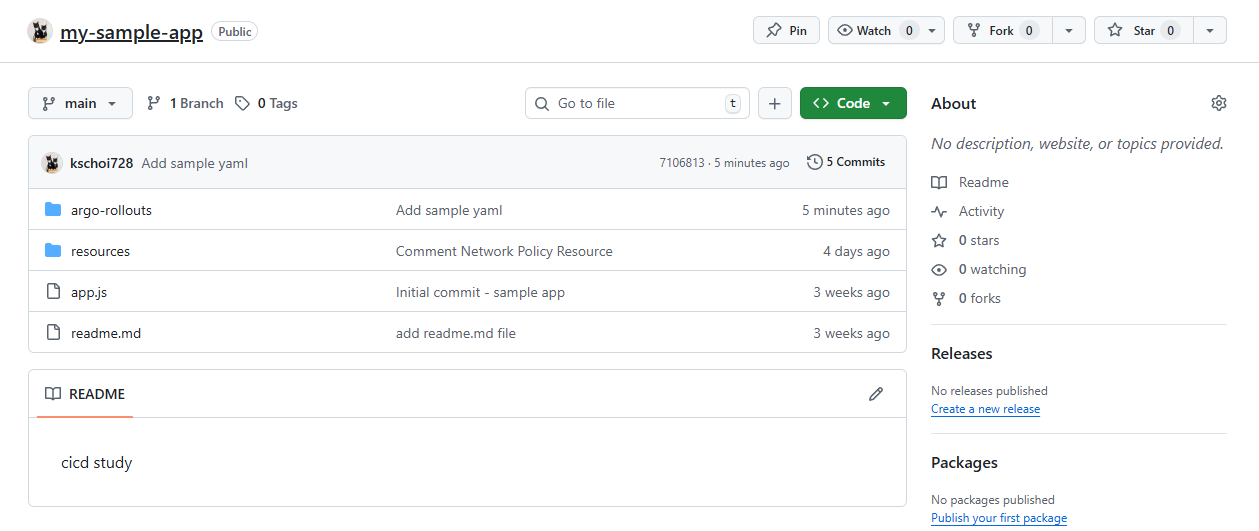


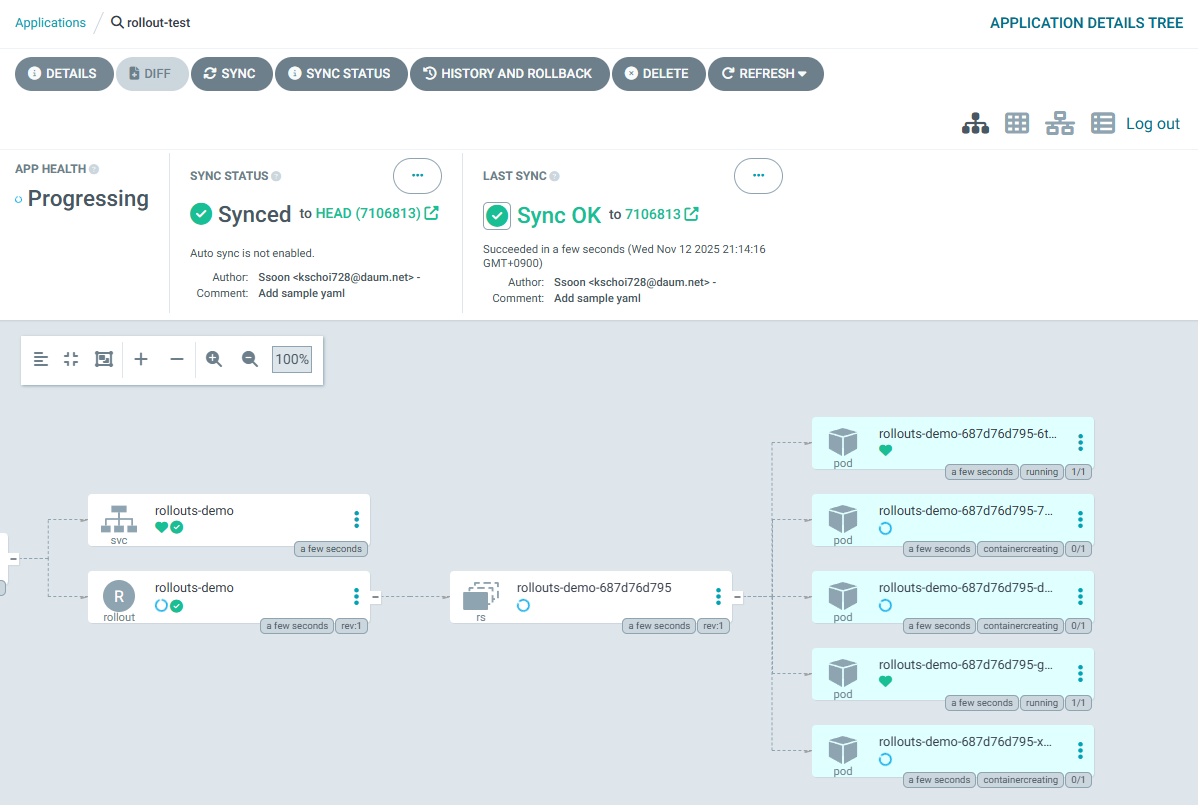
- rollout-demo 클릭

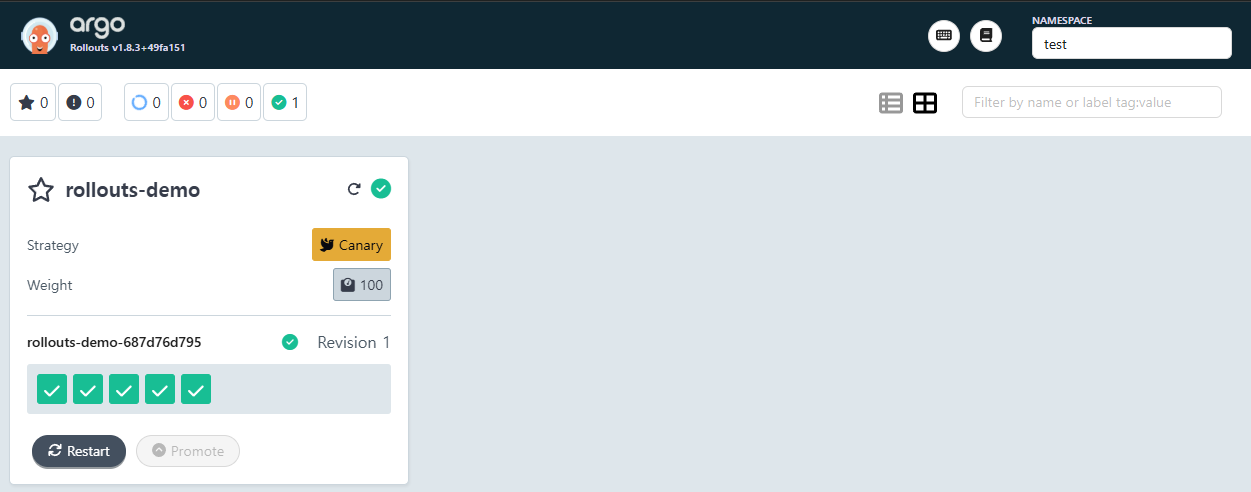
- 롤아웃 업데이트
(⎈|kind-myk8s:N/A) ssoon@DESKTOP-72C919S:~$ kubectl edit rollouts rollouts-demo -n test
rollout.argoproj.io/rollouts-demo edited


    spec:
      containers:
      - image: argoproj/rollouts-demo:yellow
        name: rollouts-demo
        ports:
        - containerPort: 8080
          name: http
          protocol: TCP
        resources:
          requests:
            cpu: 5m
            memory: 32Mi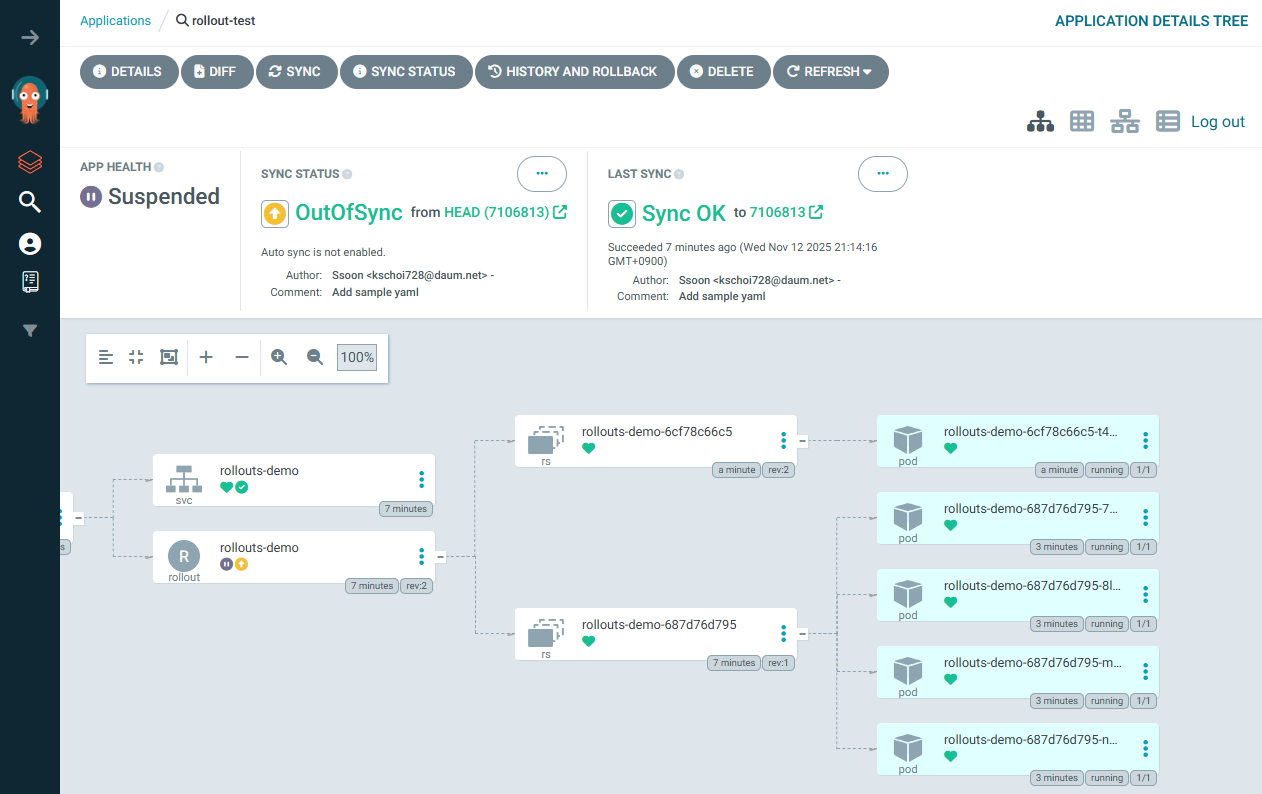
- setWeight: 20
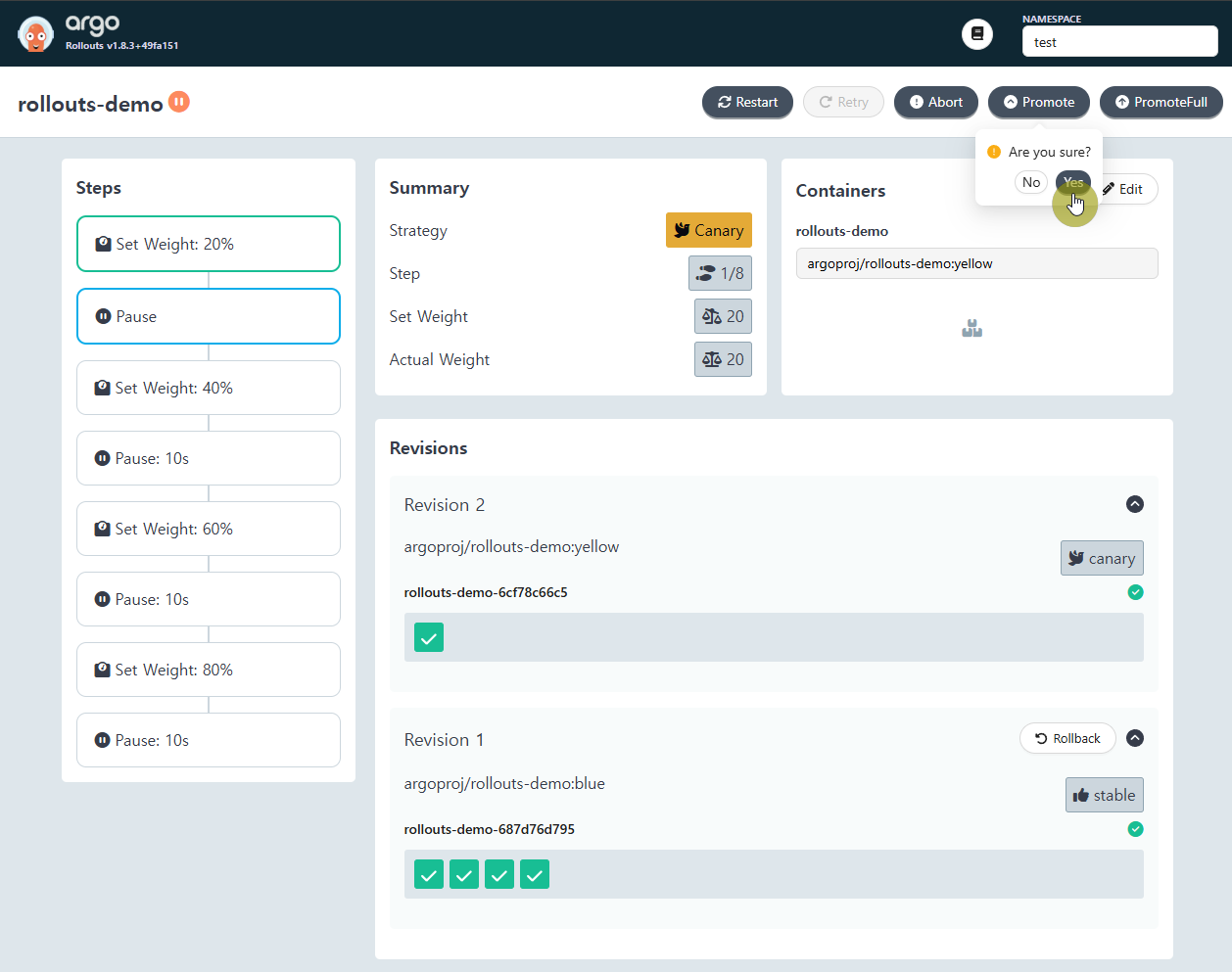
- setWeight: 40

- setWeight: 60

- setWeight: 80


'CICD Study [1기]' 카테고리의 다른 글
| Argo CD - ApplicationSet (0) | 2025.11.20 |
|---|---|
| Argo CD - Cluster Management (0) | 2025.11.20 |
| Argo Rollouts - HPA & VPA (0) | 2025.10.19 |
| Argo Rollouts - 배포 전략 (0) | 2025.10.19 |
| Argo Rollouts - Architecture (0) | 2025.10.19 |
Comments