
Ssoon
HashiCorp Vault - Vault on Kubernets 설치 본문
📦 Vault on Kubernetes — 설치 방식 개요
- Vault를 Kubernetes에서 운영하려면, 공식으로 제공되는 Helm 차트를 사용하는 것이 권장됩니다.
- Helm 차트는 단순 테스트용 단일 Vault 인스턴스부터, 파일 스토리지 혹은 HA(고가용성) 구성, 외부 스토리지 백엔드와의 연동까지 다양한 설정을 지원합니다.
- 또한 Vault를 Kubernetes 워크로드와 통합하기 위한 방법으로는 주로 다음 세 가지가 사용됩니다.
- Sidecar 방식: Vault Agent Injector
- CSI 방식: Vault CSI Provider
- CRD 기반 방식: Vault Secrets Operator
🧩 방법 A — Vault Agent Injector (Sidecar 방식)
- Vault Agent Injector는 Pod이 생성될 때 Mutating Webhook이 동작해, 해당 Pod 사양(spec)에 Vault Agent 컨테이너를 사이드카로 자동 추가합니다.
- 이 Sidecar 컨테이너가 Vault에 인증하고 secrets을 조회한 후, Pod 내 shared 메모리 볼륨(tmpfs)에 렌더링(rending)합니다. 애플리케이션 컨테이너는 Vault를 의식하지 않고도 해당 볼륨에서 secrets을 읽으면 됩니다.
- 이 방식의 장점:
- 애플리케이션 코드를 변경할 필요 없음
- Vault-native authentication (예: Kubernetes auth method) 사용 가능
- Secret renewal, rotation, 캐시, templating 등 Vault Agent의 기능 사용 가능
"Vault Agent Injector는 sidecar 패턴으로 Pod에 자동으로 Vault Agent를 주입하여, 애플리케이션이 Vault를 인지하지 않아도 secrets을 사용할 수 있게 한다."
📁 방법 B — Vault CSI Provider 방식
- Vault CSI Provider는 Kubernetes의 CSI(Secrets Store CSI Driver)를 통해 Pod에 secrets을 마운트하는 방식입니다. Vault → CSI → Pod 볼륨이라는 흐름입니다.
- 이를 위해 클러스터에 CSI driver를 설치하고, SecretProviderClass 리소스를 정의한 뒤, Pod spec에 volume으로 추가합니다.
- 이 방식은 Pod 재시작 시 secrets이 업데이트된 값으로 리프레시되지만, 자동 renewal/rotation이나 templating 기능은 Sidecar 방식에 비해 제약이 있을 수 있습니다.
"Vault CSI Provider는 Pod의 volume으로 Vault secrets을 마운트하므로, 애플리케이션은 파일 기반으로 secrets에 접근할 수 있다."
🔄 방법 C — Vault Secrets Operator (CRD 기반)
- Vault Secrets Operator는 CRD(Custom Resource Definition)을 사용해 Kubernetes-native한 방식으로 Vault 시크릿과 Kubernetes Secret을 동기화(sync)합니다.
- 이 방식은 Vault 쪽 secrets lifecycle(dynamic/static/PKI), rotation, 업데이트 등을 Kubernetes 리소스 변경으로 자동 반영할 수 있도록 설계된 방법입니다.
- 다만, 공식적으로는 Sidecar 방식이나 CSI 방식보다 도입이 덜 일반적이며, 일부 기능은 제한되거나 베타 상태일 수 있습니다.
"Vault Secrets Operator는 CRD 기반으로 Kubernetes 클러스터 내에서 Vault 시크릿을 Kubernetes 네이티브하게 동기화하고 관리하게 해준다."
✅ 실습 환경 구성
- Kind K8s 배포
(⎈|N/A:N/A) ssoon@DESKTOP-72C919S:~$ kind create cluster --name myk8s --image kindest/node:v1.32.8 --config - <<EOF
kind: Cluster
apiVersion: kind.x-k8s.io/v1alpha4
nodes:
- role: control-plane
  extraPortMappings:
  - containerPort: 30000 # Vault UI
    hostPort: 30000
  - containerPort: 30001 # Jenkins UI
    hostPort: 30001
  - containerPort: 30002 # DB 배포(PostgreSQL 또는 MySQL)
    hostPort: 30002
  - containerPort: 30003 # # Sample App
    hostPort: 30003
EOF
Creating cluster "myk8s" ...
 ✓ Ensuring node image (kindest/node:v1.32.8) 🖼
 ✓ Preparing nodes 📦
 ✓ Writing configuration 📜
 ✓ Starting control-plane 🕹️
 ✓ Installing CNI 🔌
 ✓ Installing StorageClass 💾
Set kubectl context to "kind-myk8s"
You can now use your cluster with:

kubectl cluster-info --context kind-myk8s

Thanks for using kind! 😊
(⎈|kind-myk8s:N/A) ssoon@DESKTOP-72C919S:~$ kubectl get node
NAME                  STATUS     ROLES           AGE   VERSION
myk8s-control-plane   NotReady   control-plane   16s   v1.32.8
✅ Helm 을 사용한 Vault 배포
- 네임스페이스 생성 및 Helm Repo 추가
- kubectl create namespace vault
- Kubernetes에서 vault라는 새 네임스페이스를 생성합니다.
- 네임스페이스는 리소스를 논리적으로 구분하는 공간입니다.
- 결과: vault 네임스페이스가 생겼지만 아직 리소스는 없음.
- kubectl get all --namespace vault
- vault 네임스페이스 안의 모든 리소스를 조회합니다.
- 결과: "No resources found" → 아직 아무 것도 배포되지 않았다는 뜻.
- helm repo add hashicorp https://helm.releases.hashicorp.com
- Helm에 HashiCorp의 공식 차트 저장소를 추가합니다.
- Helm은 Kubernetes 애플리케이션을 쉽게 배포하는 패키지 매니저입니다.
- helm search repo hashicorp/vault
- Helm 저장소에서 vault 관련 차트를 검색합니다.
- hashicorp/vault: Vault 서버를 설치하는 공식 차트.
- hashicorp/vault-secrets-gateway: Vault와 Kubernetes 간 비밀 전달을 위한 게이트웨이.
- hashicorp/vault-secrets-operator: Kubernetes에서 Vault 비밀을 관리하는 오퍼레이터.
- Helm 저장소에서 vault 관련 차트를 검색합니다.
- kubectl create namespace vault
(⎈|kind-myk8s:N/A) ssoon@DESKTOP-72C919S:~$ kubectl create namespace vault
namespace/vault created
(⎈|kind-myk8s:N/A) ssoon@DESKTOP-72C919S:~$ kubectl get all --namespace vault
No resources found in vault namespace.
(⎈|kind-myk8s:N/A) ssoon@DESKTOP-72C919S:~$ helm repo add hashicorp https://helm.releases.hashicorp.com
"hashicorp" has been added to your repositories
(⎈|kind-myk8s:N/A) ssoon@DESKTOP-72C919S:~$ helm search repo hashicorp/vault
NAME                                    CHART VERSION   APP VERSION     DESCRIPTION
hashicorp/vault                         0.31.0          1.20.4          Official HashiCorp Vault Chart
hashicorp/vault-secrets-gateway         0.0.2           0.1.0           A Helm chart for Kubernetes
hashicorp/vault-secrets-operator 1.0.1 1.0.1 Official Vault Secrets Operator Chart- Helm Chart 설정 Values 설정 및 배포
- Helm으로 vault 차트를 Dev 모드로 설치했습니다.
- tlsDisable: true → TLS(HTTPS) 끄고 HTTP로 접근합니다.
- server.dev.enabled: true → 메모리 저장, 루트 토큰 고정(root).
- UI 활성화 및 NodePort 30000으로 노출.
- 리소스
- 서비스
- service/vault: NodePort 30000 → Vault UI/HTTP(8200)로 외부 접근 가능.
- service/vault-internal: Headless(클러스터 내부용)
- service/vault-agent-injector-svc: Injector(Webhook)용 ClusterIP
- 서비스
- Helm으로 vault 차트를 Dev 모드로 설치했습니다.
(⎈|kind-myk8s:N/A) ssoon@DESKTOP-72C919S:~$ cat <<EOF > vault-values-dev.yaml
global:
  enabled: true
  tlsDisable: true

injector:
  enabled: true
  # Sidecar Injection을 위해 필요한 설정

server:
  dev:
    enabled: true
    devRootToken: "root" # 학습 편의를 위해 Root Token을 'root'로 고정

  # 데이터 영구 저장이 필요 없으므로 비활성화 (Dev모드는 메모리 사용)
  dataStorage:
    enabled: false

  # UI 활성화 및 NodePort 노출
  service:
    type: "NodePort"
    nodePort: 30000

  ui:
    enabled: true
EOF

(⎈|kind-myk8s:N/A) ssoon@DESKTOP-72C919S:~$ helm upgrade vault hashicorp/vault -n vault -f vault-values-dev.yaml --install
Release "vault" does not exist. Installing it now.
NAME: vault
LAST DEPLOYED: Sat Nov 29 20:47:48 2025
NAMESPACE: vault
STATUS: deployed
REVISION: 1
NOTES:
Thank you for installing HashiCorp Vault!

Now that you have deployed Vault, you should look over the docs on using
Vault with Kubernetes available here:

https://developer.hashicorp.com/vault/docs


Your release is named vault. To learn more about the release, try:

  $ helm status vault
  $ helm get manifest vault
(⎈|kind-myk8s:N/A) ssoon@DESKTOP-72C919S:~$ kubens vault
✔ Active namespace is "vault"
(⎈|kind-myk8s:vault) ssoon@DESKTOP-72C919S:~$ k get pods,svc,pvc
NAME                                        READY   STATUS              RESTARTS   AGE
pod/vault-0                                 0/1     ContainerCreating   0          12s
pod/vault-agent-injector-556c5dd8fb-dx5ct   0/1     Running             0          12s

NAME                               TYPE        CLUSTER-IP     EXTERNAL-IP   PORT(S)                         AGE
service/vault                      NodePort    10.96.72.232   <none>        8200:30000/TCP,8201:30443/TCP   12s
service/vault-agent-injector-svc   ClusterIP   10.96.95.221   <none>        443/TCP                         12s
service/vault-internal             ClusterIP   None           <none>        8200/TCP,8201/TCP               12s
✅ Vault 초기화 및 잠금해제
- Vault가 정상적으로 초기화되고 Dev 모드로 실행 중
- Seal Type: shamir → 기본 Shamir 키 분할 방식 사용.
- Initialized: true → Vault 초기화 완료.
- Sealed: false → Vault가 언실 상태(사용 가능).
- Storage Type: inmem → 메모리 기반 저장소 (Dev 모드 특징).
- HA Enabled: false → 고가용성 비활성화 (단일 노드 Dev 모드).
- Version: 1.20.4 → 최신 버전 정상 실행.
(⎈|kind-myk8s:vault) ssoon@DESKTOP-72C919S:~$ kubectl exec -ti vault-0 -- vault status
Key             Value
---             -----
Seal Type       shamir
Initialized     true
Sealed          false
Total Shares    1
Threshold       1
Version         1.20.4
Build Date      2025-09-23T13:22:38Z
Storage Type    inmem
Cluster Name    vault-cluster-b3ed10e3
Cluster ID      115af5f7-be8f-9a15-444c-bd004c076a9c
HA Enabled      false
✅ CLI 설정
- HashiCorp Vault CLI 설치
- HashiCorp 공식 APT 리포지토리를 추가하고 vault 패키지를 설치했습니다.
- 설치된 버전: Vault v1.21.1 (CLI용)
- Vault CLI 환경 설정
- VAULT_ADDR를 Kubernetes에서 실행 중인 Vault 서비스(NodePort)로 지정:
export VAULT_ADDR='http://172.18.234.111:30000' - Dev 모드에서 설정한 루트 토큰(root)으로 로그인:
vault login - 로그인 성공 → CLI에서 Vault 명령어 사용 가능.
- VAULT_ADDR를 Kubernetes에서 실행 중인 Vault 서비스(NodePort)로 지정:
- Vault 상태 확인
- vault status 결과:
- Initialized: true, Sealed: false → 정상 작동.
- Storage Type: inmem → Dev 모드.
- HA Enabled: false → 단일 노드.
- vault status 결과:
(⎈|kind-myk8s:vault) ssoon@DESKTOP-72C919S:~$ sudo apt-get update
[sudo] password for ssoon:
Hit:1 https://download.docker.com/linux/ubuntu noble InRelease
Hit:2 http://security.ubuntu.com/ubuntu noble-security InRelease
Hit:3 http://archive.ubuntu.com/ubuntu noble InRelease
Get:4 http://archive.ubuntu.com/ubuntu noble-updates InRelease [126 kB]
Hit:5 https://ppa.launchpadcontent.net/cncf-buildpacks/pack-cli/ubuntu noble InRelease
Hit:6 http://archive.ubuntu.com/ubuntu noble-backports InRelease
Fetched 126 kB in 3s (47.0 kB/s)
Reading package lists... Done

(⎈|kind-myk8s:vault) ssoon@DESKTOP-72C919S:~$ sudo apt-get install -y gpg curl lsb-release
Reading package lists... Done
Building dependency tree... Done
Reading state information... Done
gpg is already the newest version (2.4.4-2ubuntu17.3).
gpg set to manually installed.
curl is already the newest version (8.5.0-2ubuntu10.6).
lsb-release is already the newest version (12.0-2).
lsb-release set to manually installed.
0 upgraded, 0 newly installed, 0 to remove and 124 not upgraded.

(⎈|kind-myk8s:vault) ssoon@DESKTOP-72C919S:~$ curl -fsSL https://apt.releases.hashicorp.com/gpg \
  | sudo gpg --dearmor -o /usr/share/keyrings/hashicorp-archive-keyring.gpg

(⎈|kind-myk8s:vault) ssoon@DESKTOP-72C919S:~$ echo "deb [signed-by=/usr/share/keyrings/hashicorp-archive-keyring.gpg] \
https://apt.releases.hashicorp.com $(lsb_release -cs) main" \
  | sudo tee /etc/apt/sources.list.d/hashicorp.list
deb [signed-by=/usr/share/keyrings/hashicorp-archive-keyring.gpg] https://apt.releases.hashicorp.com noble main

(⎈|kind-myk8s:vault) ssoon@DESKTOP-72C919S:~$ sudo apt-get update
Get:1 https://apt.releases.hashicorp.com noble InRelease [12.9 kB]
Hit:2 https://download.docker.com/linux/ubuntu noble InRelease
Hit:3 http://archive.ubuntu.com/ubuntu noble InRelease
Get:4 https://apt.releases.hashicorp.com noble/main amd64 Packages [211 kB]
Hit:5 http://archive.ubuntu.com/ubuntu noble-updates InRelease
Hit:6 http://security.ubuntu.com/ubuntu noble-security InRelease
Hit:7 http://archive.ubuntu.com/ubuntu noble-backports InRelease
Hit:8 https://ppa.launchpadcontent.net/cncf-buildpacks/pack-cli/ubuntu noble InRelease
Fetched 224 kB in 2s (121 kB/s)
Reading package lists... Done

(⎈|kind-myk8s:vault) ssoon@DESKTOP-72C919S:~$ sudo apt-get install -y vault
Reading package lists... Done
Building dependency tree... Done
Reading state information... Done
The following NEW packages will be installed:
  vault
0 upgraded, 1 newly installed, 0 to remove and 124 not upgraded.
Need to get 169 MB of archives.
After this operation, 512 MB of additional disk space will be used.
Get:1 https://apt.releases.hashicorp.com noble/main amd64 vault amd64 1.21.1-1 [169 MB]
Fetched 169 MB in 3s (51.2 MB/s)
Selecting previously unselected package vault.
(Reading database ... 61188 files and directories currently installed.)
Preparing to unpack .../vault_1.21.1-1_amd64.deb ...
Unpacking vault (1.21.1-1) ...
Setting up vault (1.21.1-1) ...
Generating Vault TLS key and self-signed certificate...
...+.............+..+...+...+....+..+.........+.+......+.....+++++++++++++++++++++++++++++++++++++++++++++++++++++++++++++++++*...+..+...+....+...............+.....+.+............+..+.+.....+++++++++++++++++++++++++++++++++++++++++++++++++++++++++++++++++*...+........+...........................+...+...+....+...+..............+...+...+.......+...........+............+...+.......+..+.+......+...+........+.............+..+.........+.+..+.......+........+......+.+......+........+.......+........+..........+..+............+...+...+.+........................+..............+...............+......+.......+............+...+.................+.+.....+....+............+...+..+.+.......................+......+.+............+........+...........................+.+.....+.......+.....+.........+.+...............+........+....+..+...+......+.....................+......+.......+......+......+......+...+...........+.....................+.........+.........+++++++++++++++++++++++++++++++++++++++++++++++++++++++++++++++++
...+.....+...+....+++++++++++++++++++++++++++++++++++++++++++++++++++++++++++++++++*...+....+...+..+.......+++++++++++++++++++++++++++++++++++++++++++++++++++++++++++++++++*...+.......+......+.....+...+....+..................+.....+....+...+.....+...+....+.........+..+.......+..+...+..................+.......+.....+..............................+...............+.......+......+...+.........+......+............+...+..+.........+.+........+.+...+........+...+......+...+...+.............+.....+....+...+........+...............+.......+...+......+......+..+...+.......+..+.+........................+........+.+..+..........+.........+.......................+......+............+...+.+.........+............+............+++++++++++++++++++++++++++++++++++++++++++++++++++++++++++++++++
-----
Vault TLS key and self-signed certificate have been generated in '/opt/vault/tls'.

(⎈|kind-myk8s:vault) ssoon@DESKTOP-72C919S:~$ vault --version
Vault v1.21.1 (2453aac2638a6ae243341b4e0657fd8aea1cbf18), built 2025-11-18T13:04:32Z

(⎈|kind-myk8s:vault) ssoon@DESKTOP-72C919S:~$ export VAULT_ADDR='http://172.18.234.111:30000'

(⎈|kind-myk8s:vault) ssoon@DESKTOP-72C919S:~$ vault status
Key             Value
---             -----
Seal Type       shamir
Initialized     true
Sealed          false
Total Shares    1
Threshold       1
Version         1.20.4
Build Date      2025-09-23T13:22:38Z
Storage Type    inmem
Cluster Name    vault-cluster-b3ed10e3
Cluster ID      115af5f7-be8f-9a15-444c-bd004c076a9c
HA Enabled      false

(⎈|kind-myk8s:vault) ssoon@DESKTOP-72C919S:~$ vault login
Token (will be hidden):
Success! You are now authenticated. The token information displayed below
is already stored in the token helper. You do NOT need to run "vault login"
again. Future Vault requests will automatically use this token.

Key                  Value
---                  -----
token                root
token_accessor       7w3BtDaXiUxNv1dn135qeAWG
token_duration       ∞
token_renewable      false
token_policies       ["root"]
identity_policies    []
policies             ["root"]


✅ KV 엔진 활성화 및 샘플 데이터 추가
- vault secrets list 결과:
- secret/ → KV(Key/Value) 시크릿 엔진 활성화됨.
- vault kv put → secret/sampleapp/config 경로에 username과 password 저장 성공.
- vault kv get → 저장된 시크릿 정상 조회.
(⎈|kind-myk8s:vault) ssoon@DESKTOP-72C919S:~$ vault secrets list
Path          Type         Accessor              Description
----          ----         --------              -----------
cubbyhole/    cubbyhole    cubbyhole_649880ef    per-token private secret storage
identity/     identity     identity_6f0e93c1     identity store
secret/       kv           kv_cc436ec6           key/value secret storage
sys/          system       system_4a77190f       system endpoints used for control, policy and debugging
(⎈|kind-myk8s:vault) ssoon@DESKTOP-72C919S:~$ vault kv put secret/sampleapp/config \
  username="demo" \
  password="p@ssw0rd"
======== Secret Path ========
secret/data/sampleapp/config

======= Metadata =======
Key                Value
---                -----
created_time       2025-11-29T12:24:54.213960605Z
custom_metadata    <nil>
deletion_time      n/a
destroyed          false
version            1
(⎈|kind-myk8s:vault) ssoon@DESKTOP-72C919S:~$ vault kv get secret/sampleapp/config
======== Secret Path ========
secret/data/sampleapp/config

======= Metadata =======
Key                Value
---                -----
created_time       2025-11-29T12:24:54.213960605Z
custom_metadata    <nil>
deletion_time      n/a
destroyed          false
version            1

====== Data ======
Key         Value
---         -----
password    p@ssw0rd
username    demo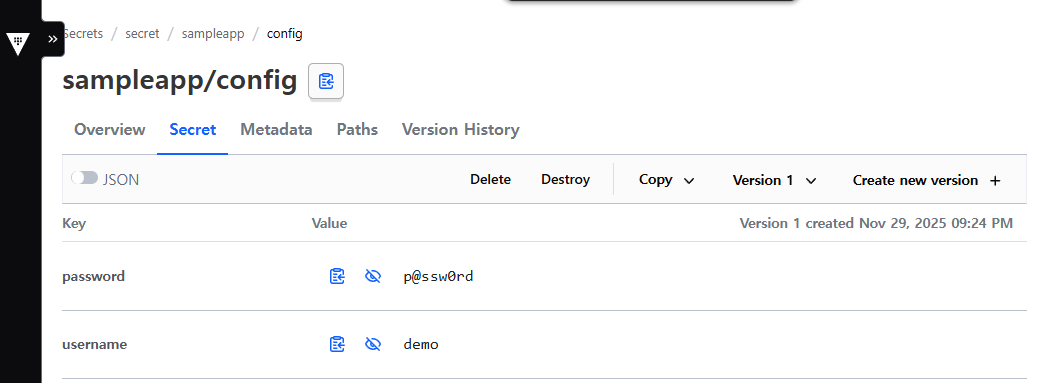
'CICD Study [1기]' 카테고리의 다른 글
| HashiCorp Vault - Jenkins + Vault (AppRole) - CI (0) | 2025.11.27 |
|---|---|
| HashiCorp Vault - Vault Agent와 Sidecar 패턴 (0) | 2025.11.27 |
| HashiCorp Vault - Vault 기본 구조와 동작 방식 (0) | 2025.11.27 |
| HashiCorp Vault - Vault 란? (0) | 2025.11.27 |
| Argo CD - OpenLDAP + KeyCloak + Argo CD + Jenkins (0) | 2025.11.20 |
Comments