Ssoon
Cloud Native CI/CD : 6.3 Create a Task to Compile and Package an App from Git 본문
CICD Study [1기]
Cloud Native CI/CD : 6.3 Create a Task to Compile and Package an App from Git
구구달스 2025. 10. 19. 14:55
⚙️ Tekton으로 Git에서 앱 Compile 및 Package 자동화
- GitOps 환경에서 Kubernetes 위에서 Tekton을 활용하여 애플리케이션을 자동으로 컴파일하고 패키징하는 방법을 자세히 알아보겠습니다. 이 과정에서는 Tekton Task를 만들고, TaskRun으로 실행하여 빌드 과정을 자동화합니다.
🛠️ Tekton Task 구조 이해하기
Tekton Task는 연속적인 단계(steps)를 정의하여 작업을 자동화할 수 있는 유연한 메커니즘을 제공합니다. Task는 Pipeline 내에서 재사용 가능한 구성 요소로 활용할 수 있으며, 입력과 출력, 파라미터를 정의하여 동적인 실행이 가능합니다.
Task의 주요 필드
- inputs: Task가 받아들이는 리소스입니다.
- outputs: Task가 생성하는 리소스입니다.
- params: Task 실행 시 사용할 파라미터입니다. 각 파라미터는 이름(name), 설명(description), 기본값(default)을 가집니다.
- results: Task가 실행 결과를 기록할 이름입니다.
- workspaces: Task가 접근할 볼륨 경로를 정의합니다.
- volumes: 외부 볼륨을 마운트할 수 있습니다.
💡 "Task는 입력, 출력, 파라미터, 워크스페이스를 통해 동적이고 재사용 가능한 빌드 과정을 정의할 수 있습니다."
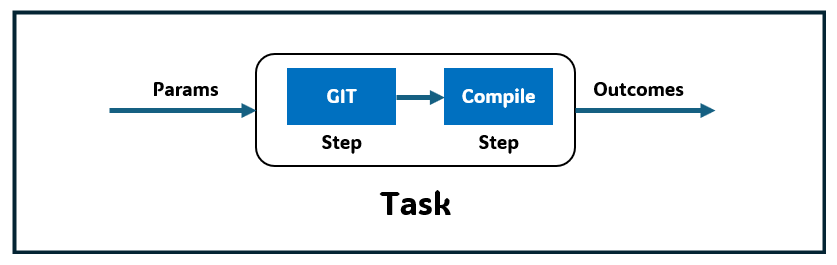
📂 Task 예제
- Tekton Pipelines를 사용하여 git에서 소스 코드를 복제 : Git 저장소에서 소스 코드를 복제하는 작업
- Task에 속한 각 단계 step 와 Task 는 텍톤 워크스페이스 workspace 라 불리는 파일 시스템을 공유할 수 있다.
- 이 공유 파일 시스템은 PVC로 만들어진 파일 시스템이거나 ConfigMap 혹은 emptyDir 불륨을 사용한다.
- Task 는 param 인자를 받을 수 있으며, 그 인자를 통해 실제 작업 내용을 동적으로 결정할 수 있다.
(⎈|kind-myk8s:N/A) ssoon@DESKTOP-72C919S:~$ cat << EOF | kubectl apply -f -
apiVersion: tekton.dev/v1
kind: Pipeline
metadata:
  name: clone-read
spec:
  description: |
    This pipeline clones a git repo, then echoes the README file to the stout.
  params:     # 매개변수 repo-url
  - name: repo-url
    type: string
    description: The git repo URL to clone from.
  workspaces: # 다운로드할 코드를 저장할 공유 볼륨인 작업 공간을 추가
  - name: shared-data
    description: |
      This workspace contains the cloned repo files, so they can be read by the
      next task.
  tasks:      # task 정의
  - name: fetch-source
    taskRef:
      name: git-clone
    workspaces:
    - name: output
      workspace: shared-data
    params:
    - name: url
      value: \$(params.repo-url)
EOF
pipeline.tekton.dev/clone-read created
| apiVersion | Tekton API 버전 명시 | tekton.dev/v1 |
| kind | 리소스 종류 | Pipeline |
| metadata.name | 파이프라인 이름 | clone-read |
| spec.description | 파이프라인 설명 | “Git repo를 클론하고 README 출력” |
| spec.params | 파이프라인 입력 매개변수 정의 | repo-url |
| spec.workspaces | Task 간 공유 데이터 공간 | shared-data |
| spec.tasks | 실제 실행할 작업(Task) 정의 | fetch-source |
| taskRef.name | 참조할 Task 리소스 이름 | git-clone |
| workspaces | Task와 workspace 연결 | output → shared-data |
| params | Task에 전달할 매개변수 값 | url = $(params.repo-url) |
(⎈|kind-myk8s:N/A) ssoon@DESKTOP-72C919S:~$ tkn pipeline list
NAME         AGE             LAST RUN   STARTED   DURATION   STATUS
clone-read   2 minutes ago   ---        ---       ---        ---
(⎈|kind-myk8s:N/A) ssoon@DESKTOP-72C919S:~$ tkn pipeline describe
Name:          clone-read
Namespace:     default
Description:   This pipeline clones a git repo, then echoes the README file to the stout.


⚓ Params

 NAME         TYPE     DESCRIPTION              DEFAULT VALUE
 ∙ repo-url   string   The git repo URL to...   ---

📂 Workspaces

 NAME            DESCRIPTION              OPTIONAL
 ∙ shared-data   This workspace cont...   false

🗒  Tasks

 NAME             TASKREF     RUNAFTER   TIMEOUT   PARAMS
 ∙ fetch-source   git-clone              ---       url: string
(⎈|kind-myk8s:N/A) ssoon@DESKTOP-72C919S:~$ kubectl get pipeline
NAME         AGE
clone-read   2m58s
📦 Workspace와 Parameter 활용
Workspace
- Task 단계와 Pipeline Task가 공유 가능한 파일 시스템입니다.
- PVC(Persistent Volume Claim), ConfigMap, 또는 ephemeral(emptyDir) 볼륨을 활용할 수 있습니다.
Parameters
- Task를 동적으로 실행할 수 있게 해주는 값입니다.
- 예를 들어 contextDir, url, revision, sslVerify 등 다양한 설정을 Task 실행 시 변경 가능합니다.
💡 "Workspace와 Parameter를 사용하면 Task 실행을 유연하게 조정할 수 있습니다."
✅ Task 생성 및 확인
- 파이프라인 실행 : 파이프라인을 인스턴스화하고 실제 값 설정
(⎈|kind-myk8s:N/A) ssoon@DESKTOP-72C919S:~$ cat << EOF | kubectl create -f -
apiVersion: tekton.dev/v1
kind: PipelineRun
metadata:
  generateName: clone-read-run-
spec:
  pipelineRef:
    name: clone-read
  taskRunTemplate:
    podTemplate:
      securityContext:
        fsGroup: 65532
  workspaces: # 작업 공간 인스턴스화, PVC 생성
  - name: shared-data
    volumeClaimTemplate:
      spec:
        accessModes:
        - ReadWriteOnce
        resources:
          requests:
            storage: 1Gi
  params:    # 저장소 URL 매개변수 값 설정
  - name: repo-url
    value: https://github.com/tektoncd/website
EOF
pipelinerun.tekton.dev/clone-read-run-zpqdt created
(⎈|kind-myk8s:N/A) ssoon@DESKTOP-72C919S:~$ kubectl get pipelineruns
NAME                   SUCCEEDED   REASON           STARTTIME   COMPLETIONTIME
clone-read-run-zpqdt   False       CouldntGetTask   16s         16s
(⎈|kind-myk8s:N/A) ssoon@DESKTOP-72C919S:~$ tkn pipelinerun list
NAME                   STARTED          DURATION   STATUS
clone-read-run-zpqdt   23 seconds ago   0s         Failed(CouldntGetTask)
(⎈|kind-myk8s:N/A) ssoon@DESKTOP-72C919S:~$ tkn pipelinerun logs
Pipeline default/clone-read can't be Run; it contains Tasks that don't exist: Couldn't retrieve Task "git-clone": tasks.tekton.dev "git-clone" not found
(⎈|kind-myk8s:N/A) ssoon@DESKTOP-72C919S:~$ kubectl get tasks
NAME    AGE
hello   17m
Tekton Pipeline에서 참조한 git-clone Task가 클러스터에 존재하지 않는다
→ Tekton이 해당 Task 정의를 찾을 수 없어서 파이프라인 실행에 실패한 상태입니다.

- 파이프라인에서 git clone 작업을 사용하려면 먼저 클러스터에 설치 필요 : tacket hub 에서 가져오기
(⎈|kind-myk8s:N/A) ssoon@DESKTOP-72C919S:~$ tkn hub install task git-clone
WARN: This version has been deprecated
Task git-clone(0.9) installed in default namespace- 추가된 task 확인
(⎈|kind-myk8s:N/A) ssoon@DESKTOP-72C919S:~$ kubectl get tasks
NAME        AGE
git-clone   25s
hello       20m
- 파이프라인 재실행
(⎈|kind-myk8s:N/A) ssoon@DESKTOP-72C919S:~$ cat << EOF | kubectl create -f -
apiVersion: tekton.dev/v1
kind: PipelineRun
metadata:
  generateName: clone-read-run-
spec:
  pipelineRef:
    name: clone-read
  taskRunTemplate:
    podTemplate:
      securityContext:
        fsGroup: 65532
  workspaces:
  - name: shared-data
    volumeClaimTemplate:
      spec:
        accessModes:
        - ReadWriteOnce
        resources:
          requests:
            storage: 1Gi
  params:
  - name: repo-url
    value: https://github.com/tektoncd/website
EOF
pipelinerun.tekton.dev/clone-read-run-t9lmt created- 로그를 보면 git-clone Task가 정상적으로 실행되어 Git 저장소를 성공적으로 클론한 것을 확인
(⎈|kind-myk8s:N/A) ssoon@DESKTOP-72C919S:~$ tkn pipelinerun logs clone-read-run-t9lmt -f
...
[fetch-source : clone] + git config --global --add safe.directory /workspace/output
[fetch-source : clone] + /ko-app/git-init '-url=https://github.com/tektoncd/website' '-revision=' '-refspec=' '-path=/workspace/output/' '-sslVerify=true' '-submodules=true' '-depth=1' '-sparseCheckoutDirectories='
[fetch-source : clone] {"level":"info","ts":1761387186.673517,"caller":"git/git.go:176","msg":"Successfully cloned https://github.com/tektoncd/website @ e6d8959b05b8bbd4aa798b28153b25c0f8766dc7 (grafted, HEAD) in path /workspace/output/"}
[fetch-source : clone] {"level":"info","ts":1761387186.7058122,"caller":"git/git.go:215","msg":"Successfully initialized and updated submodules in path /workspace/output/"}
...- 현재 Tekton 파이프라인 실행 결과와 Kubernetes 리소스 상태를 보면 다음과 같은 점들을 확인
(⎈|kind-myk8s:N/A) ssoon@DESKTOP-72C919S:~$ kubectl get pod,pv,pvc
NAME                                        READY   STATUS      RESTARTS      AGE
pod/clone-read-run-t9lmt-fetch-source-pod   0/1     Completed   0             83s

NAME                                                        CAPACITY   ACCESS MODES   RECLAIM POLICY   STATUS   CLAIM                    STORAGECLASS   VOLUMEATTRIBUTESCLASS   REASON   AGE
persistentvolume/pvc-536300bd-513a-42b9-a406-02f9fdeff8e1   1Gi        RWO            Delete           Bound    default/pvc-3ce245656a   standard       <unset>                          77s

NAME                                   STATUS   VOLUME                                     CAPACITY   ACCESS MODES   STORAGECLASS   VOLUMEATTRIBUTESCLASS   AGE
persistentvolumeclaim/pvc-3ce245656a   Bound    pvc-536300bd-513a-42b9-a406-02f9fdeff8e1   1Gi        RWO            standard       <unset>                 83s
📌 핵심 요약
- Tekton Task는 자동화된 빌드/패키징 단계를 정의하는 재사용 가능한 단위입니다.
- Task는 inputs, outputs, params, workspaces, volumes를 지원하여 동적인 빌드 수행이 가능합니다.
- Workspace를 통해 Task 단계 간 파일 시스템을 공유할 수 있습니다.
- TaskRun 객체는 Task 실행의 실제 인스턴스이며, CLI로 실행과 로그 확인이 가능합니다.
- Parameter와 기본값을 활용하면 동적이고 유연한 Task 실행이 가능합니다.
💡 "Tekton Task와 TaskRun을 통해 Git 기반 애플리케이션 빌드와 패키징을 완전히 자동화할 수 있습니다."
'CICD Study [1기]' 카테고리의 다른 글
| Cloud Native CI/CD : 6.5 Containerize an Application Using a Tekton Taskand Buildah (0) | 2025.10.19 |
|---|---|
| Cloud Native CI/CD : 6.4 Create a Task to Compile and Package an App fromPrivate Git (0) | 2025.10.19 |
| Cloud Native CI/CD : 6.2 Create a Hello World Task (0) | 2025.10.19 |
| Cloud Native CI/CD : 6.1 Install Tekton (0) | 2025.10.19 |
| Helm : 5.7 Triggering a Rolling Update Automatically (0) | 2025.10.19 |
Comments