Ssoon
Cloud Native CI/CD : 6.5 Containerize an Application Using a Tekton Taskand Buildah 본문
CICD Study [1기]
Cloud Native CI/CD : 6.5 Containerize an Application Using a Tekton Taskand Buildah
구구달스 2025. 10. 19. 15:00
🐳 6.5 Containerize an Application Using a Tekton Task and Buildah
- Kubernetes 환경에서 애플리케이션을 컴파일, 패키징, 컨테이너화하는 방법
- Kubernetes에서는 자체적으로 컨테이너를 빌드할 수 있는 기능이 없습니다. 따라서 CI/CD 워크로드를 클라우드 네이티브 방식으로 자동화하려면 Tekton과 같은 도구를 사용하거나 외부 서비스를 활용해야 합니다.
"Kubernetes는 컨테이너 빌드를 직접 지원하지 않기 때문에 Tekton과 같은 CI/CD 도구를 사용해야 합니다."
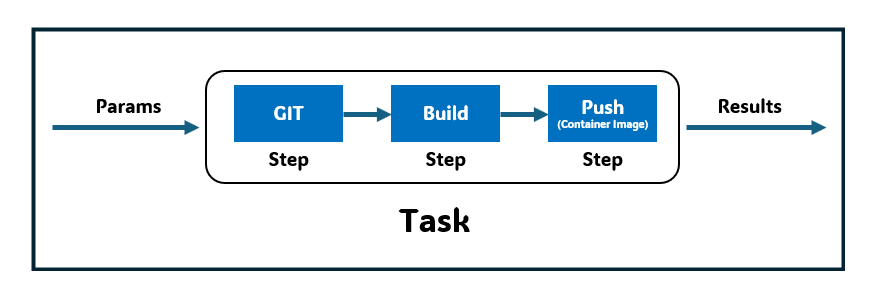
- 텍톤 Task를 사용하여 앱 컴파일, 패키징, 컨테이너 이미지 생성까지의 과정을 처리
- 텍톤의 확장 가능한 모델 덕분에 6.3절에서 사용한 Task를 재사용하는 것이 가능
- 이전 단계 step 의 결과물을 가져와 컨테이너 이미지를 만드는 새로운 단계를 그림같이 추가하는 방식
- 비공개 컨테이너 이미지 저장소로 푸시하려면 인증이 필요
- 작업을 실행할 ServiceAccount 에 인증에 쓰일 정보를 Secret 으로 연결
1️⃣ 사전 준비 : 비공개 컨테이너 이미지 저장소 인증 정보(토큰 등)
- task 설치
(⎈|kind-myk8s:N/A) ssoon@DESKTOP-72C919S:~$ tkn hub install task kaniko
WARN: This version has been deprecated
Task kaniko(0.7) installed in default namespace

(⎈|kind-myk8s:N/A) ssoon@DESKTOP-72C919S:~$ kubectl get tasks
NAME          AGE
git-clone     54m
hello         74m
kaniko 28s- Docker 자격 증명으로 Secret을 적용
(⎈|kind-myk8s:N/A) ssoon@DESKTOP-72C919S:~$ cat ~/.docker/config.json | base64 -w0
ewoJImF1dGhzIjogewoJCSJodHRwczovL2luZGV4LmRvY2tlci5pby92MS8iOiB7CgkJCSJhdXRoIjogImEzTm...

(⎈|kind-myk8s:N/A) ssoon@DESKTOP-72C919S:~$ DSH=$(cat ~/.docker/config.json | base64 -w0)er/config.json | base64 -w0)- ServiceAccount 생성 및 Secert 연결
(⎈|kind-myk8s:N/A) ssoon@DESKTOP-72C919S:~$ cat << EOF | kubectl apply -f -
apiVersion: v1
kind: Secret
metadata:
  name: docker-credentials
data:
  config.json: $DSH
EOF
secret/docker-credentials created

(⎈|kind-myk8s:N/A) ssoon@DESKTOP-72C919S:~$ kubectl create sa build-sa
serviceaccount/build-sa created
(⎈|kind-myk8s:N/A) ssoon@DESKTOP-72C919S:~$ kubectl patch sa build-sa -p '{"secrets": [{"name": "docker-credentials"}]}'
serviceaccount/build-sa patched
(⎈|kind-myk8s:N/A) ssoon@DESKTOP-72C919S:~$ kubectl get sa build-sa -o yaml
apiVersion: v1
kind: ServiceAccount
metadata:
  creationTimestamp: "2025-10-25T11:11:20Z"
  name: build-sa
  namespace: default
  resourceVersion: "42610"
  uid: 0bfe0177-6b05-43b5-9ee9-4eca66bc760d
secrets:
- name: docker-credentials- 파이프라인 파일 작성
(⎈|kind-myk8s:N/A) ssoon@DESKTOP-72C919S:~$ cat << EOF | kubectl apply -f -
apiVersion: tekton.dev/v1
kind: Pipeline
metadata:
  name: clone-build-push
spec:
  description: |
    This pipeline clones a git repo, builds a Docker image with Kaniko and pushes it to a registry
  params:
  - name: repo-url
    type: string
  - name: image-reference
    type: string
  workspaces:
  - name: shared-data
  - name: docker-credentials
  tasks:
  - name: fetch-source
    taskRef:
      name: git-clone
    workspaces:
    - name: output
      workspace: shared-data
    params:
    - name: url
      value: \$(params.repo-url)
  - name: build-push
    runAfter: ["fetch-source"]
    taskRef:
      name: kaniko
    workspaces:
    - name: source
      workspace: shared-data
    - name: dockerconfig
EOF   value: \$(params.image-reference)
pipeline.tekton.dev/clone-build-push created- 파이프라인 실행
(⎈|kind-myk8s:N/A) ssoon@DESKTOP-72C919S:~$ cat << EOF | kubectl create -f -
apiVersion: tekton.dev/v1
kind: PipelineRun
metadata:
  generateName: clone-build-push-run-
spec:
  pipelineRef:
    name: clone-build-push
  taskRunTemplate:
    serviceAccountName: build-sa
    podTemplate:
      securityContext:
        fsGroup: 65532
  workspaces:
  - name: shared-data
    volumeClaimTemplate:
      spec:
        accessModes:
        - ReadWriteOnce
        resources:
          requests:
            storage: 1Gi
  - name: docker-credentials
    secret:
      secretName: docker-credentials
  params:
  - name: repo-url
    value: https://github.com/gasida/docsy-example.git  # 유형욱님이 제보해주신 대로 Dockerfile 에 USER root 추가해두었습니다
  - name: image-reference
    value: docker.io/kschoi728/docsy:1.0.0    # 각자 자신의 저장소
EOF
pipelinerun.tekton.dev/clone-build-push-run-8nct8 created- 결과 확인 & 로그 확인
(⎈|kind-myk8s:N/A) ssoon@DESKTOP-72C919S:~$ kubectl get pod,pv,pvc
NAME                                              READY   STATUS      RESTARTS      AGE
pod/affinity-assistant-c24e82691b-0               1/1     Running     0             16s
pod/clone-build-push-run-8nct8-fetch-source-pod   0/1     Completed   0             16s
pod/my-db-postgresql-0                            1/1     Running     1 (84m ago)   4h7m
pod/my-db-postgresql-client                       0/1     Completed   0             4h58m
pod/pacman-576769bb86-w2vsc                       1/1     Running     2 (84m ago)   3d20h

NAME                                                        CAPACITY   ACCESS MODES   RECLAIM POLICY   STATUS   CLAIM                    STORAGECLASS   VOLUMEATTRIBUTESCLASS   REASON   AGE
persistentvolume/pvc-9ffac8e9-1dd2-45dd-9d5d-983dcbb1caab   1Gi        RWO            Delete           Bound    default/pvc-fd40f54bc8   standard       <unset>                          14s

NAME                                   STATUS   VOLUME                                     CAPACITY   ACCESS MODES   STORAGECLASS   VOLUMEATTRIBUTESCLASS   AGE
persistentvolumeclaim/pvc-fd40f54bc8   Bound    pvc-9ffac8e9-1dd2-45dd-9d5d-983dcbb1caab   1Gi        RWO            standard       <unset>                 17s

(⎈|kind-myk8s:N/A) ssoon@DESKTOP-72C919S:~$ kubectl get pipelinerun
NAME                         SUCCEEDED   REASON      STARTTIME   COMPLETIONTIME
clone-build-push-run-8nct8   True        Succeeded   2m14s       59s
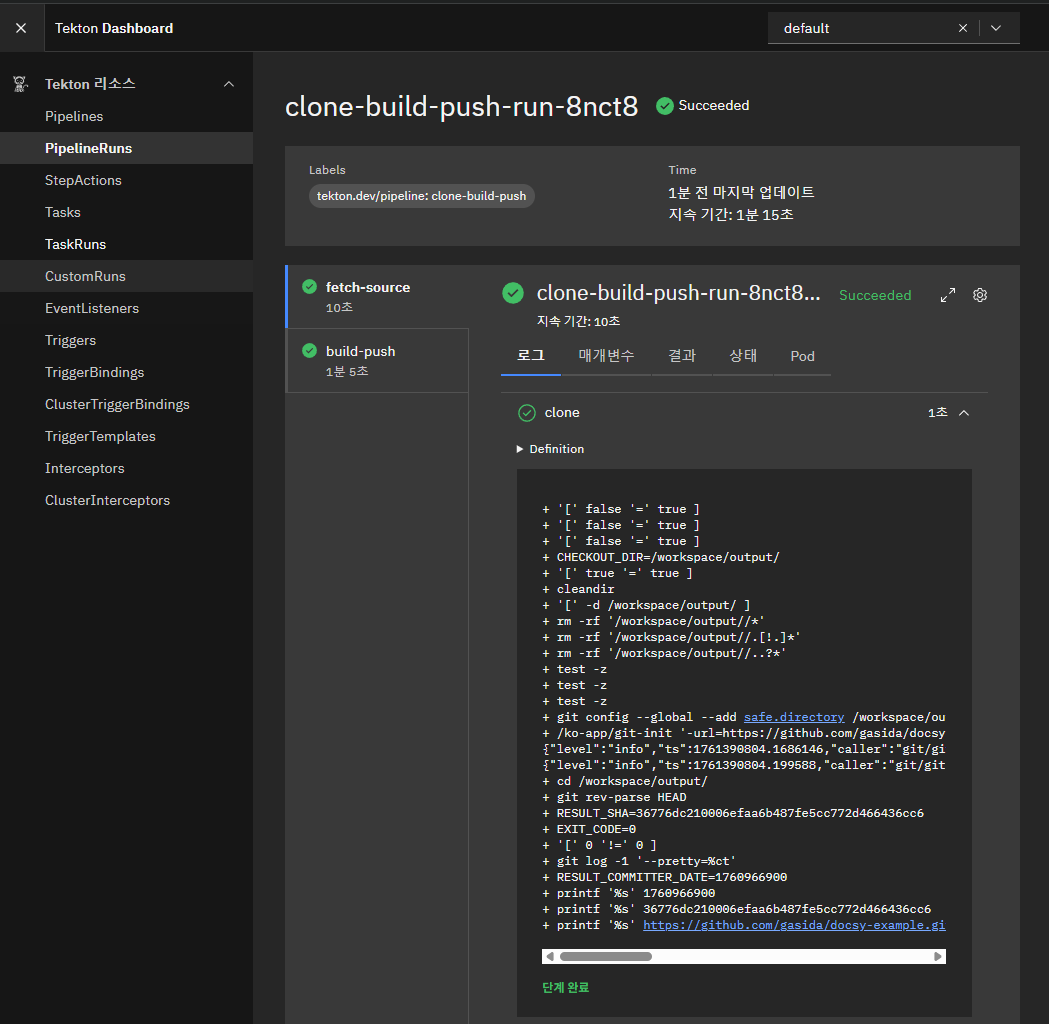
(⎈|kind-myk8s:N/A) ssoon@DESKTOP-72C919S:~$ tkn pipelinerun logs clone-build-push-run-8nct8 -f
[fetch-source : clone] + '[' false '=' true ]
[fetch-source : clone] + '[' false '=' true ]
[fetch-source : clone] + '[' false '=' true ]
[fetch-source : clone] + CHECKOUT_DIR=/workspace/output/
[fetch-source : clone] + '[' true '=' true ]
[fetch-source : clone] + cleandir
[fetch-source : clone] + '[' -d /workspace/output/ ]
[fetch-source : clone] + rm -rf '/workspace/output//*'
[fetch-source : clone] + rm -rf '/workspace/output//.[!.]*'
[fetch-source : clone] + rm -rf '/workspace/output//..?*'
[fetch-source : clone] + test -z
[fetch-source : clone] + test -z
[fetch-source : clone] + test -z
[fetch-source : clone] + git config --global --add safe.directory /workspace/output
[fetch-source : clone] + /ko-app/git-init '-url=https://github.com/gasida/docsy-example.git' '-revision=' '-refspec=' '-path=/workspace/output/' '-sslVerify=true' '-submodules=true' '-depth=1' '-sparseCheckoutDirectories='
[fetch-source : clone] {"level":"info","ts":1761390804.1686146,"caller":"git/git.go:176","msg":"Successfully cloned https://github.com/gasida/docsy-example.git @ 36776dc210006efaa6b487fe5cc772d466436cc6 (grafted, HEAD) in path /workspace/output/"}
[fetch-source : clone] {"level":"info","ts":1761390804.199588,"caller":"git/git.go:215","msg":"Successfully initialized and updated submodules in path /workspace/output/"}
...
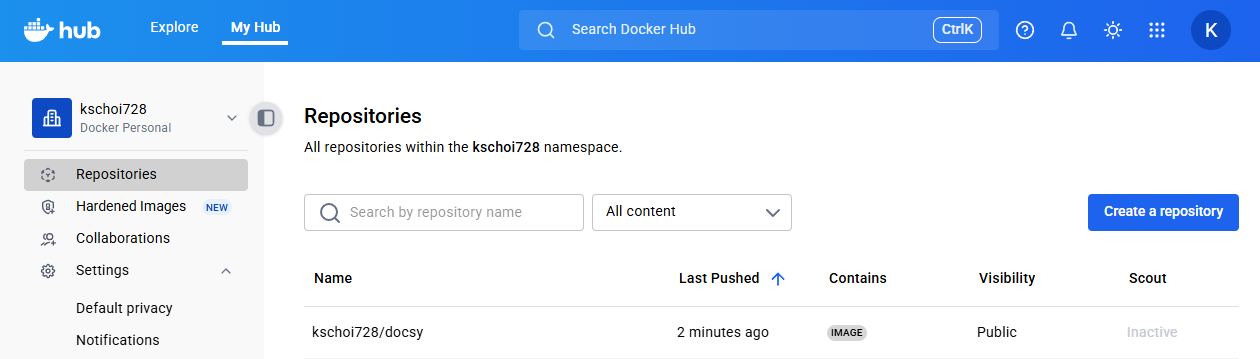
"Tekton Task는 전체 CI/CD 파이프라인에서 컨테이너 빌드와 푸시를 자동화합니다."
'CICD Study [1기]' 카테고리의 다른 글
| Jenkins + ArgoCD : Jenkins CI + K8S(Kind) (0) | 2025.10.19 |
|---|---|
| Jenkins + ArgoCD : 실습 환경 구성 (0) | 2025.10.19 |
| Cloud Native CI/CD : 6.4 Create a Task to Compile and Package an App fromPrivate Git (0) | 2025.10.19 |
| Cloud Native CI/CD : 6.3 Create a Task to Compile and Package an App from Git (0) | 2025.10.19 |
| Cloud Native CI/CD : 6.2 Create a Hello World Task (0) | 2025.10.19 |
Comments