Ssoon

Argo CD in Practice – 3) Argo CD 운영 : 고가용성(HA) 설치 구성 본문

CICD Study [1기]

Argo CD in Practice – 3) Argo CD 운영 : 고가용성(HA) 설치 구성

구구달스 2025. 10. 19. 18:49


🚀 Operating Argo CD

Argo CD 고가용성(HA) 환경 구성 및 운영


🧩 Declarative Configuration 

📘 개요

  • Argo CD를 설치하는 방법은 여러 가지가 있습니다.
  • Argo CD의 선언적 설치(Declarative Configuration)는 GitOps 철학의 핵심으로, 모든 설정이 코드로 정의되고 Git을 통해 관리됩니다. 즉, kubectl로 수동 적용하는 대신 Git Repository에 변경 사항을 Commit하면, Argo CD가 이를 감지해 자동으로 적용합니다.

"Git은 단순한 버전 관리 도구가 아니라, 인프라의 ‘Single Source of Truth’ 역할을 합니다."


🧱 Argo CD 설치 방법

Argo CD를 클러스터에 설치하는 방법은 다음 세 가지가 있습니다:

  1. 직접 Manifest 적용→ install.yaml은 Argo CD의 설치 리소스를 모두 포함하고 있습니다.
  2. Helm Chart 사용
  3. Kustomize 사용

"Kustomize는 YAML을 템플릿 없이 조합할 수 있어 GitOps 환경에서 특히 강력합니다."


🧩 HA 모드로 설치되는 주요 컴포넌트

🖥️ API Server

📌 역할

  • API Server는 Argo CD의 모든 외부 요청(UI, CLI, API)을 처리하는 진입점입니다.
  • 이 컴포넌트는 상태(state)가 없기 때문에 부하에 따라 자유롭게 scale out 할 수 있습니다.

🗂️ Repository Server

📌 역할

  • Repository Server는 Git 저장소의 내용을 읽고, Helm / Kustomize / Jsonnet 등의 템플릿을 실제 Kubernetes manifest로 변환하는 핵심 컴포넌트입니다.
  • 이 과정은 리소스를 많이 사용하는 작업이므로, 병렬 실행을 위해 여러 인스턴스로 구성하는 것이 좋습니다.

🧠 Application Controller

📌 역할

  • Application Controller는 Argo CD의 핵심 로직을 담당합니다.
  • Control Loop를 통해 Git 상태와 실제 클러스터 상태를 동기화(Sync)합니다.
  • 과거에는 단일 replica만 지원했지만, v1.8부터 다중 replica(shard) 구성이 가능해졌습니다.
  • 각 replica는 서로 다른 클러스터를 관리하므로, 장애 발생 시 영향 범위를 줄일 수 있습니다.

🔐 Dex Server

📌 역할

  • Dex는 외부 인증(OIDC, SAML, LDAP 등)을 처리하는 컴포넌트입니다.
  • 예를 들어 GitHub, Google 등의 계정으로 로그인할 때 사용됩니다.

💾 Redis Cache

📌 역할

  • Redis는 Argo CD에서 manifest 캐싱을 위한 보조 저장소로 사용됩니다.
  • 캐시가 없더라도 동작은 가능하지만, 매번 manifest를 새로 생성하므로 성능 저하가 발생합니다.

⚙️ HA 구성

HA 모드에서는 Redis가 1 master + 2 slaves (총 3 replicas) 로 구성됩니다.
또한 HAProxy가 Redis 앞단에 배치되어 master 장애 발생 시 자동으로 slave를 승격시킵니다.


Argo CD HA의 핵심은 Controller, Repo-server, Server 3대 구성요소를 다중화 + Redis HA 구성

⚙️ Setting up an HA Installation (고가용성 설치) : 직접 Manifest 적용

📋 사전 준비

  • kind k8s 배포 : worker 3대
(⎈|N/A:N/A) ssoon@DESKTOP-72C919S:~/argo-cd-in-practice/ch03$ kind create cluster --name myk8s --image kindest/node:v1.32.8 --config - <<EOF
kind: Cluster
apiVersion: kind.x-k8s.io/v1alpha4
nodes:
- role: control-plane
  extraPortMappings:
  - containerPort: 30000
    hostPort: 30000
  - containerPort: 30001
    hostPort: 30001
  - containerPort: 30002
    hostPort: 30002
  - containerPort: 30003
    hostPort: 30003
- role: worker
- role: worker
- role: worker
EOF
Creating cluster "myk8s" ...
 ✓ Ensuring node image (kindest/node:v1.32.8) 🖼
 ✓ Preparing nodes 📦 📦 📦 📦
 ✓ Writing configuration 📜
 ✓ Starting control-plane 🕹️
 ✓ Installing CNI 🔌
 ✓ Installing StorageClass 💾
 ✓ Joining worker nodes 🚜
Set kubectl context to "kind-myk8s"
You can now use your cluster with:

kubectl cluster-info --context kind-myk8s

Thanks for using kind! 😊


"HA 설치는 단일 노드(Local) 환경에서는 불가능합니다. 노드 분산이 전제 조건입니다."


🧰 설치 절차

1️⃣ Namespace 정의

  • resources/namespace.yaml 파일을 생성합니다.
(⎈|kind-myk8s:N/A) ssoon@DESKTOP-72C919S:~/my-sample-app$ mkdir -p resources
(⎈|kind-myk8s:N/A) ssoon@DESKTOP-72C919S:~/my-sample-app$ cat << EOF > resources/namespace.yaml
apiVersion: v1
kind: Namespace
metadata:
  name: argocd
EOF
  • argocd 네임스페이스 생성
(⎈|kind-myk8s:N/A) ssoon@DESKTOP-72C919S:~/my-sample-app$ kubectl apply -f resources/namespace.yaml
namespace/argocd created
  • Argo CD의 HA 설치 매니페스트를 GitHub에서 직접 다운로드
(⎈|kind-myk8s:N/A) ssoon@DESKTOP-72C919S:~/my-sample-app$ wget https://raw.githubusercontent.com/argoproj/argo-cd/refs/heads/master/manifests/ha/install.yaml
--2025-11-08 16:18:25--  https://raw.githubusercontent.com/argoproj/argo-cd/refs/heads/master/manifests/ha/install.yaml
Resolving raw.githubusercontent.com (raw.githubusercontent.com)... 185.199.109.133, 185.199.110.133, 185.199.108.133, ...
Connecting to raw.githubusercontent.com (raw.githubusercontent.com)|185.199.109.133|:443... connected.
HTTP request sent, awaiting response... 200 OK
Length: 1516613 (1.4M) [text/plain]
Saving to: ‘install.yaml’

install.yaml              100%[=====================================>]   1.45M  --.-KB/s    in 0.04s

2025-11-08 16:18:25 (38.3 MB/s) - ‘install.yaml’ saved [1516613/1516613]
  • install.yaml 파일을 resources/ 디렉토리로 이동 & 해당 파일을 argocd 네임스페이스에 적용
(⎈|kind-myk8s:N/A) ssoon@DESKTOP-72C919S:~/my-sample-app$ mv install.yaml resources/
(⎈|kind-myk8s:N/A) ssoon@DESKTOP-72C919S:~/my-sample-app$ kubectl apply -f resources/install.yaml -n argocd
customresourcedefinition.apiextensions.k8s.io/applications.argoproj.io created
customresourcedefinition.apiextensions.k8s.io/applicationsets.argoproj.io created
customresourcedefinition.apiextensions.k8s.io/appprojects.argoproj.io created
...
  • 초기 admin 사용자 비밀번호 확인
(⎈|kind-myk8s:N/A) ssoon@DESKTOP-72C919S:~/my-sample-app$ kubectl get secret -n argocd argocd-initial-admin-secret -o jsonpath='{.data.password}' | base64 -d ; echo
D1x443hRSzRw8wbj

  •  로컬 레포지토리의 Remote 주소 변경
(⎈|kind-myk8s:N/A) ssoon@DESKTOP-72C919S:~/argo-cd-in-practice/ch03$ git remote remove origin
(⎈|kind-myk8s:N/A) ssoon@DESKTOP-72C919S:~/argo-cd-in-practice/ch03$ git remote -v
(⎈|kind-myk8s:N/A) ssoon@DESKTOP-72C919S:~/argo-cd-in-practice/ch03$ git remote add origin https://github.com/kschoi728/my-sample-app.git
(⎈|kind-myk8s:N/A) ssoon@DESKTOP-72C919S:~/argo-cd-in-practice/ch03$ git remote -v
origin  https://github.com/kschoi728/my-sample-app.git (fetch)
origin  https://github.com/kschoi728/my-sample-app.git (push)
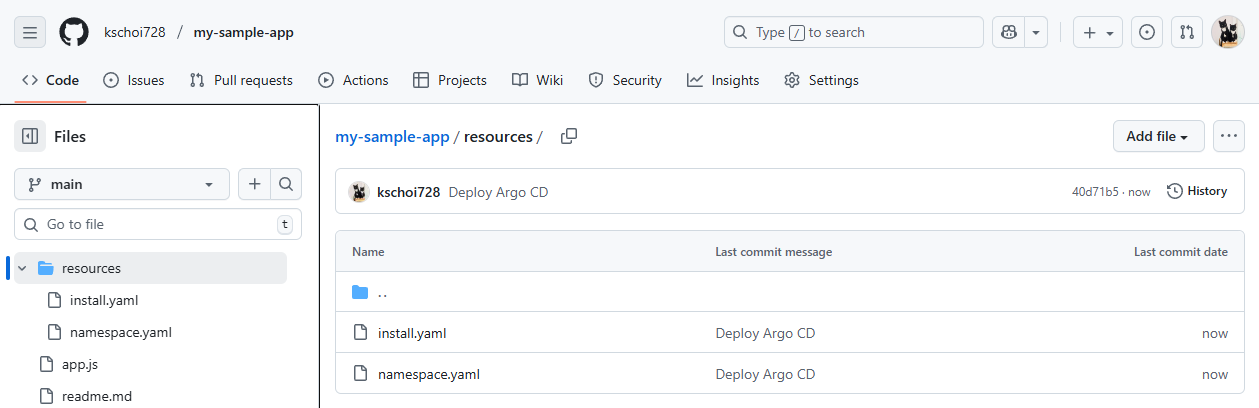
  • 원격 리포지터리에 커밋하고 푸시
(⎈|kind-myk8s:N/A) ssoon@DESKTOP-72C919S:~/my-sample-app$ git status
On branch main
Your branch is up to date with 'origin/main'.

Untracked files:
  (use "git add <file>..." to include in what will be committed)
        resources/

nothing added to commit but untracked files present (use "git add" to track)
(⎈|kind-myk8s:N/A) ssoon@DESKTOP-72C919S:~/my-sample-app$ git add .
(⎈|kind-myk8s:N/A) ssoon@DESKTOP-72C919S:~/my-sample-app$ git status
On branch main
Your branch is up to date with 'origin/main'.

Changes to be committed:
  (use "git restore --staged <file>..." to unstage)
        new file:   resources/install.yaml
        new file:   resources/namespace.yaml

(⎈|kind-myk8s:N/A) ssoon@DESKTOP-72C919S:~/my-sample-app$ git commit -m "Deploy Argo CD"
[main 40d71b5] Deploy Argo CD
 2 files changed, 28233 insertions(+)
 create mode 100644 resources/install.yaml
 create mode 100644 resources/namespace.yaml
(⎈|kind-myk8s:N/A) ssoon@DESKTOP-72C919S:~/my-sample-app$ git push -u origin main
Enumerating objects: 6, done.
Counting objects: 100% (6/6), done.
Delta compression using up to 12 threads
Compressing objects: 100% (5/5), done.
Writing objects: 100% (5/5), 90.48 KiB | 4.76 MiB/s, done.
Total 5 (delta 0), reused 0 (delta 0), pack-reused 0
To github.com:kschoi728/my-sample-app.git
   8e5307b..40d71b5  main -> main
branch 'main' set up to track 'origin/main'.


🔄 Argo CD Self-management

🧠 Argo CD가 자기 자신을 관리하기

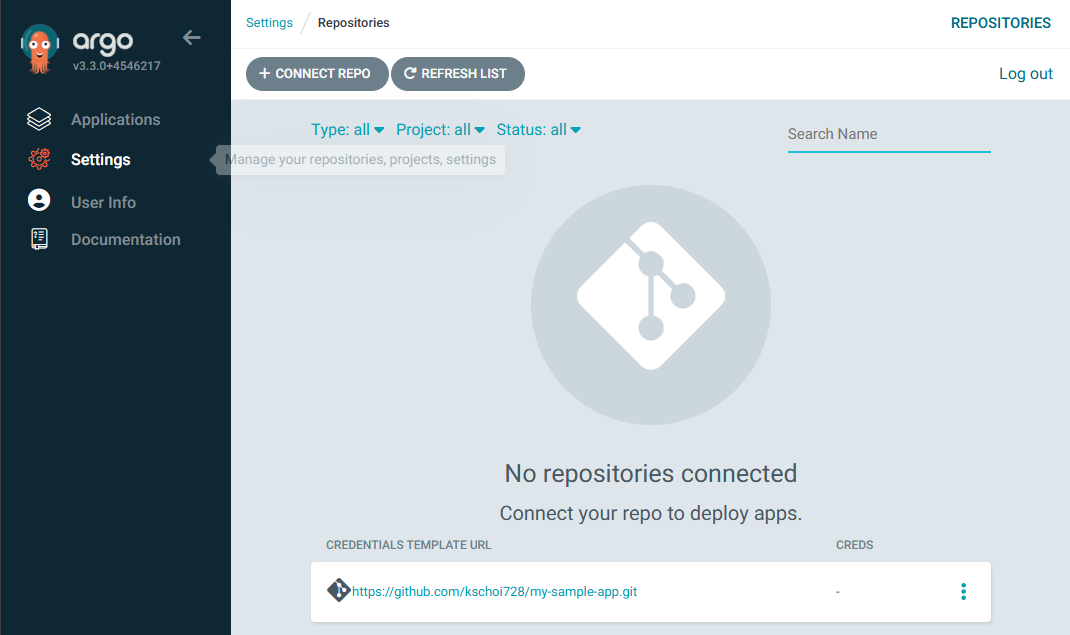
  • Argo CD는 자신을 관리 대상으로 등록할 수 있습니다.
  • Argo CD의 설치 구성을 Argo CD Application으로 등록하면,자체 설정 변경도 자동으로 동기화할 수 있습니다.

  • Argo CD UI → Settings → Repo 에 자신의 Repo 추가

1️⃣ Argo CD 애플리케이션 생성

  • GitHub 리포지토리의 resources 디렉토리에 있는 Kubernetes 리소스를 Argo CD가 자동으로 동기화하여 argocd 네임스페이스에 배포하도록 설정한 Application 리소스를 생성
(⎈|kind-myk8s:N/A) ssoon@DESKTOP-72C919S:~/my-sample-app$ cat <<EOF | kubectl apply -f -
apiVersion: argoproj.io/v1alpha1
kind: Application
metadata:
  name: argocd
  namespace: argocd
spec:
  project: default
  source:
    path: resources
    repoURL: https://github.com/kschoi728/my-sample-app
    targetRevision: main
  syncPolicy:
    automated: {}
  destination:
    namespace: argocd
    server: https://kubernetes.default.svc
EOF
application.argoproj.io/argocd created

  • Argo CD는 이제 Repository의 해당 경로를 3분마다 체크하며, 변경사항이 있으면 자동으로 적용합니다.

"이제 Argo CD는 스스로를 GitOps 방식으로 관리하는 완전한 셀프 관리 구조가 됩니다."


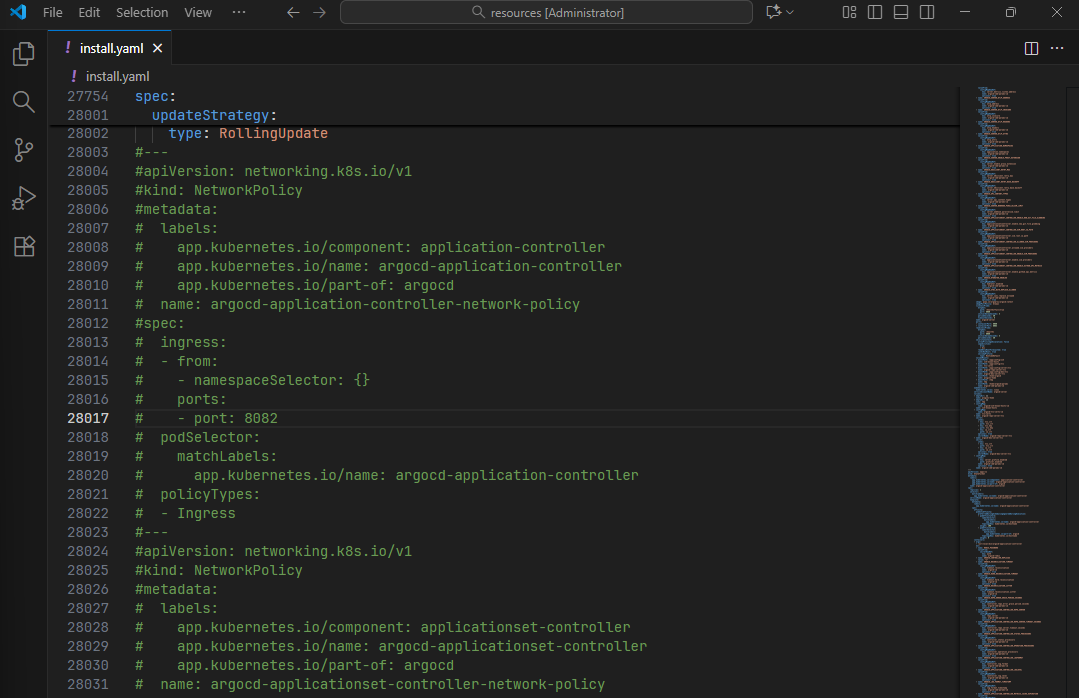
🧩 Argo CD 설정 변경 : networkpolicy 를 삭제

  • 커밋을 하거나 원격 저장소에 푸시하면 자동으로 Argo CD에 적용되는 간단한 설정 업데이트
  • 배포된 networkpolicy
(⎈|kind-myk8s:N/A) ssoon@DESKTOP-72C919S:~/my-sample-app$ kubectl get networkpolicies.networking.k8s.io -n argocd
NAME                                              POD-SELECTOR                                              AGE
argocd-application-controller-network-policy      app.kubernetes.io/name=argocd-application-controller      31m
argocd-applicationset-controller-network-policy   app.kubernetes.io/name=argocd-applicationset-controller   31m
argocd-dex-server-network-policy                  app.kubernetes.io/name=argocd-dex-server                  31m
argocd-notifications-controller-network-policy    app.kubernetes.io/name=argocd-notifications-controller    31m
argocd-redis-ha-proxy-network-policy              app.kubernetes.io/name=argocd-redis-ha-haproxy            31m
argocd-redis-ha-server-network-policy             app.kubernetes.io/name=argocd-redis-ha                    31m
argocd-repo-server-network-policy                 app.kubernetes.io/name=argocd-repo-server                 31m
argocd-server-network-policy                      app.kubernetes.io/name=argocd-server                      31m
  • 코드 수정 : networkpolicy 주 후 푸시

(⎈|kind-myk8s:N/A) ssoon@DESKTOP-72C919S:~/my-sample-app/resources$ git status
On branch main
Your branch is up to date with 'origin/main'.

Changes not staged for commit:
  (use "git add <file>..." to update what will be committed)
  (use "git restore <file>..." to discard changes in working directory)
        modified:   install.yaml

no changes added to commit (use "git add" and/or "git commit -a")
(⎈|kind-myk8s:N/A) ssoon@DESKTOP-72C919S:~/my-sample-app/resources$ git add .
(⎈|kind-myk8s:N/A) ssoon@DESKTOP-72C919S:~/my-sample-app/resources$ git commit -m "Comment Network Policy Resource"
[main 401b8df] Comment Network Policy Resource
 1 file changed, 227 insertions(+), 227 deletions(-)
(⎈|kind-myk8s:N/A) ssoon@DESKTOP-72C919S:~/my-sample-app/resources$ git push -u origin main
Enumerating objects: 7, done.
Counting objects: 100% (7/7), done.
Delta compression using up to 12 threads
Compressing objects: 100% (4/4), done.
Writing objects: 100% (4/4), 1.00 KiB | 73.00 KiB/s, done.
Total 4 (delta 2), reused 0 (delta 0), pack-reused 0
remote: Resolving deltas: 100% (2/2), completed with 2 local objects.
To github.com:kschoi728/my-sample-app.git
   40d71b5..401b8df  main -> main
branch 'main' set up to track 'origin/main'.
  • SYNC → SYNCHRONIZE (PRUNE 체크)


📌 핵심 요약

  • Argo CD Declarative 설치는 GitOps 방식의 핵심으로, 모든 설정을 코드로 관리합니다.
  • HA 설치를 위해 최소 3개 노드의 Kubernetes 클러스터가 필요합니다.
  • Self-management를 구성하면 Argo CD가 자신을 Argo CD Application으로 관리합니다.
  • ConfigMap Patch로 Git 동기화 주기(timeout.reconciliation) 등 설정을 쉽게 변경할 수 있습니다.
  • 변경 사항은 Git Commit → 자동 Sync → 수동 재시작으로 적용됩니다.

“Argo CD를 GitOps 방식으로 스스로 관리하게 만들면, 운영 자동화와 일관성을 극대화할 수 있습니다.”

 
Comments