
Ssoon
Argo CD in Practice – 2) Argo CD 시작하기 본문
🚀 Getting Started with Argo CD
- Argo CD는 Kubernetes 기반의 GitOps Continuous Delivery 도구입니다.
🧩 What is Argo CD?
- 애플리케이션 개발 환경은 일반적으로 development, test, staging, production으로 나뉘며, Kubernetes에서는 이를 namespace나 별도의 cluster로 분리해 운영합니다.
- 하지만 이 방식에는 한 가지 큰 문제점이 있습니다. 시간이 지나면서 각 환경의 설정이 조금씩 달라지는 Configuration Drift가 발생합니다. 즉, 개발 환경의 최신 설정이 운영 환경에 자동으로 반영되지 않아 수동 관리가 필요해집니다.
- 이를 해결하기 위해 Helm, Kustomize, Jsonnet 같은 툴을 사용해보지만, 여전히 여러 버전을 관리하고 추적하는 것은 쉽지 않습니다. 👉 이런 문제를 깔끔하게 해결하는 접근법이 바로 GitOps입니다.
- GitOps에서는 모든 인프라와 애플리케이션 설정을 Git 저장소에 보관하고, 이 Git 저장소를 단일 Source of Truth로 사용합니다. 변경사항은 Pull Request를 통해 검토되며, Git에 반영된 설정이 자동으로 cluster에 적용됩니다.
"Argo CD는 이 GitOps 철학을 완벽하게 구현하는 도구입니다."
⚙️ Core Concepts and Vocabulary
- Argo CD의 핵심은 reconciliation loop입니다. 즉, Git에 정의된 desired state(목표 상태) 와 cluster의 live state(실제 상태) 를 지속적으로 비교하고, 차이가 발생하면 자동으로 일치시키는 과정입니다.
🔄 Argo CD Reconciliation Loop
Git Repository ──> (Helm Template) ──> Manifest ──> Kubernetes Cluster
       ↑                                               │
       └─────────────────── Compare & Sync ────────────┘
- Argo CD는 helm install이 아닌 kubectl apply를 사용합니다.
이는 Argo CD가 특정 템플릿 툴에 종속되지 않고, 단순히 Git에 선언된 상태를 cluster에 적용하는 컨트롤러이기 때문입니다.
"Reconciliation은 Argo CD의 핵심 동작 원리로, Git의 상태를 항상 cluster에 반영하는 과정입니다."
📚 Argo CD Vocabulary
용어 설명
| Application | 하나의 애플리케이션을 구성하는 Kubernetes 리소스 집합 |
| Application Source Type | Helm, Kustomize, Jsonnet 등 manifest 생성 도구 |
| Target State | Git에 정의된 원하는 상태 |
| Live State | 현재 cluster에 배포된 실제 상태 |
| Sync Status | Live State가 Target State와 일치하는지 여부 |
| Sync Operation | Target State로 동기화하는 실제 과정 |
| Health Status | 애플리케이션이 정상 동작 중인지 여부 |
"Application은 Argo CD에서 관리 단위이며, Sync는 GitOps의 핵심 프로세스입니다."
🏗️ Argo CD Architecture
- Argo CD는 Kubernetes Controller 형태로 동작합니다. 즉, cluster의 상태를 감시하고, 필요 시 변경을 적용하여 Desired State를 유지합니다.
🧠 Core Components
1️⃣ API Server
- Argo CD의 중심 API 인터페이스
- Web UI, CLI, CI/CD, Argo Events 등과 상호작용
- 주요 기능:
- Application 관리 및 상태 보고
- Git Repo 및 Cluster 관리
- Authentication & SSO 지원
- RBAC 권한 정책 관리
2️⃣ Repository Server
- Git Repository의 local cache 유지
- 요청 시 Kubernetes manifest를 생성 (Helm, Kustomize 등 템플릿 기반)
- 주요 입력값:
- Repo URL
- Git Revision
- Application Path
- Helm Values 등
3️⃣ Application Controller
- Live State ↔ Target State 비교 및 자동 동기화
- Drift 발생 시 상태를 복원
- Lifecycle Hooks 실행 (PreSync, PostSync 등)
"Application Controller는 Argo CD의 두뇌이며, Git과 Kubernetes 사이를 연결하는 핵심 엔진입니다."
🗺️ Architectural Overview
[Git Repository] → [Repository Server] → [API Server] → [Application Controller] → [Kubernetes Cluster]
                             ↑                                                │
                             └─────────────── CLI / UI / Webhook ─────────────┘
Argo CD의 Sync Trigger 방식
- UI에서 수동으로 Sync
- CLI (argocd app sync myapp)
- Git Webhook (GitHub, GitLab, Bitbucket 등)
"Argo CD는 Git 변경을 감지해 자동 또는 수동으로 Sync를 수행하며, 완전한 GitOps 워크플로우를 구현합니다."
🧱 Argo CD Core Objects
Argo CD는 Kubernetes의 CRD(Custom Resource Definition) 로 확장되어 동작합니다.
🧩 Application (CRD)
- Argo CD는 실제 쿠버네티스 클러스터에 배포하려는 애플리케이션의 인스턴스를 Application 이라는 CRD로 구현
- metadata.name: guestbook
Argo CD UI에서 표시될 애플리케이션 이름입니다. - spec.project: default
default 프로젝트에 속한 애플리케이션으로 등록됩니다. 만약 dev, prd, applications 등의 프로젝트를 사용하고 싶다면 이 값을 변경해야 합니다. - source.repoURL
애플리케이션 소스가 위치한 Git 리포지토리입니다. 여기서는 Argo CD 공식 예제 리포지토리를 사용하고 있습니다. - source.path: guestbook
리포지토리 내에서 guestbook 디렉토리를 기준으로 K8s 매니페스트를 찾습니다. - destination.server
현재 클러스터의 API 서버 주소입니다. - destination.namespace: guestbook
애플리케이션이 배포될 네임스페이스입니다. 이 있습니다.
- metadata.name: guestbook
apiVersion: argoproj.io/v1alpha1
kind: Application
metadata:
  name: guestbook
  namespace: argocd
spec:
  project: default
  source:
    repoURL: https://github.com/argoproj/argocd-example-apps.git
    targetRevision: HEAD
    path: guestbook
  destination:
    server: https://kubernetes.default.svc
    namespace: guestbook
🧩 AppProject (CRD)
- 애플리케이션처럼 앱 프로젝트 CRD는 태그 지정과 같이 관련 있는 애플리케이션을 논리적으로 그룹화
- 실무에서는 애플리케이션과 유틸리티 서비스가 분리
- sourceRepos: ['*']
- 모든 Git 리포지토리에서 소스를 허용합니다.
- 보안상 민감한 환경에서는 특정 리포지토리만 허용하는 것이 좋습니다.
- destinations:
- guestbook 네임스페이스와 https://kubernetes.default.svc 서버로 배포를 허용합니다.
- 이는 현재 클러스터 내의 기본 API 서버를 의미합니다.
- sourceRepos: ['*']
apiVersion: argoproj.io/v1alpha1
kind: AppProject
metadata:
  name: applications
  namespace: argocd
spec:
  sourceRepos:
    - '*'
  destinations:
    - namespace: guestbook
      server: https://kubernetes.default.svc
🔐 Repository Credentials (Secret)
- 실제 운영에서는 프라이빗 리포지터리를 사용하기 때문에 Argo CD가 해당 리포지터리에 접근하기 위해서는 접근 가능한 자격 증명이 필요
- Argo CD가 해당 리포지터리에 접근하기 위해서는 접근 가능한 자격 증명이 필요
- Argo CD는 이를 쿠버네티스 시크릿과 컨피그맵을 사용해 해결
- 따라서 ‘argocd.argoproj.io/secret-type: repository ’같은 특정 쿠버네티스 레이블을 포함해 쿠버네티스 시크릿 리소스를 생성
- metadata.name: Argo CD에서 이 리포지토리를 식별할 때 사용하는 이름입니다.
- labels.argocd.argoproj.io/secret-type: repository: 이 Secret이 Git 리포지토리 인증 정보임을 나타냅니다.
- stringData.url: 등록할 Git 리포지토리의 주소입니다.
- stringData.sshPrivateKey: 해당 리포지토리에 접근하기 위한 SSH 개인 키입니다.
apiVersion: v1
kind: Secret
metadata:
  name: private-repo
  namespace: argocd
  labels:
    argocd.argoproj.io/secret-type: repository
stringData:
  url: https://github.com/private/repo.git
  sshPrivateKey: |
    -----BEGIN OPENSSH PRIVATE KEY-----
    ...
    -----END OPENSSH PRIVATE KEY-----
🔐 Cluster Credentials (Secret)
- Argo CD가 여러 클러스터를 관리하고 Argo CD가 이미 실행 중인 클러스터에 포함되지 않은 경우 다른 쿠버네티스 클러스터에 대한 액세스 권한을 얻어야 한다.
- 리포지터리 자격 증명과 클러스터 자격 증명의 차이점은 시크릿 유형이 다르기 때문에 쿠버네티스 레이블이 다르다는 것
- labels.argocd.argoproj.io/secret-type: cluster: 이 Secret이 클러스터 등록용임을 나타냅니다.
- stringData.server: 등록할 외부 클러스터의 API 서버 주소입니다.
- stringData.config:
- bearerToken: 해당 클러스터에 접근하기 위한 인증 토큰 (여기서는 비어 있음)
- tlsClientConfig.insecure: false로 설정되어 있어 TLS 인증서를 검증합니다. 만약 자체 서명 인증서를 사용하는 경우 true로 설정하거나 caData를 추가해야 합니다.
apiVersion: v1
kind: Secret
metadata:
  name: mycluster-secret
  labels:
    argocd.argoproj.io/secret-type: cluster
stringData:
  server: https://mycluster.com
  config: |
    {
      "bearerToken": "",
      "tlsClientConfig": {"insecure": false}
    }
"Argo CD의 모든 구성 요소는 Kubernetes 리소스로 정의되어 완전한 선언적 관리가 가능합니다."
✅ Argo CD 설치 by Helm
- 네임스페이스 생성 & Argo CD Helm 설치 설정 파일 생성
(⎈|kind-myk8s:N/A) ssoon@DESKTOP-72C919S:~/argo-cd-in-practice/ch02$ kubectl create ns argocd
cat <<EOF > argocd-values.yaml
server:
  service:
    type: NodePort
    nodePortHttps: 30002
  extraArgs:
    - --insecure  # HTTPS 대신 HTTP 사용
EOF
namespace/argocd create- Helm 리포지토리 추가 & Argo CD 설치
(⎈|kind-myk8s:N/A) ssoon@DESKTOP-72C919S:~/argo-cd-in-practice/ch02$ helm repo add argo https://argoproj.github.io/argo-helm
"argo" has been added to your repositories
(⎈|kind-myk8s:N/A) ssoon@DESKTOP-72C919S:~/argo-cd-in-practice/ch02$ helm install argocd argo/argo-cd --version 9.0.5 -f argocd-values.yaml --namespace argocd
NAME: argocd
LAST DEPLOYED: Sat Nov  8 14:39:34 2025
NAMESPACE: argocd
STATUS: deployed
REVISION: 1
TEST SUITE: None
NOTES:
In order to access the server UI you have the following options:

1. kubectl port-forward service/argocd-server -n argocd 8080:443

    and then open the browser on http://localhost:8080 and accept the certificate

2. enable ingress in the values file `server.ingress.enabled` and either
      - Add the annotation for ssl passthrough: https://argo-cd.readthedocs.io/en/stable/operator-manual/ingress/#option-1-ssl-passthrough
      - Set the `configs.params."server.insecure"` in the values file and terminate SSL at your ingress: https://argo-cd.readthedocs.io/en/stable/operator-manual/ingress/#option-2-multiple-ingress-objects-and-hosts


After reaching the UI the first time you can login with username: admin and the random password generated during the installation. You can find the password by running:

kubectl -n argocd get secret argocd-initial-admin-secret -o jsonpath="{.data.password}" | base64 -d

(You should delete the initial secret afterwards as suggested by the Getting Started Guide: https://argo-cd.readthedocs.io/en/stable/getting_started/#4-login-using-the-cli)- Krew 설치 & rolesum 플러그인 설치
(⎈|kind-myk8s:N/A) ssoon@DESKTOP-72C919S:~$ (
  set -x; cd "$(mktemp -d)" &&
  OS="$(uname | tr '[:upper:]' '[:lower:]')" &&
  ARCH="$(uname -m | sed -e 's/x86_64/amd64/' -e 's/\(arm\)\(64\)\?.*/\1\2/' -e 's/aarch64$/arm64/')" &&
  KREW="krew-${OS}_${ARCH}" &&
  curl -fsSLO "https://github.com/kubernetes-sigs/krew/releases/latest/download/${KREW}.tar.gz" &&
  tar zxvf "${KREW}.tar.gz" &&
  ./"${KREW}" install krew
)
++ mktemp -d
+ cd /tmp/tmp.YKLjsYB5tE
++ uname
++ tr '[:upper:]' '[:lower:]'
+ OS=linux
++ uname -m
++ sed -e s/x86_64/amd64/ -e 's/\(arm\)\(64\)\?.*/\1\2/' -e 's/aarch64$/arm64/'
+ ARCH=amd64
+ KREW=krew-linux_amd64
+ curl -fsSLO https://github.com/kubernetes-sigs/krew/releases/latest/download/krew-linux_amd64.tar.gz
+ tar zxvf krew-linux_amd64.tar.gz
./._LICENSE
tar: Ignoring unknown extended header keyword 'LIBARCHIVE.xattr.com.apple.provenance'
./LICENSE
./._krew-linux_amd64
tar: Ignoring unknown extended header keyword 'LIBARCHIVE.xattr.com.apple.provenance'
./krew-linux_amd64
+ ./krew-linux_amd64 install krew
Adding "default" plugin index from https://github.com/kubernetes-sigs/krew-index.git.
Updated the local copy of plugin index.
Installing plugin: krew
Installed plugin: krew
\
 | Use this plugin:
 |      kubectl krew
 | Documentation:
 |      https://krew.sigs.k8s.io/
 | Caveats:
 | \
 |  | krew is now installed! To start using kubectl plugins, you need to add
 |  | krew's installation directory to your PATH:
 |  |
 |  |   * macOS/Linux:
 |  |     - Add the following to your ~/.bashrc or ~/.zshrc:
 |  |         export PATH="${KREW_ROOT:-$HOME/.krew}/bin:$PATH"
 |  |     - Restart your shell.
 |  |
 |  |   * Windows: Add %USERPROFILE%\.krew\bin to your PATH environment variable
 |  |
 |  | To list krew commands and to get help, run:
 |  |   $ kubectl krew
 |  | For a full list of available plugins, run:
 |  |   $ kubectl krew search
 |  |
 |  | You can find documentation at
 |  |   https://krew.sigs.k8s.io/docs/user-guide/quickstart/.
 | /
/
(⎈|kind-myk8s:N/A) ssoon@DESKTOP-72C919S:~$ export PATH="${KREW_ROOT:-$HOME/.krew}/bin:$PATH"
(⎈|kind-myk8s:N/A) ssoon@DESKTOP-72C919S:~$ echo 'export PATH="${KREW_ROOT:-$HOME/.krew}/bin:$PATH"' >> ~/.bashrc
source ~/.bashrc # Or source ~/.zshrc, depending on your shell
(⎈|kind-myk8s:N/A) ssoon@DESKTOP-72C919S:~$ kubectl krew version
OPTION            VALUE
GitTag            v0.4.5
GitCommit         e7e5b61
IndexURI          https://github.com/kubernetes-sigs/krew-index.git
BasePath          /home/ssoon/.krew
IndexPath         /home/ssoon/.krew/index/default
InstallPath       /home/ssoon/.krew/store
BinPath           /home/ssoon/.krew/bin
DetectedPlatform  linux/amd64
(⎈|kind-myk8s:N/A) ssoon@DESKTOP-72C919S:~$ kubectl krew install rolesum
Updated the local copy of plugin index.
Installing plugin: rolesum
Installed plugin: rolesum
\
 | Use this plugin:
 |      kubectl rolesum
 | Documentation:
 |      https://github.com/Ladicle/kubectl-rolesum
/
WARNING: You installed plugin "rolesum" from the krew-index plugin repository.
   These plugins are not audited for security by the Krew maintainers.
   Run them at your own risk.
🔐 서비스 계정: argocd-server (네임스페이스: argocd)
📦 관련된 권한 바인딩:
- RoleBinding (RB): argocd/argocd-server
- 네임스페이스 내에서만 적용되는 권한
- 주요 리소스에 대해 거의 모든 권한 (Get, List, Watch, Create, Update, Patch, Delete) 보유
- 리소스:
- applications.argoproj.io
- applicationsets.argoproj.io
- appprojects.argoproj.io
- configmaps
- secrets
- events (읽기만 가능)
- ClusterRoleBinding (CRB): /argocd-server
- 클러스터 전체에 적용되는 권한
- 일부 리소스에 대해 제한된 권한 보유
- 리소스:
- .*: 모든 리소스에 대해 Get, Patch, Delete 가능
- applications.argoproj.io, applicationsets.argoproj.io: 읽기 및 일부 쓰기 권한
- pods, pods/log: Get만 가능
- jobs.batch, workflows.argoproj.io: Create만 가능
(⎈|kind-myk8s:N/A) ssoon@DESKTOP-72C919S:~$ kubectl rolesum -n argocd argocd-server
ServiceAccount: argocd/argocd-server
Secrets:

Policies:
• [RB] argocd/argocd-server ⟶  [R] argocd/argocd-server
  Resource                     Name  Exclude  Verbs  G L W C U P D DC
  applications.argoproj.io     [*]     [-]     [-]   ✔ ✔ ✔ ✔ ✔ ✔ ✔ ✖
  applicationsets.argoproj.io  [*]     [-]     [-]   ✔ ✔ ✔ ✔ ✔ ✔ ✔ ✖
  appprojects.argoproj.io      [*]     [-]     [-]   ✔ ✔ ✔ ✔ ✔ ✔ ✔ ✖
  configmaps                   [*]     [-]     [-]   ✔ ✔ ✔ ✔ ✔ ✔ ✔ ✖
  events                       [*]     [-]     [-]   ✖ ✔ ✖ ✔ ✖ ✖ ✖ ✖
  secrets                      [*]     [-]     [-]   ✔ ✔ ✔ ✔ ✔ ✔ ✔ ✖


• [CRB] */argocd-server ⟶  [CR] */argocd-server
  Resource                     Name  Exclude  Verbs  G L W C U P D DC
  *.*                          [*]     [-]     [-]   ✔ ✖ ✖ ✖ ✖ ✔ ✔ ✖
  applications.argoproj.io     [*]     [-]     [-]   ✔ ✔ ✔ ✖ ✔ ✖ ✖ ✖
  applicationsets.argoproj.io  [*]     [-]     [-]   ✔ ✔ ✔ ✖ ✔ ✖ ✖ ✖
  events                       [*]     [-]     [-]   ✖ ✔ ✖ ✔ ✖ ✖ ✖ ✖
  jobs.batch                   [*]     [-]     [-]   ✖ ✖ ✖ ✔ ✖ ✖ ✖ ✖
  pods                         [*]     [-]     [-]   ✔ ✖ ✖ ✖ ✖ ✖ ✖ ✖
  pods/log                     [*]     [-]     [-]   ✔ ✖ ✖ ✖ ✖ ✖ ✖ ✖
workflows.argoproj.io [*] [-] [-] ✖ ✖ ✖ ✔ ✖ ✖ ✖ ✖- 최초 접속 암호 확인
(⎈|kind-myk8s:N/A) ssoon@DESKTOP-72C919S:~/argo-cd-in-practice/ch02$ kubectl -n argocd get secret argocd-initial-admin-secret -o jsonpath="{.data.password}" | base64 -d ;echo
FUOW796bstRc7TXt- Argo CD 웹 접속

🌐 첫 애플리케이션 실행
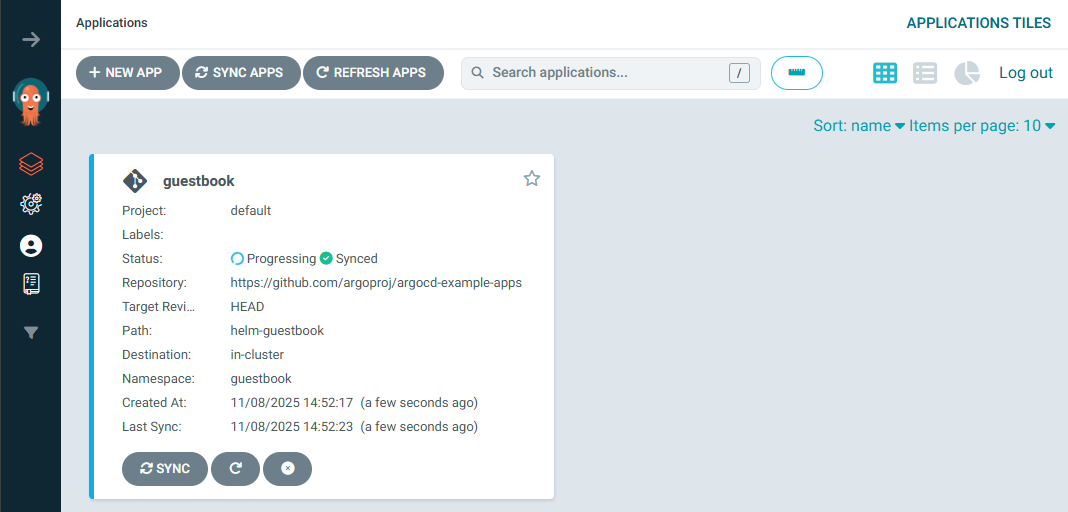
- Argo CD 애플리케이션을 Kubernetes 리소스로 직접 정의하여 kubectl apply로 생성
- Helm CLI를 쓰는 대신 YAML로 선언적으로 관리
- Helm 차트 기반 애플리케이션: helm-guestbook 경로의 Helm 차트를 사용
- 자동 동기화 활성화:
- enabled: true: 변경 사항 자동 반영
- prune: true: Git에 없는 리소스 자동 삭제
- selfHeal: true: 리소스가 변경되면 자동 복구
- 네임스페이스 자동 생성: CreateNamespace=true
- Git 리포지토리에서 HEAD 기준으로 배포
(⎈|kind-myk8s:N/A) ssoon@DESKTOP-72C919S:~/argo-cd-in-practice/ch02$ cat <<EOF | kubectl apply -f -
apiVersion: argoproj.io/v1alpha1
kind: Application
metadata:
  name: guestbook
  namespace: argocd
  finalizers:
  - resources-finalizer.argocd.argoproj.io
spec:
  project: default
  source:
    helm:
      valueFiles:
      - values.yaml
    path: helm-guestbook
    repoURL: https://github.com/argoproj/argocd-example-apps
    targetRevision: HEAD
  syncPolicy:
    automated:
      enabled: true
      prune: true
      selfHeal: true
    syncOptions:
    - CreateNamespace=true
  destination:
    namespace: guestbook
    server: https://kubernetes.default.svc
EOF
Warning: metadata.finalizers: "resources-finalizer.argocd.argoproj.io": prefer a domain-qualified finalizer name including a path (/) to avoid accidental conflicts with other finalizer writers
application.argoproj.io/guestbook created
- 서비스 타입 변경: ClusterIP → NodePort : 변경되지 않는다
(⎈|kind-myk8s:N/A) ssoon@DESKTOP-72C919S:~/argo-cd-in-practice/ch02$ kubectl get svc -n guestbook
NAME                       TYPE        CLUSTER-IP     EXTERNAL-IP   PORT(S)   AGE
guestbook-helm-guestbook   ClusterIP   10.96.54.206   <none>        80/TCP    72s
(⎈|kind-myk8s:N/A) ssoon@DESKTOP-72C919S:~/argo-cd-in-practice/ch02$ kubectl patch svc -n guestbook guestbook-helm-guestbook -p '{"spec":{"type":"NodePort","ports":[{"port":80,"targetPort":80,"nodePort":30003}]}}'
service/guestbook-helm-guestbook patched- Self Heal Disable
- Argo CD는 리소스가 클러스터에서 변경되더라도 자동으로 복구하지 않습니다.


- nodeport 변경 시도 : 변경된다.
(⎈|kind-myk8s:N/A) ssoon@DESKTOP-72C919S:~/argo-cd-in-practice/ch02$ kubectl get svc -n guestbook
NAME                       TYPE        CLUSTER-IP     EXTERNAL-IP   PORT(S)   AGE
guestbook-helm-guestbook   ClusterIP   10.96.54.206   <none>        80/TCP    4m44s
(⎈|kind-myk8s:N/A) ssoon@DESKTOP-72C919S:~/argo-cd-in-practice/ch02$ kubectl patch svc -n guestbook guestbook-helm-guestbook -p '{"spec":{"type":"NodePort","ports":[{"port":80,"targetPort":80,"nodePort":30003}]}}'
service/guestbook-helm-guestbook patched
(⎈|kind-myk8s:N/A) ssoon@DESKTOP-72C919S:~/argo-cd-in-practice/ch02$ kubectl get svc -n guestbook
NAME                       TYPE       CLUSTER-IP     EXTERNAL-IP   PORT(S)        AGE
guestbook-helm-guestbook NodePort 10.96.54.206 <none> 80:30003/TCP 4m50s- App 삭제
kubectl delete applications -n argocd guestbook🌐 Argo CLI 설치
- Argo CD CLI 최신 버전 설치
(⎈|kind-myk8s:N/A) ssoon@DESKTOP-72C919S:~/argo-cd-in-practice/ch02$ VERSION=$(curl -L -s https://raw.githubusercontent.com/argoproj/argo-cd/stable/VERSION)
(⎈|kind-myk8s:N/A) ssoon@DESKTOP-72C919S:~/argo-cd-in-practice/ch02$ curl -sSL -o argocd-linux-amd64 https://github.com/argoproj/argo-cd/releases/download/v$VERSION/argocd-linux-amd64
(⎈|kind-myk8s:N/A) ssoon@DESKTOP-72C919S:~/argo-cd-in-practice/ch02$ sudo install -m 555 argocd-linux-amd64 /usr/local/bin/argocd
[sudo] password for ssoon:
(⎈|kind-myk8s:N/A) ssoon@DESKTOP-72C919S:~/argo-cd-in-practice/ch02$ rm argocd-linux-amd64
(⎈|kind-myk8s:N/A) ssoon@DESKTOP-72C919S:~/argo-cd-in-practice/ch02$ argocd version --client
argocd: v3.2.0+66b2f30
  BuildDate: 2025-11-04T15:21:01Z
  GitCommit: 66b2f302d91a42cc151808da0eec0846bbe1062c
  GitTreeState: clean
  GoVersion: go1.25.0
  Compiler: gc
Platform: linux/amd64- argocd 서버 (http) 로그인
(⎈|kind-myk8s:N/A) ssoon@DESKTOP-72C919S:~/argo-cd-in-practice/ch02$ argocd login 127.0.0.1:30002 --plaintext
Username: admin
Password:
'admin:login' logged in successfully
Context '127.0.0.1:30002' updated
🌐Argo CLI로 애플리케이션 배포
- Argo CD를 통해 Helm 기반 애플리케이션을 생성
- guestbook: 생성할 Argo CD 애플리케이션 이름
- --repo: Git 리포지토리 URL (애플리케이션 소스)
- --path: 리포지토리 내 Helm 차트 경로
- --dest-server: 애플리케이션을 배포할 Kubernetes API 서버 주소
- --dest-namespace: 애플리케이션이 배포될 네임스페이스 (guestbook)
- --values values.yaml: Helm 차트에 적용할 사용자 정의 값 파일
(⎈|kind-myk8s:N/A) ssoon@DESKTOP-72C919S:~/argo-cd-in-practice/ch02$ argocd app create guestbook --repo https://github.com/argoproj/argocd-example-apps.git --path helm-guestbook \
  --dest-server https://kubernetes.default.svc --dest-namespace guestbook --values values.yaml
application 'guestbook' created- guestbook 애플리케이션이 OutOfSync 상태이며, Health는 Missing으로 표시
(⎈|kind-myk8s:N/A) ssoon@DESKTOP-72C919S:~/argo-cd-in-practice/ch02$ argocd app list
NAME              CLUSTER                         NAMESPACE  PROJECT  STATUS     HEALTH   SYNCPOLICY  CONDITIONS  REPO                                                 PATH            TARGET
argocd/guestbook  https://kubernetes.default.svc  guestbook  default  OutOfSync  Missing  Manual      <none>      https://github.com/argoproj/argocd-example-apps.git  helm-guestbook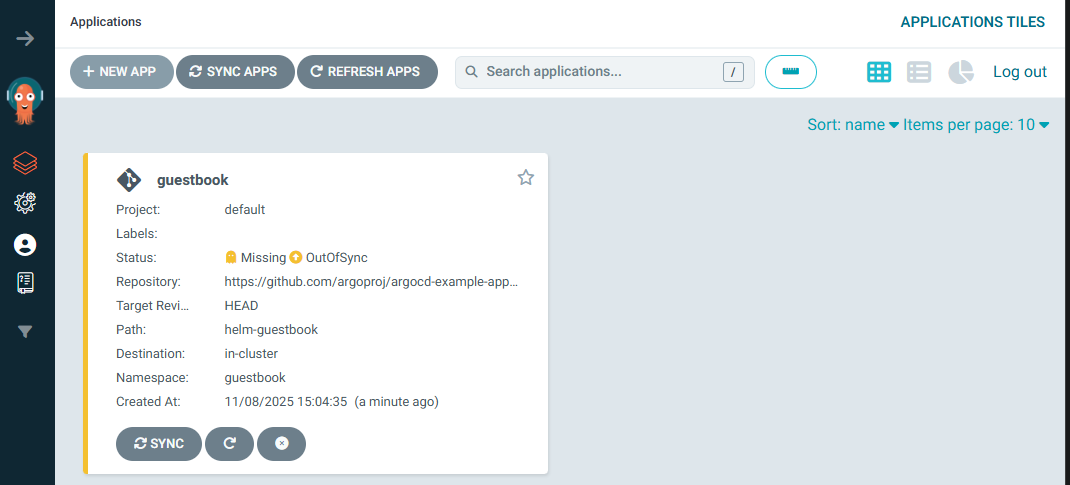
- argocd app sync : guestbook 애플리케이션이 성공적으로 동기화되었고, 리소스들이 생성
(⎈|kind-myk8s:N/A) ssoon@DESKTOP-72C919S:~/argo-cd-in-practice/ch02$ argocd app sync argocd/guestbook
TIMESTAMP                  GROUP        KIND   NAMESPACE                  NAME        STATUS    HEALTH        HOOK  MESSAGE
2025-11-08T15:06:12+09:00            Service   guestbook  guestbook-helm-guestbook  OutOfSync  Missing
2025-11-08T15:06:12+09:00   apps  Deployment   guestbook  guestbook-helm-guestbook  OutOfSync  Missing
2025-11-08T15:06:12+09:00            Service   guestbook  guestbook-helm-guestbook  OutOfSync  Missing              service/guestbook-helm-guestbook created
2025-11-08T15:06:12+09:00   apps  Deployment   guestbook  guestbook-helm-guestbook  OutOfSync  Missing              deployment.apps/guestbook-helm-guestbook created
2025-11-08T15:06:12+09:00   apps  Deployment   guestbook  guestbook-helm-guestbook    Synced  Progressing              deployment.apps/guestbook-helm-guestbook created
2025-11-08T15:06:12+09:00            Service   guestbook  guestbook-helm-guestbook    Synced  Healthy                  service/guestbook-helm-guestbook created

Name:               argocd/guestbook
Project:            default
Server:             https://kubernetes.default.svc
Namespace:          guestbook
URL:                https://argocd.example.com/applications/argocd/guestbook
Source:
- Repo:             https://github.com/argoproj/argocd-example-apps.git
  Target:
  Path:             helm-guestbook
  Helm Values:      values.yaml
SyncWindow:         Sync Allowed
Sync Policy:        Manual
Sync Status:        Synced to  (0d521c6)
Health Status:      Progressing

Operation:          Sync
Sync Revision:      0d521c6e049889134f3122eb32d7ed342f43ca0d
Phase:              Succeeded
Start:              2025-11-08 15:06:12 +0900 KST
Finished:           2025-11-08 15:06:12 +0900 KST
Duration:           0s
Message:            successfully synced (all tasks run)

GROUP  KIND        NAMESPACE  NAME                      STATUS  HEALTH       HOOK  MESSAGE
       Service     guestbook  guestbook-helm-guestbook  Synced  Healthy            service/guestbook-helm-guestbook created
apps   Deployment  guestbook  guestbook-helm-guestbook  Synced  Progressing        deployment.apps/guestbook-helm-guestbook created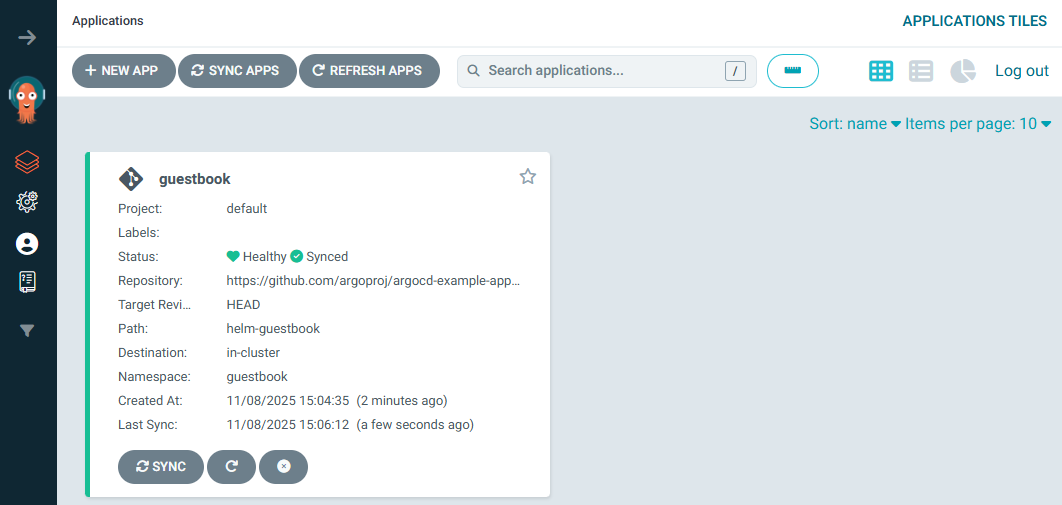
- 다음 실습을 위해 리소스 삭제
(⎈|kind-myk8s:N/A) ssoon@DESKTOP-72C919S:~/argo-cd-in-practice/ch02$ helm uninstall -n argocd argocd && kubectl delete ns argocd
These resources were kept due to the resource policy:
[CustomResourceDefinition] applications.argoproj.io
[CustomResourceDefinition] applicationsets.argoproj.io
[CustomResourceDefinition] appprojects.argoproj.io

release "argocd" uninstalled
namespace "argocd" deleted
"Helm chart를 이용한 declarative Application 정의는 GitOps의 가장 기본적인 예시입니다."
🧭 Argo CD Autopilot
- Argo CD Autopilot은 Argo CD의 GitOps 설정을 자동화하는 툴입니다.
- Argo CD가 스스로를 GitOps 방식으로 관리하도록 구성합니다.
🔧 주요 기능
- Argo CD 설치 및 self-management 구조 생성
- Git Repository 구조 자동 구성
- 여러 환경(dev/stage/prod) 관리
- Disaster Recovery 및 failover 지원
- 향후 Secret 암호화 지원 예정
"Argo CD Autopilot은 Argo CD의 bootstrap부터 환경 관리까지 자동화합니다."
💻 argocd-autopilot CLI 설치
(⎈|kind-myk8s:N/A) ssoon@DESKTOP-72C919S:~/argo-cd-in-practice/ch02$ VERSION=$(curl --silent "https://api.github.com/repos/argoproj-labs/argocd-autopilot/releases/latest" | grep '"tag_name"' | sed -E 's/.*"([^"]+)".*/\1/')
(⎈|kind-myk8s:N/A) ssoon@DESKTOP-72C919S:~/argo-cd-in-practice/ch02$ curl -L --output - https://github.com/argoproj-labs/argocd-autopilot/releases/download/"$VERSION"/argocd-autopilot-linux-amd64.tar.gz | tar zx
  % Total    % Received % Xferd  Average Speed   Time    Time     Time  Current
                                 Dload  Upload   Total   Spent    Left  Speed
  0     0    0     0    0     0      0      0 --:--:-- --:--:-- --:--:--     0
100 71.5M  100 71.5M    0     0  19.4M      0  0:00:03  0:00:03 --:--:-- 22.4M
(⎈|kind-myk8s:N/A) ssoon@DESKTOP-72C919S:~/argo-cd-in-practice/ch02$ mv ./argocd-autopilot-* /usr/local/bin/argocd-autopilot
mv: cannot move './argocd-autopilot-linux-amd64' to '/usr/local/bin/argocd-autopilot': Permission denied
(⎈|kind-myk8s:N/A) ssoon@DESKTOP-72C919S:~/argo-cd-in-practice/ch02$ sudo mv ./argocd-autopilot-* /usr/local/bin/argocd-autopilot
(⎈|kind-myk8s:N/A) ssoon@DESKTOP-72C919S:~/argo-cd-in-practice/ch02$ argocd-autopilot version
v0.4.20
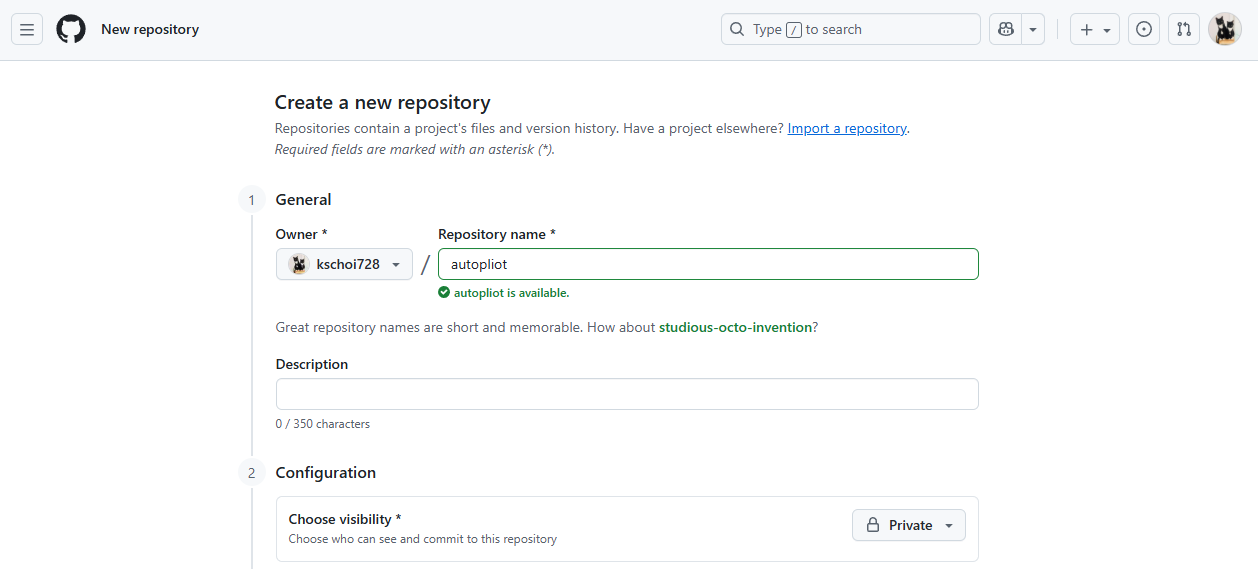
🧩 Git 레포지토리 (GitOps 환경으로 사용할 레포지토리) & Git Token 준비
- Git 레포지토리 생성 : Private
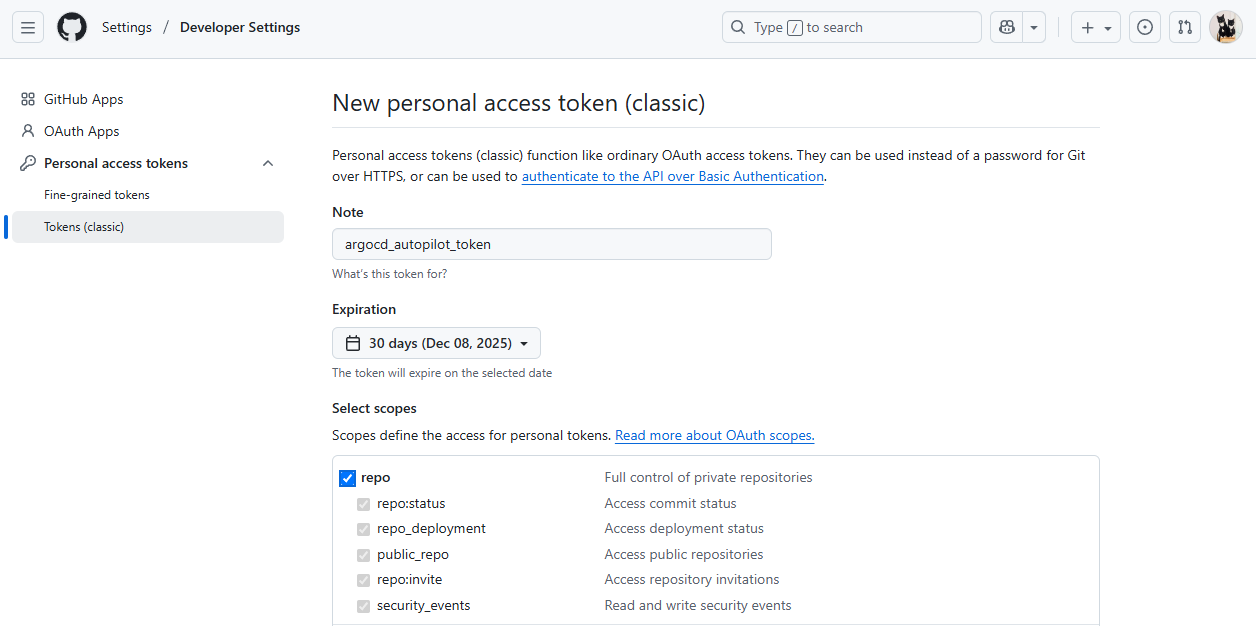
- Git Personal access tokens 생성 : scope(repo 체크)
- 매니페스트를 푸시하고 깃 리포지터리 안에 필요한 구조를 생성
- Argo CD Autopilot을 통해 GitOps 환경이 성공적으로 부트스트랩
- Argo CD가 argocd 네임스페이스에 설치됨
- GitHub 리포지토리 https://github.com/kschoi728/autopliot.git에 초기 GitOps 구조가 푸시됨
(⎈|kind-myk8s:N/A) ssoon@DESKTOP-72C919S:~/argo-cd-in-practice/ch02$ export GIT_TOKEN=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
(⎈|kind-myk8s:N/A) ssoon@DESKTOP-72C919S:~/argo-cd-in-practice/ch02$ export GIT_REPO=https://github.com/kschoi728/autopliot.git
(⎈|kind-myk8s:N/A) ssoon@DESKTOP-72C919S:~/argo-cd-in-practice/ch02$ argocd-autopilot repo bootstrap
INFO cloning repo: https://github.com/kschoi728/autopliot.git
INFO empty repository, initializing a new one with specified remote
WARNING --provider not specified, assuming provider from url: github
INFO using revision: "", installation path: ""
INFO using context: "kind-myk8s", namespace: "argocd"
INFO applying bootstrap manifests to cluster...
namespace/argocd created
...
waiting for argo-cd to be ready.
...
INFO pushing bootstrap manifests to repo
Resolving deltas: 100% (1/1), done.
INFO applying argo-cd bootstrap application
I1108 15:19:31.505150   20978 warnings.go:110] "Warning: metadata.finalizers: \"resources-finalizer.argocd.argoproj.io\": prefer a domain-qualified finalizer name including a path (/) to avoid accidental conflicts with other finalizer writers"
application.argoproj.io/autopilot-bootstrap created
INFO running argocd login to initialize argocd config
'admin:login' logged in successfully
Context 'autopilot' updated

INFO argocd initialized. password: hVFuxxqjRbKg3q2w
INFO run:

kubectl port-forward -n argocd svc/argocd-server 8080:80- kubectl port-forward 명령이 정상적으로 실행되어 Argo CD 서버에 로컬 포트 8080을 통해 접근
(⎈|kind-myk8s:N/A) ssoon@DESKTOP-72C919S:~$ kubectl port-forward -n argocd svc/argocd-server 8080:80
Forwarding from 127.0.0.1:8080 -> 8080
Forwarding from [::1]:8080 -> 8080- 웹 접속


✅ Project 생성, Application 추가
- 프로젝트 생성
- 각각의 프로젝트가 Git 리포지토리 https://github.com/kschoi728/autopliot.git에 정상적으로 생성되었고, manifest가 푸시되었습니다.
(⎈|kind-myk8s:N/A) ssoon@DESKTOP-72C919S:~/argo-cd-in-practice/ch02$ argocd-autopilot project create dev
INFO cloning git repository: https://github.com/kschoi728/autopliot.git
Enumerating objects: 17, done.
Counting objects: 100% (17/17), done.
Compressing objects: 100% (13/13), done.
Total 17 (delta 1), reused 17 (delta 1), pack-reused 0 (from 0)
INFO using revision: "", installation path: "/"
INFO pushing new project manifest to repo
INFO project created: 'dev'
(⎈|kind-myk8s:N/A) ssoon@DESKTOP-72C919S:~/argo-cd-in-practice/ch02$ argocd-autopilot project create prd
INFO cloning git repository: https://github.com/kschoi728/autopliot.git
Enumerating objects: 18, done.
Counting objects: 100% (18/18), done.
Compressing objects: 100% (15/15), done.
Total 18 (delta 2), reused 17 (delta 1), pack-reused 0 (from 0)
INFO using revision: "", installation path: "/"
INFO pushing new project manifest to repo
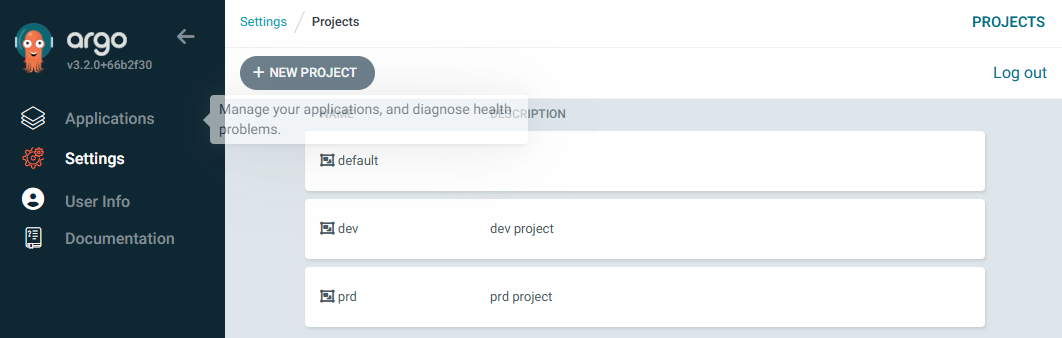
INFO project created: 'prd'- dev, prd, 그리고 기본 default 프로젝트가 모두 정상적으로 생성된 상태입니다. argocd-autopilot 명령어를 통해 GitOps 방식으로 프로젝트가 잘 반영
(⎈|kind-myk8s:N/A) ssoon@DESKTOP-72C919S:~/argo-cd-in-practice/ch02$ kubectl get appprojects.argoproj.io -n argocd
NAME      AGE
default   10m
dev       35s
prd       35s

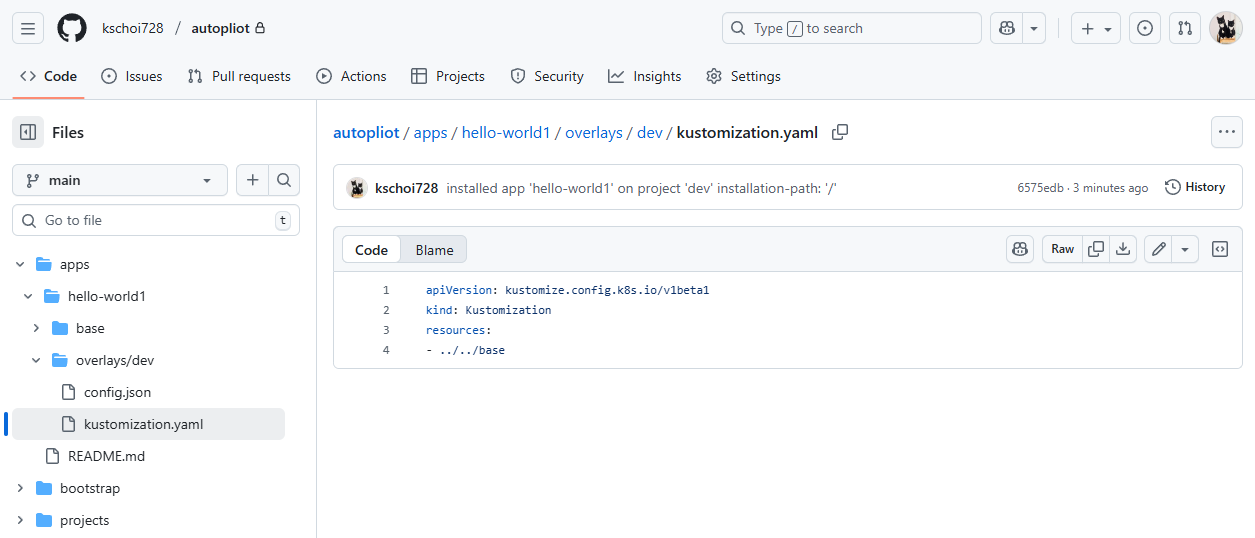
- Application 추가 (hello-world1, hello-world2)
(⎈|kind-myk8s:N/A) ssoon@DESKTOP-72C919S:~/argo-cd-in-practice/ch02$ argocd-autopilot app create hello-world1 --app github.com/argoproj-labs/argocd-autopilot/examples/demo-app/ -p dev --type kustomize
INFO cloning git repository: https://github.com/kschoi728/autopliot.git
Enumerating objects: 19, done.
Counting objects: 100% (19/19), done.
Compressing objects: 100% (16/16), done.
Total 19 (delta 3), reused 17 (delta 1), pack-reused 0 (from 0)
INFO using revision: "", installation path: "/"
INFO committing changes to gitops repo...
INFO installed application: hello-world1
(⎈|kind-myk8s:N/A) ssoon@DESKTOP-72C919S:~/argo-cd-in-practice/ch02$ argocd-autopilot app create hello-world2 --app github.com/argoproj-labs/argocd-autopilot/examples/demo-app/ -p prd --type kustomize
INFO cloning git repository: https://github.com/kschoi728/autopliot.git
Enumerating objects: 26, done.
Counting objects: 100% (26/26), done.
Compressing objects: 100% (22/22), done.
Total 26 (delta 4), reused 23 (delta 1), pack-reused 0 (from 0)
INFO using revision: "", installation path: "/"
INFO committing changes to gitops repo...
INFO installed application: hello-world2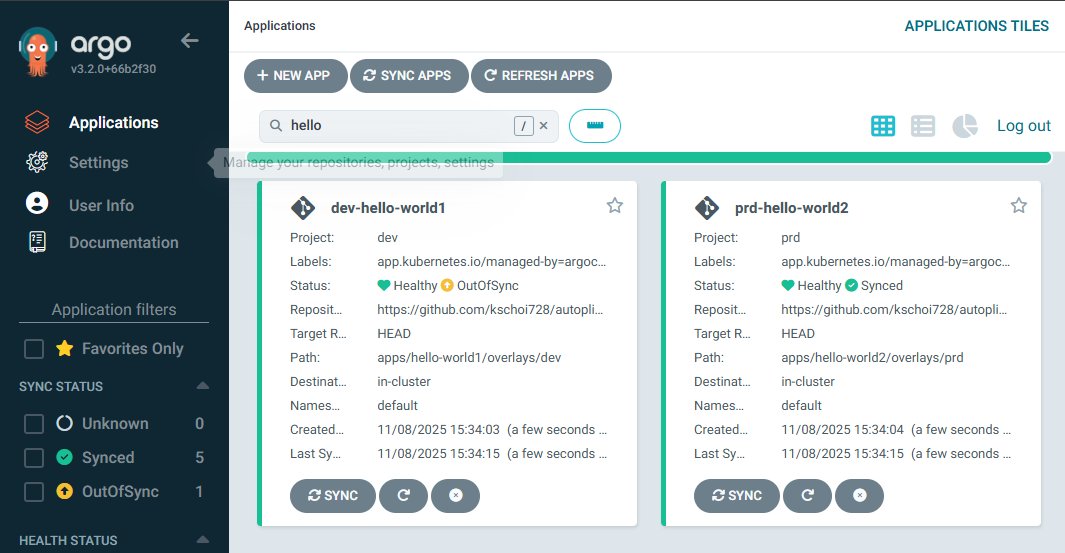
- Application 삭제 (hello-world2)
(⎈|kind-myk8s:N/A) ssoon@DESKTOP-72C919S:~/argo-cd-in-practice/ch02$ argocd-autopilot app delete hello-world2 -p prd
INFO cloning git repository: https://github.com/kschoi728/autopliot.git
Enumerating objects: 30, done.
Counting objects: 100% (30/30), done.
Compressing objects: 100% (25/25), done.
Total 30 (delta 5), reused 26 (delta 1), pack-reused 0 (from 0)
INFO using revision: "", installation path: "/"
INFO committing changes to gitops repo...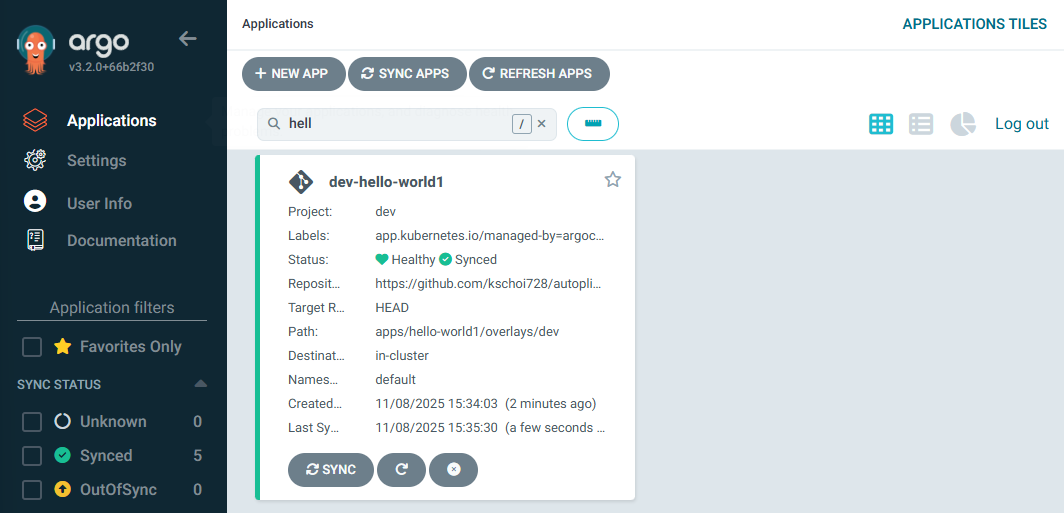

- 다음 실습을 위해 리소스 삭제
(⎈|kind-myk8s:N/A) ssoon@DESKTOP-72C919S:~/argo-cd-in-practice/ch02$ kind delete cluster --name myk8s
Deleting cluster "myk8s" ...
Deleted nodes: ["myk8s-control-plane"]
🔁 Synchronization Principles
- Argo CD의 Sync Phase는 다음 단계로 구성됩니다.
🪄 Resource Hooks
Hook Type 설명
| PreSync | Sync 전에 실행 (예: DB Migration) |
| Sync | 실제 배포 단계 |
| PostSync | 배포 완료 후 테스트 및 알림 |
| SyncFail | 실패 시 정리 작업 수행 |
apiVersion: batch/v1
kind: Job
metadata:
  annotations:
    argocd.argoproj.io/hook: PreSync
"Resource Hooks를 통해 배포 전/후 동작을 자유롭게 제어할 수 있습니다."
🌊 Sync Waves
- Sync 과정에서 리소스 배포 순서를 제어할 수 있습니다.
metadata:
  annotations:
    argocd.argoproj.io/sync-wave: "5"
- Sync 순서는 다음 순서로 정해집니다.
- Phase (PreSync → Sync → PostSync)
- Wave (낮은 값부터)
- Kubernetes Kind
- Resource Name
"Sync Waves를 이용하면 복잡한 배포 순서를 논리적으로 제어할 수 있습니다."
📌 핵심 요약
- Argo CD는 Kubernetes를 위한 GitOps 기반 CD 도구이다.
- Git Repository를 단일 Source of Truth로 삼고 cluster 상태를 자동 동기화한다.
- 주요 구성요소는 API Server, Repository Server, Application Controller이다.
- 모든 설정은 Kubernetes CRD로 선언적으로 관리된다.
- Helm을 통해 Argo CD를 쉽게 설치하고, CLI/UI로 관리 가능하다.
- Autopilot을 사용하면 Argo CD를 GitOps 방식으로 스스로 관리할 수 있다.
- Resource Hooks와 Sync Waves로 정교한 배포 순서 제어가 가능하다.
"Argo CD는 GitOps를 실현하는 가장 직관적이고 강력한 도구로, DevOps 자동화의 핵심이다."
'CICD Study [1기]' 카테고리의 다른 글
| Argo CD in Practice – 3) Argo CD 운영 : 재해 복구 계획 수립 (0) | 2025.10.19 |
|---|---|
| Argo CD in Practice – 3) Argo CD 운영 : 고가용성(HA) 설치 구성 (0) | 2025.10.19 |
| Argo CD in Practice – 1) GitOps와 쿠버네티스 (0) | 2025.10.19 |
| Jenkins + ArgoCD : Jenkins CI + Argo CD + K8S(Kind) (0) | 2025.10.19 |
| Jenkins + ArgoCD : Argo CD + K8S(Kind) (0) | 2025.10.19 |